Join us in Barcelona for FabCon and SQLCon, September 28 - October 1, 2026.
This is best Fabric, Power BI, SQL and AI community event. How do we know? The last event sold out! Save €200 with code FABCMTY200.
Register now- Power BI forums
- Get Help with Power BI
- Desktop
- Service
- Report Server
- Power Query
- Mobile Apps
- Developer
- DAX Commands and Tips
- Custom Visuals Development Discussion
- Health and Life Sciences
- Power BI Spanish forums
- Translated Spanish Desktop
- Training and Consulting
- Instructor Led Training
- Dashboard in a Day for Women, by Women
- Galleries
- Data Stories Gallery
- Themes Gallery
- Contests Gallery
- QuickViz Gallery
- Quick Measures Gallery
- Visual Calculations Gallery
- Fabric Apps Gallery
- Notebook Gallery
- Translytical Task Flow Gallery
- TMDL Gallery
- R Script Showcase
- Webinars and Video Gallery
- Ideas
- Custom Visuals Ideas (read-only)
- Issues
- Issues
- Events
- Upcoming Events
The Fabric community is now in read-only for platform upgrade. Learn more
- Power BI forums
- Forums
- Get Help with Power BI
- Desktop
- Calculated Column from same table rows
- Subscribe to RSS Feed
- Mark Topic as New
- Mark Topic as Read
- Float this Topic for Current User
- Bookmark
- Subscribe
- Printer Friendly Page

- Mark as New
- Bookmark
- Subscribe
- Mute
- Subscribe to RSS Feed
- Permalink
Calculated Column from same table rows
Hi,
I am trying to create a new column Calculated Column [New Epic Name] which will have the EPIC Name.
For the Type = Epic, the Epic Name is in 3rd Column "Epic Name"
For the Type = Task, the Epic Name is in 4th Column "Epic Link"
But for Sub-Task the Epic Name will be the Parent Key "Ticket" [Epic Link]
I am trying this way, but not doing a good job, I know there should be a easy way.
New Epic Name =
IF (
Worklogs[Epic Link] = BLANK (),
CALCULATE ( Worklogs[Epic Link] , ALLEXCEPT ( Worklogs, Worklogs[Parent Key] ) ),
Worklogs[Epic Link]
)
| Ticket | Type | Epic Name | Epic Link | Parent Key | Calculated Column [New Epic Name] |
| DMO-192 | Epic | Project Yellow Tree | |||
| DMO-195 | Task | Project Yellow Tree | |||
| DMO-195 | Task | Project Yellow Tree | |||
| DMO-204 | Sub-task | DMO-195 | |||
| DMO-204 | Sub-task | DMO-195 | |||
| DMO-207 | Sub-task | DMO-195 | |||
| DMO-208 | Sub-task | DMO-195 | |||
| DMO-209 | Epic | Grappling Hook Head | |||
| DMO-210 | Task | Grappling Hook Head | |||
| DMO-211 | Task | Grappling Hook Head | |||
| DMO-212 | Sub-task | DMO-210 | |||
| DMO-229 | Sub-task | DMO-211 | |||
| DMO-255 | Sub-task | DMO-210 | |||
| DMO-256 | Sub-task | DMO-211 |
Thanks,
Joydeep
Solved! Go to Solution.


- Mark as New
- Bookmark
- Subscribe
- Mute
- Subscribe to RSS Feed
- Permalink
@Anonymous Please try this by adding as "New Column"
NewEpicName =
VAR _lkp = LOOKUPVALUE(EpicsTest[Epic Link],EpicsTest[Ticket],EpicsTest[Parent Key])
VAR _epic = IF(EpicsTest[Type]="Epic",EpicsTest[Epic Name],
                                    IF(EpicsTest[Type] = "Task",EpicsTest[Epic Link],
                                                                _lkp))
RETURN _epic 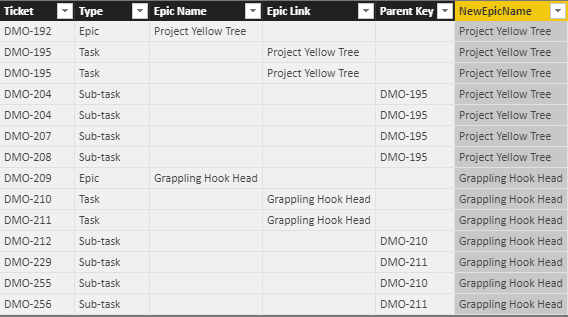
Did I answer your question? Mark my post as a solution!
Proud to be a PBI Community Champion
- Mark as New
- Bookmark
- Subscribe
- Mute
- Subscribe to RSS Feed
- Permalink
@Anonymous Please try this by adding as "New Column"
NewEpicName =
VAR _lkp = LOOKUPVALUE(EpicsTest[Epic Link],EpicsTest[Ticket],EpicsTest[Parent Key])
VAR _epic = IF(EpicsTest[Type]="Epic",EpicsTest[Epic Name],
                                    IF(EpicsTest[Type] = "Task",EpicsTest[Epic Link],
                                                                _lkp))
RETURN _epic
Did I answer your question? Mark my post as a solution!
Proud to be a PBI Community Champion
- Mark as New
- Bookmark
- Subscribe
- Mute
- Subscribe to RSS Feed
- Permalink
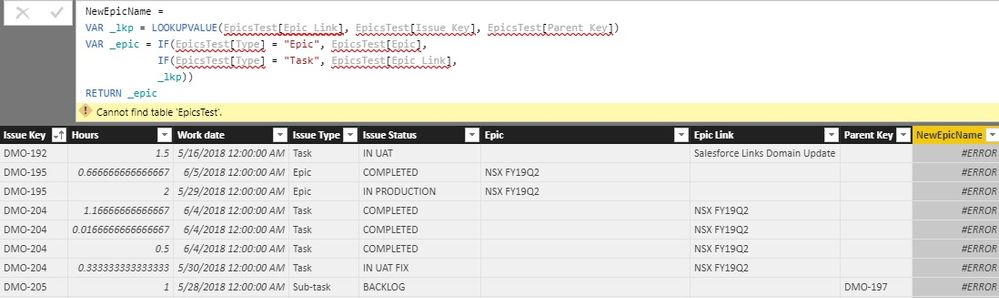
@PattemManohar I am getting error, it says Cannot find table 'EpicsTest'.
@Anonymous yes the 3rd part is what it tricky, or else could have used RELATED()
- Mark as New
- Bookmark
- Subscribe
- Mute
- Subscribe to RSS Feed
- Permalink
@Anonymous EpicsTest is the table I've used, you need to give your table name and corresponding fields accordingly...
Did I answer your question? Mark my post as a solution!
Proud to be a PBI Community Champion
- Mark as New
- Bookmark
- Subscribe
- Mute
- Subscribe to RSS Feed
- Permalink
Oh I see, I didn't read through the third part properly.
- Mark as New
- Bookmark
- Subscribe
- Mute
- Subscribe to RSS Feed
- Permalink
Hey @Anonymous,
try this one out:
New Epic Name = IF(
                  AND(Table1[Epic Name]=BLANK(),Table1[Parent Key]=BLANK()),
                  Table1[Epic Link],
                  IF(
                    AND(Table1[Epic Name]=BLANK(),Table1[Epic Link]=BLANK()),
                    Table1[Parent Key],
                    Table1[Epic Name])
                   )
Please let me know if it's what you wished to achieve.
Regards,
Barna
Helpful resources

FabCon & SQLCon – Barcelona 2026
Join us in Barcelona for FabCon and SQLCon, the Fabric, Power BI, SQL, and AI community event. Save €200 with code FABCMTY200.

Power BI DataViz World Championships - June 2026
A new Power BI DataViz World Championship is coming this June! Don't miss out on submitting your entry.

| User | Count |
|---|---|
| 20 | |
| 18 | |
| 14 | |
| 13 | |
| 13 |


| User | Count |
|---|---|
| 48 | |
| 35 | |
| 24 | |
| 20 | |
| 19 |


