We've captured the moments from FabCon & SQLCon that everyone is talking about, and we are bringing them to the community, live and on-demand. Starts on April 14th. Register now
Hi,
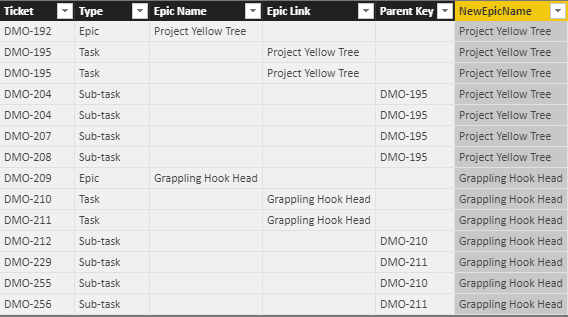
I am trying to create a new column Calculated Column [New Epic Name] which will have the EPIC Name.
For the Type = Epic, the Epic Name is in 3rd Column "Epic Name"
For the Type = Task, the Epic Name is in 4th Column "Epic Link"
But for Sub-Task the Epic Name will be the Parent Key "Ticket" [Epic Link]
I am trying this way, but not doing a good job, I know there should be a easy way.
New Epic Name =
IF (
Worklogs[Epic Link] = BLANK (),
CALCULATE ( Worklogs[Epic Link] , ALLEXCEPT ( Worklogs, Worklogs[Parent Key] ) ),
Worklogs[Epic Link]
)
| Ticket | Type | Epic Name | Epic Link | Parent Key | Calculated Column [New Epic Name] |
| DMO-192 | Epic | Project Yellow Tree | |||
| DMO-195 | Task | Project Yellow Tree | |||
| DMO-195 | Task | Project Yellow Tree | |||
| DMO-204 | Sub-task | DMO-195 | |||
| DMO-204 | Sub-task | DMO-195 | |||
| DMO-207 | Sub-task | DMO-195 | |||
| DMO-208 | Sub-task | DMO-195 | |||
| DMO-209 | Epic | Grappling Hook Head | |||
| DMO-210 | Task | Grappling Hook Head | |||
| DMO-211 | Task | Grappling Hook Head | |||
| DMO-212 | Sub-task | DMO-210 | |||
| DMO-229 | Sub-task | DMO-211 | |||
| DMO-255 | Sub-task | DMO-210 | |||
| DMO-256 | Sub-task | DMO-211 |
Thanks,
Joydeep
Solved! Go to Solution.
@Anonymous Please try this by adding as "New Column"
NewEpicName =
VAR _lkp = LOOKUPVALUE(EpicsTest[Epic Link],EpicsTest[Ticket],EpicsTest[Parent Key])
VAR _epic = IF(EpicsTest[Type]="Epic",EpicsTest[Epic Name],
IF(EpicsTest[Type] = "Task",EpicsTest[Epic Link],
_lkp))
RETURN _epic Proud to be a PBI Community Champion
@Anonymous Please try this by adding as "New Column"
NewEpicName =
VAR _lkp = LOOKUPVALUE(EpicsTest[Epic Link],EpicsTest[Ticket],EpicsTest[Parent Key])
VAR _epic = IF(EpicsTest[Type]="Epic",EpicsTest[Epic Name],
IF(EpicsTest[Type] = "Task",EpicsTest[Epic Link],
_lkp))
RETURN _epic Proud to be a PBI Community Champion
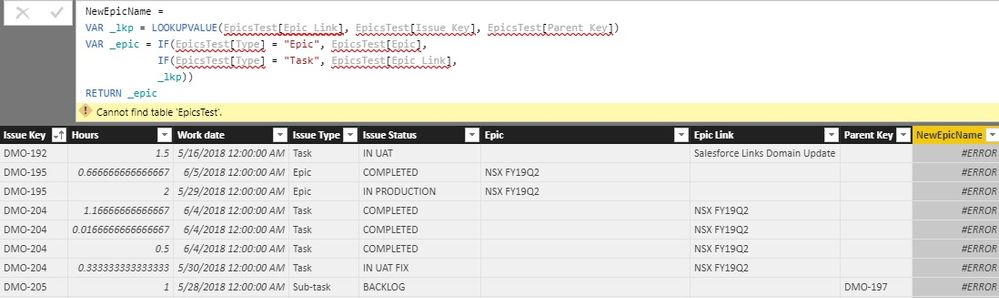
@PattemManohar I am getting error, it says Cannot find table 'EpicsTest'.
@Barnee yes the 3rd part is what it tricky, or else could have used RELATED()
@Anonymous EpicsTest is the table I've used, you need to give your table name and corresponding fields accordingly...
Proud to be a PBI Community Champion
Oh I see, I didn't read through the third part properly.
Hey @Anonymous,
try this one out:
New Epic Name = IF(
AND(Table1[Epic Name]=BLANK(),Table1[Parent Key]=BLANK()),
Table1[Epic Link],
IF(
AND(Table1[Epic Name]=BLANK(),Table1[Epic Link]=BLANK()),
Table1[Parent Key],
Table1[Epic Name])
)
Please let me know if it's what you wished to achieve.
Regards,
Barna
If you have recently started exploring Fabric, we'd love to hear how it's going. Your feedback can help with product improvements.
A new Power BI DataViz World Championship is coming this June! Don't miss out on submitting your entry.
Share feedback directly with Fabric product managers, participate in targeted research studies and influence the Fabric roadmap.
| User | Count |
|---|---|
| 53 | |
| 38 | |
| 33 | |
| 17 | |
| 17 |
| User | Count |
|---|---|
| 67 | |
| 63 | |
| 38 | |
| 34 | |
| 22 |