cancel
Showing results for 
Search instead for 
Did you mean: 

Vote for your favorite vizzies from the Power BI Dataviz World Championship submissions. Vote now!

Reply
Noak
Helper IV
Helper IV

Calculate table

Hey guys I need your help,

I have the following sample data:

SubscriberIDCategoryAccountIDVNumberInstalldate482242
107817322152361161140112/1/2017 0:000100
107862022152361162190112/6/2017 0:000100
107862222152361162170112/6/2017 0:000100
107862922152361162090112/6/2017 0:000100
107863022152361162380112/6/2017 0:000100
107863122152361161160112/6/2017 0:000100
10786374152361162120112/6/2017 0:000010
10786384152361162160112/6/2017 0:000010
107864048152361160260112/7/2017 0:001000
107864822152361162140112/7/2017 0:000100


(for one vnumber we can have several category types)

I would like to have finall result table with the following columns:

Vnumbe | category22 | category48 | category4 | if(category22=1 && category48=1 && category4=1  , Important, Regular)


any tips.tricks?...

BR,
Noa.
1 ACCEPTED SOLUTION
v-ljerr-msft
Microsoft Employee
Microsoft Employee

Hi @Noak,


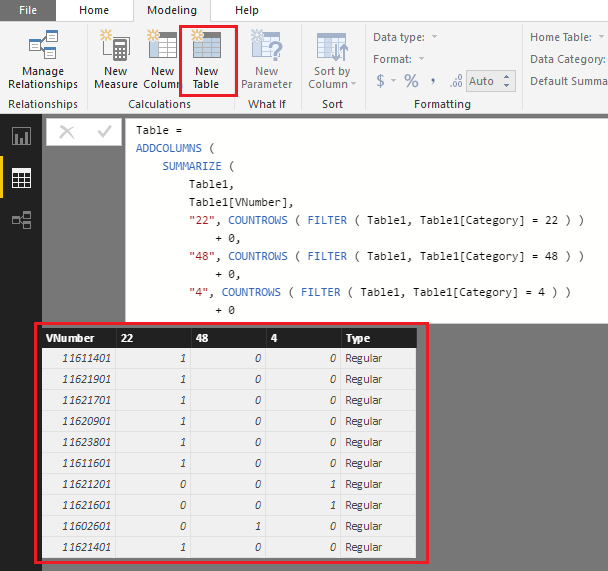
If I understand you correctly, the formula below should work in your scenario. Smiley Happy

Table =
ADDCOLUMNS (
    SUMMARIZE (
        Table1,
        Table1[VNumber],
        "22", COUNTROWS ( FILTER ( Table1, Table1[Category] = 22 ) )
            + 0,
        "48", COUNTROWS ( FILTER ( Table1, Table1[Category] = 48 ) )
            + 0,
        "4", COUNTROWS ( FILTER ( Table1, Table1[Category] = 4 ) )
            + 0
    ),
    "Type", IF ( [22] = 1 && [48] = 1 && [4] = 1, " Important", "Regular" )
)

t2.PNG


Regards

View solution in original post

1 REPLY 1
v-ljerr-msft
Microsoft Employee
Microsoft Employee

Hi @Noak,


If I understand you correctly, the formula below should work in your scenario. Smiley Happy

Table =
ADDCOLUMNS (
    SUMMARIZE (
        Table1,
        Table1[VNumber],
        "22", COUNTROWS ( FILTER ( Table1, Table1[Category] = 22 ) )
            + 0,
        "48", COUNTROWS ( FILTER ( Table1, Table1[Category] = 48 ) )
            + 0,
        "4", COUNTROWS ( FILTER ( Table1, Table1[Category] = 4 ) )
            + 0
    ),
    "Type", IF ( [22] = 1 && [48] = 1 && [4] = 1, " Important", "Regular" )
)

t2.PNG


Regards

Helpful resources

Announcements
Power BI DataViz World Championships

Power BI Dataviz World Championships

Vote for your favorite vizzies from the Power BI World Championship submissions!

Sticker Challenge 2026 Carousel

Join our Community Sticker Challenge 2026

If you love stickers, then you will definitely want to check out our Community Sticker Challenge!

January Power BI Update Carousel

Power BI Monthly Update - January 2026

Check out the January 2026 Power BI update to learn about new features.

FabCon Atlanta 2026 carousel

FabCon Atlanta 2026

Join us at FabCon Atlanta, March 16-20, for the ultimate Fabric, Power BI, AI and SQL community-led event. Save $200 with code FABCOMM.