cancel
Showing results for 
Search instead for 
Did you mean: 

The Power BI Data Visualization World Championships is back! It's time to submit your entry. Live now!

Reply
Noak
Helper IV
Helper IV

Calculate table

Hey guys I need your help,

I have the following sample data:

SubscriberIDCategoryAccountIDVNumberInstalldate482242
107817322152361161140112/1/2017 0:000100
107862022152361162190112/6/2017 0:000100
107862222152361162170112/6/2017 0:000100
107862922152361162090112/6/2017 0:000100
107863022152361162380112/6/2017 0:000100
107863122152361161160112/6/2017 0:000100
10786374152361162120112/6/2017 0:000010
10786384152361162160112/6/2017 0:000010
107864048152361160260112/7/2017 0:001000
107864822152361162140112/7/2017 0:000100


(for one vnumber we can have several category types)

I would like to have finall result table with the following columns:

Vnumbe | category22 | category48 | category4 | if(category22=1 && category48=1 && category4=1  , Important, Regular)


any tips.tricks?...

BR,
Noa.
1 ACCEPTED SOLUTION
v-ljerr-msft
Microsoft Employee
Microsoft Employee

Hi @Noak,


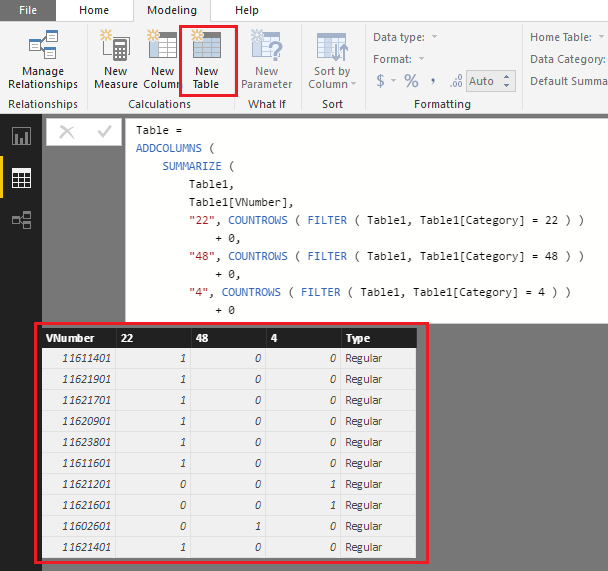
If I understand you correctly, the formula below should work in your scenario. Smiley Happy

Table =
ADDCOLUMNS (
    SUMMARIZE (
        Table1,
        Table1[VNumber],
        "22", COUNTROWS ( FILTER ( Table1, Table1[Category] = 22 ) )
            + 0,
        "48", COUNTROWS ( FILTER ( Table1, Table1[Category] = 48 ) )
            + 0,
        "4", COUNTROWS ( FILTER ( Table1, Table1[Category] = 4 ) )
            + 0
    ),
    "Type", IF ( [22] = 1 && [48] = 1 && [4] = 1, " Important", "Regular" )
)

t2.PNG


Regards

View solution in original post

1 REPLY 1
v-ljerr-msft
Microsoft Employee
Microsoft Employee

Hi @Noak,


If I understand you correctly, the formula below should work in your scenario. Smiley Happy

Table =
ADDCOLUMNS (
    SUMMARIZE (
        Table1,
        Table1[VNumber],
        "22", COUNTROWS ( FILTER ( Table1, Table1[Category] = 22 ) )
            + 0,
        "48", COUNTROWS ( FILTER ( Table1, Table1[Category] = 48 ) )
            + 0,
        "4", COUNTROWS ( FILTER ( Table1, Table1[Category] = 4 ) )
            + 0
    ),
    "Type", IF ( [22] = 1 && [48] = 1 && [4] = 1, " Important", "Regular" )
)

t2.PNG


Regards

Helpful resources

Announcements
FabCon Atlanta 2026 carousel

FabCon Atlanta 2026

Join us at FabCon Atlanta, March 16-20, for the ultimate Fabric, Power BI, AI and SQL community-led event. Save $200 with code FABCOMM.