Fabric Data Days starts November 4th!
Advance your Data & AI career with 50 days of live learning, dataviz contests, hands-on challenges, study groups & certifications and more!
Get registered- Power BI forums
- Get Help with Power BI
- Desktop
- Service
- Report Server
- Power Query
- Mobile Apps
- Developer
- DAX Commands and Tips
- Custom Visuals Development Discussion
- Health and Life Sciences
- Power BI Spanish forums
- Translated Spanish Desktop
- Training and Consulting
- Instructor Led Training
- Dashboard in a Day for Women, by Women
- Galleries
- Data Stories Gallery
- Themes Gallery
- Contests Gallery
- QuickViz Gallery
- Quick Measures Gallery
- Visual Calculations Gallery
- Notebook Gallery
- Translytical Task Flow Gallery
- TMDL Gallery
- R Script Showcase
- Webinars and Video Gallery
- Ideas
- Custom Visuals Ideas (read-only)
- Issues
- Issues
- Events
- Upcoming Events
Get Fabric Certified for FREE during Fabric Data Days. Don't miss your chance! Request now
- Power BI forums
- Forums
- Get Help with Power BI
- Desktop
- Re: Calculate if a column contains some text for e...
- Subscribe to RSS Feed
- Mark Topic as New
- Mark Topic as Read
- Float this Topic for Current User
- Bookmark
- Subscribe
- Printer Friendly Page


- Mark as New
- Bookmark
- Subscribe
- Mute
- Subscribe to RSS Feed
- Permalink
- Report Inappropriate Content
Calculate if a column contains some text for each occurrence of a unique value
Hello,
I'm trying to come up with a formula for the following scenario. Any help would be greatly appreciated.
For a given Primary Key in column D ("R_PK1"), IF the Primary Key is present EXACTLY 2 times in the table, AND if column B equals "BBB" in any of the 2 rows for that Primary Key, then give me "some text" else "some other text".
Below is the sample data. Thank you for your help!
| Code: | Category: | Type: | R_PK1: | Output column: |
| abc | AAA | Shared | 1111111 | some text |
| xyz | BBB | Shared | 1111111 | some text |
| cdb | AAA | Shared | 2222222 | some other text |
| wsd | BBB | Shared | 2222222 | some other text |
| gjk | FFF | Shared | 2222222 | some other text |
Solved! Go to Solution.


- Mark as New
- Bookmark
- Subscribe
- Mute
- Subscribe to RSS Feed
- Permalink
- Report Inappropriate Content
Hi,
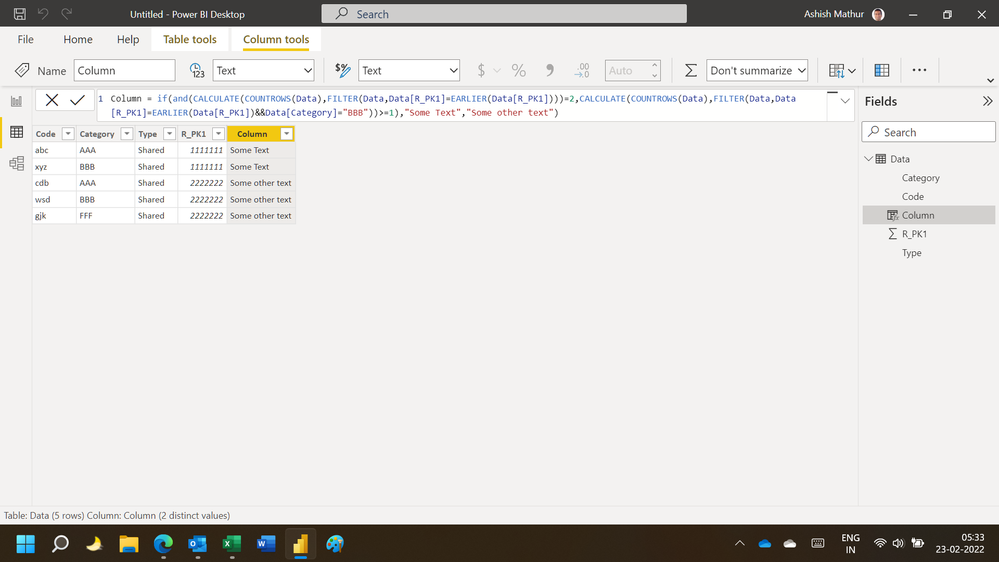
This calculated column formula works
Column = if(and(CALCULATE(COUNTROWS(Data),FILTER(Data,Data[R_PK1]=EARLIER(Data[R_PK1])))=2,CALCULATE(COUNTROWS(Data),FILTER(Data,Data[R_PK1]=EARLIER(Data[R_PK1])&&Data[Category]="BBB"))>=1),"Some Text","Some other text")Hope this helps.
Regards,
Ashish Mathur
http://www.ashishmathur.com
https://www.linkedin.com/in/excelenthusiasts/

- Mark as New
- Bookmark
- Subscribe
- Mute
- Subscribe to RSS Feed
- Permalink
- Report Inappropriate Content
Hi @tomekm ,
Here are the steps you can follow:
1. Create calculated column.
Output column =
var _count=COUNTX(FILTER(ALL('Table'),'Table'[R_PK1:]=EARLIER('Table'[R_PK1:])),[R_PK1:])
var _category=SELECTCOLUMNS(FILTER(ALL('Table'),[R_PK1:]=EARLIER('Table'[R_PK1:])),"1",'Table'[Category:])
return
IF(
    _count=2&&"BBB" in _category,"Some Text","Some other text")
2. Result:
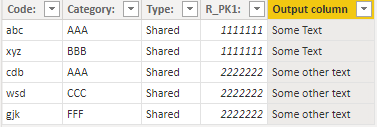
Best Regards,
Liu Yang
If this post helps, then please consider Accept it as the solution to help the other members find it more quickly
- Mark as New
- Bookmark
- Subscribe
- Mute
- Subscribe to RSS Feed
- Permalink
- Report Inappropriate Content
Hi @tomekm ,
Here are the steps you can follow:
1. Create calculated column.
Output column =
var _count=COUNTX(FILTER(ALL('Table'),'Table'[R_PK1:]=EARLIER('Table'[R_PK1:])),[R_PK1:])
var _category=SELECTCOLUMNS(FILTER(ALL('Table'),[R_PK1:]=EARLIER('Table'[R_PK1:])),"1",'Table'[Category:])
return
IF(
    _count=2&&"BBB" in _category,"Some Text","Some other text")
2. Result:
Best Regards,
Liu Yang
If this post helps, then please consider Accept it as the solution to help the other members find it more quickly
- Mark as New
- Bookmark
- Subscribe
- Mute
- Subscribe to RSS Feed
- Permalink
- Report Inappropriate Content
Hi,
This calculated column formula works
Column = if(and(CALCULATE(COUNTROWS(Data),FILTER(Data,Data[R_PK1]=EARLIER(Data[R_PK1])))=2,CALCULATE(COUNTROWS(Data),FILTER(Data,Data[R_PK1]=EARLIER(Data[R_PK1])&&Data[Category]="BBB"))>=1),"Some Text","Some other text")Hope this helps.
Regards,
Ashish Mathur
http://www.ashishmathur.com
https://www.linkedin.com/in/excelenthusiasts/
- Mark as New
- Bookmark
- Subscribe
- Mute
- Subscribe to RSS Feed
- Permalink
- Report Inappropriate Content
Thank you!
- Mark as New
- Bookmark
- Subscribe
- Mute
- Subscribe to RSS Feed
- Permalink
- Report Inappropriate Content
You are welcome.
Regards,
Ashish Mathur
http://www.ashishmathur.com
https://www.linkedin.com/in/excelenthusiasts/

- Mark as New
- Bookmark
- Subscribe
- Mute
- Subscribe to RSS Feed
- Permalink
- Report Inappropriate Content
Hi @tomekm
Please try this, (change table name and col name as per quirement)
= VAR _count2 = DISTINCTCOUNT('Table'[R_PK1])
RESULT
SWITCH(
TRUE(),
_count2 = 2 && 'Table'[Category] = "BBB", "Some Test",
"Some Other Test")
If not solved, please keep posted (paste from excel, your data is broken when I try to use)
If solve your requirement, please mark this answer as SOLUTION
If this comment helps you, please LIKE this comment/Kudos
Proud to be a Super User! |  |
- Mark as New
- Bookmark
- Subscribe
- Mute
- Subscribe to RSS Feed
- Permalink
- Report Inappropriate Content
| Code: | Category: | Type: | R_PK1: | Output column: |
| abc | AAA | Shared | 1111111 | some text |
| xyz | BBB | Shared | 1111111 | some text |
| cdb | AAA | Shared | 2222222 | some other text |
| wsd | CCC | Shared | 2222222 | some other text |
| gjk | FFF | Shared | 2222222 | some other text |
- Mark as New
- Bookmark
- Subscribe
- Mute
- Subscribe to RSS Feed
- Permalink
- Report Inappropriate Content
Thank you for the quick response. Unfortunately this formula didn't work for me. I'm pasting the data in tabular format here:
| Code: | Category: | Type: | R_PK1: | Output column: |
| abc | AAA | Shared | 1111111 | some text |
| xyz | BBB | Shared | 1111111 | some text |
| cdb | AAA | Shared | 2222222 | some other text |
| wsd | CCC | Shared | 2222222 | some other text |
| gjk | FFF | Shared | 2222222 | some other text |
Helpful resources

Fabric Data Days
Advance your Data & AI career with 50 days of live learning, contests, hands-on challenges, study groups & certifications and more!

Power BI Monthly Update - October 2025
Check out the October 2025 Power BI update to learn about new features.

FabCon Atlanta 2026
Join us at FabCon Atlanta, March 16-20, for the ultimate Fabric, Power BI, AI and SQL community-led event. Save $200 with code FABCOMM.


