cancel
Showing results for 
Search instead for 
Did you mean: 

The Fabric community is upgrading! Read all of the details including the timeline and what you can expect. Learn more

Reply
HenryJS
Post Prodigy
Post Prodigy

Calculate Time Between

Hi all,


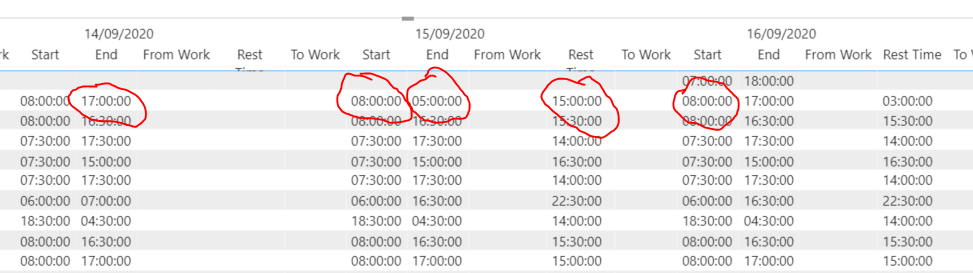
I have a column 'Rest Time' shown below which calculate the time between the start on one day and the end time on the previous day.


How can I change this column to calculate the time difference between the end time on one day and the start time on the next day?


Capture.PNG


Rest Time = 

VAR CT = COUNTROWS(filter('Engage Timesheet Export', [Timesheet ID] =earlier([Timesheet ID]) && [Date]<earlier([date])))

RETURN IF(CT = 0 , 0 , maxx(filter('Engage Timesheet Export', [Timesheet ID] =earlier([Timesheet ID]) && [Date]<earlier([date])),[End time]) -[start time])
1 ACCEPTED SOLUTION

@HenryJS, try this:


Rest = 
VAR vTimesheet =
    MAX ( Timesheet[Timesheet ID] )
VAR vMaxDate =
    MAX ( Timesheet[Date] )
VAR vMaxEndTime =
    MAX ( Timesheet[End Time] )
VAR vFutureDates =
    FILTER ( ALL ( Timesheet ), Timesheet[Timesheet ID] = vTimesheet && Timesheet[Date] > vMaxDate )
VAR vMinFutureDate =
    MINX ( vFutureDates, Timesheet[Date] )
VAR vFutureDate =
    FILTER ( vFutureDates, Timesheet[Date] = vMinFutureDate )
VAR vFutureStartTime =
    MINX ( vFutureDate, Timesheet[Start Tme] )
VAR vResult = 24 - vMaxEndTime + vFutureStartTime
RETURN
    IF ( ISBLANK ( vFutureStartTime ), BLANK(), vResult )


DataInsights_0-1601482403793.png


Did I answer your question? Mark my post as a solution!

Proud to be a Super User!


View solution in original post

4 REPLIES 4
Anonymous
Not applicable

Hi @HenryJS ,

According to my understand, you could use the following formula after adding a Index column :

Rest Time =
VAR _previous =
    CALCULATE (
        MAX ( 'Table'[Start] ),
        FILTER ( ALL ( 'Table' ), 'Table'[Index] = MAX ( 'Table'[Index] ) + 1 )
    )
VAR TotalSeconds =
    24 * 3600
        - HOUR ( MAX ( 'Table'[End] ) ) * 3600
        + MINUTE ( MAX ( 'Table'[End] ) ) * 60
        + SECOND ( MAX ( 'Table'[End] ) )
        + HOUR ( _previous ) * 3600
        + MINUTE ( _previous ) * 60
        + SECOND ( _previous )
VAR Days =
    TRUNC ( TotalSeconds / 3600 / 24 )
VAR Hors =
    TRUNC ( ( TotalSeconds - Days * 3600 * 24 ) / 3600 )
VAR Mins =
    TRUNC ( MOD ( TotalSeconds, 3600 ) / 60 )
VAR Secs =
    MOD ( TotalSeconds, 60 )
RETURN
    IF ( DAYS = 0, "", IF ( DAYS > 1, DAYS & "days ", Days & "day" ) )
        & IF ( Hors < 10, "0" & Hors, Hors ) & "h"
        & IF ( Mins < 10, "0" & Mins, Mins ) & "m"
        & IF ( Secs < 10, "0" & Secs, Secs ) & "s"

My visualization looks like this:
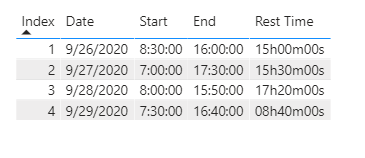
9.29.1.1.png

Here is the pbix file.


Did I answer your question ? Please mark my reply as solution. Thank you very much.

If not, please upload some insensitive data samples and expected output.


Best Regards,

Eyelyn Qin

DataInsights
Super User
Super User

@HenryJS, try this measure:


Rest = 
VAR vTimesheet =
    MAX ( Timesheet[Timesheet ID] )
VAR vMaxDate =
    MAX ( Timesheet[Date] )
VAR vMaxStartTime =
    MAX ( Timesheet[Start Tme] )
VAR vPrevDates =
    FILTER ( ALL ( Timesheet ), Timesheet[Timesheet ID] = vTimesheet && Timesheet[Date] < vMaxDate )
VAR vMaxPrevDate =
    MAXX ( vPrevDates, Timesheet[Date] )
VAR vPrevDate =
    FILTER ( vPrevDates, Timesheet[Date] = vMaxPrevDate )
VAR vPrevEndTime =
    MAXX ( vPrevDate, Timesheet[End Time] )
VAR vResult = 24 - vPrevEndTime + vMaxStartTime
RETURN
    IF ( ISBLANK ( vPrevEndTime ), BLANK(), vResult )


DataInsights_0-1601413782222.png


Did I answer your question? Mark my post as a solution!

Proud to be a Super User!


@DataInsights  Hi,


Is it possible to switch the rest time so it is calculating the time between End time on 14/09 and Start time on 15/09.


So rest time on 14/09 on your image below, would be 15:00:00


thanks,

@HenryJS, try this:


Rest = 
VAR vTimesheet =
    MAX ( Timesheet[Timesheet ID] )
VAR vMaxDate =
    MAX ( Timesheet[Date] )
VAR vMaxEndTime =
    MAX ( Timesheet[End Time] )
VAR vFutureDates =
    FILTER ( ALL ( Timesheet ), Timesheet[Timesheet ID] = vTimesheet && Timesheet[Date] > vMaxDate )
VAR vMinFutureDate =
    MINX ( vFutureDates, Timesheet[Date] )
VAR vFutureDate =
    FILTER ( vFutureDates, Timesheet[Date] = vMinFutureDate )
VAR vFutureStartTime =
    MINX ( vFutureDate, Timesheet[Start Tme] )
VAR vResult = 24 - vMaxEndTime + vFutureStartTime
RETURN
    IF ( ISBLANK ( vFutureStartTime ), BLANK(), vResult )


DataInsights_0-1601482403793.png


Did I answer your question? Mark my post as a solution!

Proud to be a Super User!


Helpful resources

Announcements
FabCon and SQLCon Barcelona 2026

FabCon & SQLCon – Barcelona 2026

Join us in Barcelona for FabCon and SQLCon, the Fabric, Power BI, SQL, and AI community event. Save €200 with code FABCMTY200.

Power BI DataViz World Championships carousel

Power BI DataViz World Championships - June 2026

A new Power BI DataViz World Championship is coming this June! Don't miss out on submitting your entry.