

Don't miss your chance to take the Fabric Data Engineer (DP-700) exam on us!
Learn moreWe've captured the moments from FabCon & SQLCon that everyone is talking about, and we are bringing them to the community, live and on-demand. Starts on April 14th. Register now
Hi all,
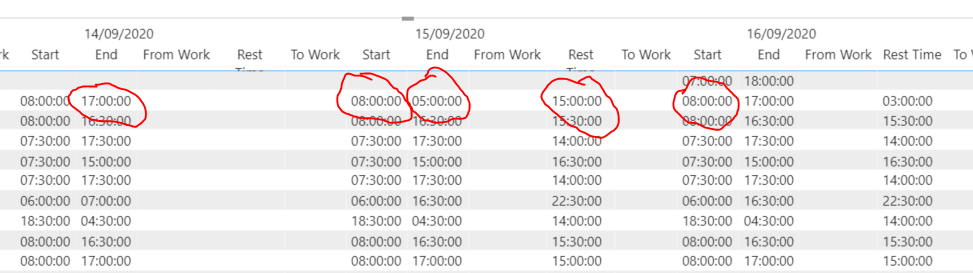
I have a column 'Rest Time' shown below which calculate the time between the start on one day and the end time on the previous day.
How can I change this column to calculate the time difference between the end time on one day and the start time on the next day?
Rest Time =
VAR CT = COUNTROWS(filter('Engage Timesheet Export', [Timesheet ID] =earlier([Timesheet ID]) && [Date]<earlier([date])))
RETURN IF(CT = 0 , 0 , maxx(filter('Engage Timesheet Export', [Timesheet ID] =earlier([Timesheet ID]) && [Date]<earlier([date])),[End time]) -[start time])
Solved! Go to Solution.
@HenryJS, try this:
Rest =
VAR vTimesheet =
MAX ( Timesheet[Timesheet ID] )
VAR vMaxDate =
MAX ( Timesheet[Date] )
VAR vMaxEndTime =
MAX ( Timesheet[End Time] )
VAR vFutureDates =
FILTER ( ALL ( Timesheet ), Timesheet[Timesheet ID] = vTimesheet && Timesheet[Date] > vMaxDate )
VAR vMinFutureDate =
MINX ( vFutureDates, Timesheet[Date] )
VAR vFutureDate =
FILTER ( vFutureDates, Timesheet[Date] = vMinFutureDate )
VAR vFutureStartTime =
MINX ( vFutureDate, Timesheet[Start Tme] )
VAR vResult = 24 - vMaxEndTime + vFutureStartTime
RETURN
IF ( ISBLANK ( vFutureStartTime ), BLANK(), vResult )
Proud to be a Super User!
Hi @HenryJS ,
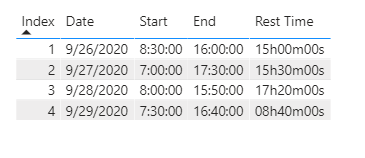
According to my understand, you could use the following formula after adding a Index column :
Rest Time =
VAR _previous =
CALCULATE (
MAX ( 'Table'[Start] ),
FILTER ( ALL ( 'Table' ), 'Table'[Index] = MAX ( 'Table'[Index] ) + 1 )
)
VAR TotalSeconds =
24 * 3600
- HOUR ( MAX ( 'Table'[End] ) ) * 3600
+ MINUTE ( MAX ( 'Table'[End] ) ) * 60
+ SECOND ( MAX ( 'Table'[End] ) )
+ HOUR ( _previous ) * 3600
+ MINUTE ( _previous ) * 60
+ SECOND ( _previous )
VAR Days =
TRUNC ( TotalSeconds / 3600 / 24 )
VAR Hors =
TRUNC ( ( TotalSeconds - Days * 3600 * 24 ) / 3600 )
VAR Mins =
TRUNC ( MOD ( TotalSeconds, 3600 ) / 60 )
VAR Secs =
MOD ( TotalSeconds, 60 )
RETURN
IF ( DAYS = 0, "", IF ( DAYS > 1, DAYS & "days ", Days & "day" ) )
& IF ( Hors < 10, "0" & Hors, Hors ) & "h"
& IF ( Mins < 10, "0" & Mins, Mins ) & "m"
& IF ( Secs < 10, "0" & Secs, Secs ) & "s"My visualization looks like this:
Did I answer your question ? Please mark my reply as solution. Thank you very much.
If not, please upload some insensitive data samples and expected output.
Best Regards,
Eyelyn Qin
@HenryJS, try this measure:
Rest =
VAR vTimesheet =
MAX ( Timesheet[Timesheet ID] )
VAR vMaxDate =
MAX ( Timesheet[Date] )
VAR vMaxStartTime =
MAX ( Timesheet[Start Tme] )
VAR vPrevDates =
FILTER ( ALL ( Timesheet ), Timesheet[Timesheet ID] = vTimesheet && Timesheet[Date] < vMaxDate )
VAR vMaxPrevDate =
MAXX ( vPrevDates, Timesheet[Date] )
VAR vPrevDate =
FILTER ( vPrevDates, Timesheet[Date] = vMaxPrevDate )
VAR vPrevEndTime =
MAXX ( vPrevDate, Timesheet[End Time] )
VAR vResult = 24 - vPrevEndTime + vMaxStartTime
RETURN
IF ( ISBLANK ( vPrevEndTime ), BLANK(), vResult )
Proud to be a Super User!
@DataInsights Hi,
Is it possible to switch the rest time so it is calculating the time between End time on 14/09 and Start time on 15/09.
So rest time on 14/09 on your image below, would be 15:00:00
thanks,
@HenryJS, try this:
Rest =
VAR vTimesheet =
MAX ( Timesheet[Timesheet ID] )
VAR vMaxDate =
MAX ( Timesheet[Date] )
VAR vMaxEndTime =
MAX ( Timesheet[End Time] )
VAR vFutureDates =
FILTER ( ALL ( Timesheet ), Timesheet[Timesheet ID] = vTimesheet && Timesheet[Date] > vMaxDate )
VAR vMinFutureDate =
MINX ( vFutureDates, Timesheet[Date] )
VAR vFutureDate =
FILTER ( vFutureDates, Timesheet[Date] = vMinFutureDate )
VAR vFutureStartTime =
MINX ( vFutureDate, Timesheet[Start Tme] )
VAR vResult = 24 - vMaxEndTime + vFutureStartTime
RETURN
IF ( ISBLANK ( vFutureStartTime ), BLANK(), vResult )
Proud to be a Super User!
If you have recently started exploring Fabric, we'd love to hear how it's going. Your feedback can help with product improvements.
A new Power BI DataViz World Championship is coming this June! Don't miss out on submitting your entry.
Share feedback directly with Fabric product managers, participate in targeted research studies and influence the Fabric roadmap.
| User | Count |
|---|---|
| 51 | |
| 37 | |
| 35 | |
| 19 | |
| 17 |
| User | Count |
|---|---|
| 72 | |
| 70 | |
| 39 | |
| 34 | |
| 23 |