cancel
Showing results for 
Search instead for 
Did you mean: 

Try your skills in the Power BI Dataviz World Championship! Round one ends June 26. Join now

Reply
EricaD
New Member

Calculate SUMX ignoring slicer filter

Hi, 

I need to calculate ROA for each company and then sum those values ignoring slicer filter for companies. I just need one number that will not change while using filter for companies. I tried ALL, REMOVEFILTERS, ... nothing worked.  Can anybody help me? 


This is what I got: 

ROA =  
var income = CALCULATE(SUM(Table[NUM_VALUE]), FILTER(Table, Table[C_EP] = "BCE")
var assets= CALCULATE(SUM(Table[NUM_VALUE]), FILTER(Table, Table[C_EP] = "CE")
return income/assets

TOTAL_ROA = 
var p = MAX(Table[PERIOD])
var a = SUMX(
   SUMMARIZE(Table,Table[SUBJECT], "ROA",CALCULATE(Table[ROA], Table[PERIOD] = p)),
CALCULATE(Table[ROA], Table[PERIOD] = p))
return a
 
Thanks for all your help. 
1 ACCEPTED SOLUTION

Hi @EricaD 

Try this measure

TOTAL_ROA = 
var d = MAX(TABLE1[PERIOD])
RETURN

SUMX(
    SUMMARIZE(
        ALL(Table1[SUBJECT]),
        Table1[SUBJECT], 
        "ReturnOnAssets", 
        CALCULATE(
            [ROA],
            Table1[PERIOD] = d
        )
    ), 
    [ReturnOnAssets]
)


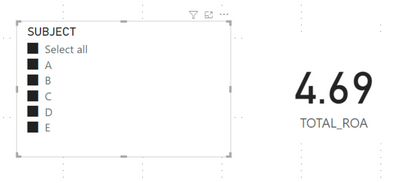
littlemojopuppy_0-1659449723631.png

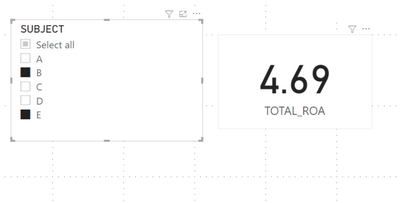
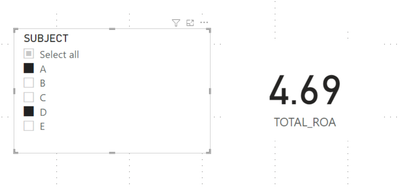
littlemojopuppy_1-1659449747017.pnglittlemojopuppy_2-1659449765003.png


View solution in original post

5 REPLIES 5
EricaD
New Member

Hi @littlemojopuppy, thanks for your quick response. I can give you .pbix and also .xlsx: Files 

I just want TOTAL_ROA to be 469% no matter what I select in filter for subject.

Hi @EricaD 

Try this measure

TOTAL_ROA = 
var d = MAX(TABLE1[PERIOD])
RETURN

SUMX(
    SUMMARIZE(
        ALL(Table1[SUBJECT]),
        Table1[SUBJECT], 
        "ReturnOnAssets", 
        CALCULATE(
            [ROA],
            Table1[PERIOD] = d
        )
    ), 
    [ReturnOnAssets]
)


littlemojopuppy_0-1659449723631.png

littlemojopuppy_1-1659449747017.pnglittlemojopuppy_2-1659449765003.png


@littlemojopuppy Thank you soooo much, you literally saved my life! 😄
And I really don't know why I haven't try that one. 

HI @EricaD.  Glad I could help!  🙂

littlemojopuppy
Community Champion
Community Champion

Hi @EricaD.  Very strange that ALL and REMOVEFILTERS didn't work...  Can you provide some sample data to work with?

Helpful resources

Announcements
Fabric Data Days is here Carousel

Fabric Data Days 2026

Don't miss out on Data Days, June 15 through August 7. Learn Fabric, Power BI, SQL, AI and more.

May Power BI Update Carousel

Power BI Monthly Update - May 2026

Check out the May 2026 Power BI update to learn about new features.

Power BI DataViz World Championships carousel

Power BI DataViz World Championships - June 2026

A new Power BI DataViz World Championship is coming this June! Don't miss out on submitting your entry.