This is best Fabric, Power BI, SQL and AI community event. How do we know? The last event sold out! Save €200 with code FABCMTY200.
Register nowA new Data Days event is coming soon! This time we’re going bigger than ever. Fabric, Power BI, SQL, AI and more. Don't miss out.
Hi All,
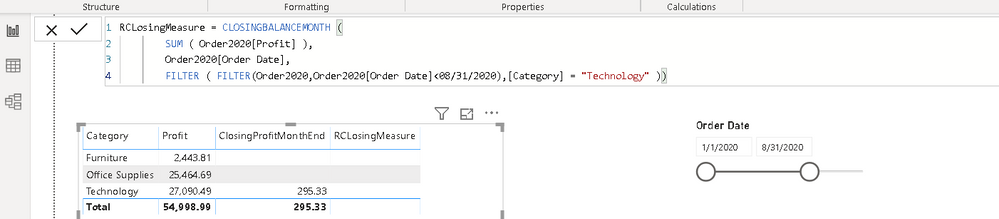
Can some help me with below DAX, I am not able to see results as expected. Attached screenshot for your reference
Thanks
K Raghavender Rao
Solved! Go to Solution.
Are you looking for a cumulative total every month, like
calculate (
SUM ( Order2020[Profit] ),FILTER('Date','Date'[Date]<= max('Date'[date])),[Category] = "Furniture" )
calculate (
SUM ( Order2020[Profit] ),FILTER('Date','Date'[Date]<= date(2020,08,31)),[Category] = "Furniture" )
Make sure you have a calendar table
To get the best of the time intelligence function. Make sure you have a date calendar and it has been marked as the date in model view. Also, join it with the date column of your fact/s. Refer :
https://radacad.com/creating-calendar-table-in-power-bi-using-dax-functions
https://www.archerpoint.com/blog/Posts/creating-date-table-power-bi
https://www.sqlbi.com/articles/creating-a-simple-date-table-in-dax/
Are you looking for a cumulative total every month, like
calculate (
SUM ( Order2020[Profit] ),FILTER('Date','Date'[Date]<= max('Date'[date])),[Category] = "Furniture" )
calculate (
SUM ( Order2020[Profit] ),FILTER('Date','Date'[Date]<= date(2020,08,31)),[Category] = "Furniture" )
Make sure you have a calendar table
To get the best of the time intelligence function. Make sure you have a date calendar and it has been marked as the date in model view. Also, join it with the date column of your fact/s. Refer :
https://radacad.com/creating-calendar-table-in-power-bi-using-dax-functions
https://www.archerpoint.com/blog/Posts/creating-date-table-power-bi
https://www.sqlbi.com/articles/creating-a-simple-date-table-in-dax/
Very difficult without sample data. Please see this post regarding How to Get Your Question Answered Quickly: https://community.powerbi.com/t5/Community-Blog/How-to-Get-Your-Question-Answered-Quickly/ba-p/38490
That being said, EOMONTH may be of use. Also, See if my Time Intelligence the Hard Way provides a different way of accomplishing what you are going for.
https://community.powerbi.com/t5/Quick-Measures-Gallery/Time-Intelligence-quot-The-Hard-Way-quot-TIT...
Check out the May 2026 Power BI update to learn about new features.
Sign up to receive a private message when registration opens and key events begin.
If you have recently started exploring Fabric, we'd love to hear how it's going. Your feedback can help with product improvements.
| User | Count |
|---|---|
| 29 | |
| 28 | |
| 25 | |
| 20 | |
| 14 |
| User | Count |
|---|---|
| 53 | |
| 47 | |
| 27 | |
| 20 | |
| 19 |