Get certified for free when you join Fabric Data Days 2026 and dive into Fabric, Power BI, SQL, AI, and other essential data skills.
Join nowTry your skills in the Power BI Dataviz World Championship! Round one ends June 26. Join now
Hi All,
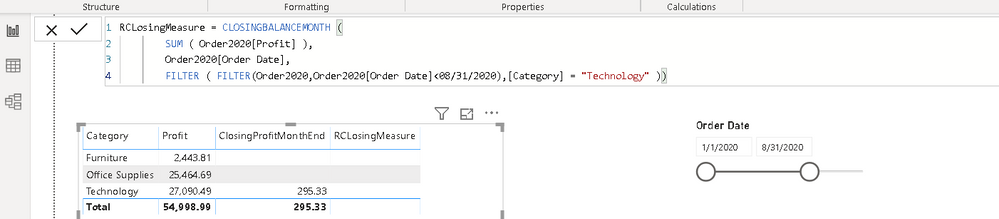
Can some help me with below DAX, I am not able to see results as expected. Attached screenshot for your reference
Thanks
K Raghavender Rao
Solved! Go to Solution.
Are you looking for a cumulative total every month, like
calculate (
SUM ( Order2020[Profit] ),FILTER('Date','Date'[Date]<= max('Date'[date])),[Category] = "Furniture" )
calculate (
SUM ( Order2020[Profit] ),FILTER('Date','Date'[Date]<= date(2020,08,31)),[Category] = "Furniture" )
Make sure you have a calendar table
To get the best of the time intelligence function. Make sure you have a date calendar and it has been marked as the date in model view. Also, join it with the date column of your fact/s. Refer :
https://radacad.com/creating-calendar-table-in-power-bi-using-dax-functions
https://www.archerpoint.com/blog/Posts/creating-date-table-power-bi
https://www.sqlbi.com/articles/creating-a-simple-date-table-in-dax/
Are you looking for a cumulative total every month, like
calculate (
SUM ( Order2020[Profit] ),FILTER('Date','Date'[Date]<= max('Date'[date])),[Category] = "Furniture" )
calculate (
SUM ( Order2020[Profit] ),FILTER('Date','Date'[Date]<= date(2020,08,31)),[Category] = "Furniture" )
Make sure you have a calendar table
To get the best of the time intelligence function. Make sure you have a date calendar and it has been marked as the date in model view. Also, join it with the date column of your fact/s. Refer :
https://radacad.com/creating-calendar-table-in-power-bi-using-dax-functions
https://www.archerpoint.com/blog/Posts/creating-date-table-power-bi
https://www.sqlbi.com/articles/creating-a-simple-date-table-in-dax/
Very difficult without sample data. Please see this post regarding How to Get Your Question Answered Quickly: https://community.powerbi.com/t5/Community-Blog/How-to-Get-Your-Question-Answered-Quickly/ba-p/38490
That being said, EOMONTH may be of use. Also, See if my Time Intelligence the Hard Way provides a different way of accomplishing what you are going for.
https://community.powerbi.com/t5/Quick-Measures-Gallery/Time-Intelligence-quot-The-Hard-Way-quot-TIT...
| User | Count |
|---|---|
| 23 | |
| 20 | |
| 18 | |
| 16 | |
| 10 |
| User | Count |
|---|---|
| 53 | |
| 52 | |
| 40 | |
| 37 | |
| 32 |