cancel
Showing results for 
Search instead for 
Did you mean: 

The Power BI Data Visualization World Championships is back! Get ahead of the game and start preparing now! Learn more

Reply
kolturra
Helper IV
Helper IV

CLOSINGBALANCEMONTH DAX Issue

Hi All,


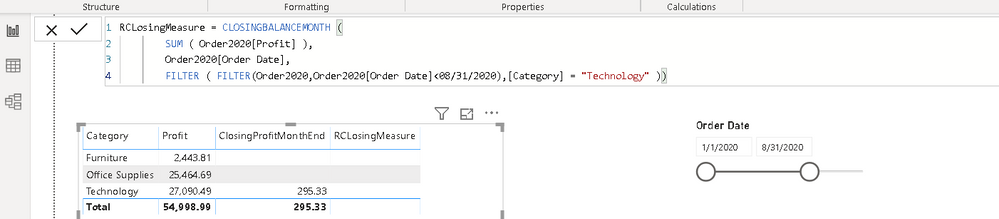
Can some help me with below DAX, I am not able to see results as expected. Attached screenshot for your reference


CLOSINGBALANCEMONTH (
SUM ( Order2020[Profit] ),
Order2020[Order Date],
FILTER ( FILTER(Order2020,Order2020[Order Date]<08/31/2020),[Category] = "Furniture" ))
 

CLOSINGBALANCEMONTH ISSUE.PNG


Thanks

K Raghavender Rao

1 ACCEPTED SOLUTION
amitchandak
Super User
Super User

Are you looking for a cumulative total every month, like

calculate (
SUM ( Order2020[Profit] ),FILTER('Date','Date'[Date]<= max('Date'[date])),[Category] = "Furniture" )

calculate (
SUM ( Order2020[Profit] ),FILTER('Date','Date'[Date]<= date(2020,08,31)),[Category] = "Furniture" )

Make sure you have a calendar table

To get the best of the time intelligence function. Make sure you have a date calendar and it has been marked as the date in model view. Also, join it with the date column of your fact/s. Refer :
https://radacad.com/creating-calendar-table-in-power-bi-using-dax-functions
https://www.archerpoint.com/blog/Posts/creating-date-table-power-bi
https://www.sqlbi.com/articles/creating-a-simple-date-table-in-dax/

Share with Power BI Enthusiasts: Full Power BI Video (20 Hours) YouTube
Microsoft Fabric Series 60+ Videos YouTube
Microsoft Fabric Hindi End to End YouTube

View solution in original post

2 REPLIES 2
amitchandak
Super User
Super User

Are you looking for a cumulative total every month, like

calculate (
SUM ( Order2020[Profit] ),FILTER('Date','Date'[Date]<= max('Date'[date])),[Category] = "Furniture" )

calculate (
SUM ( Order2020[Profit] ),FILTER('Date','Date'[Date]<= date(2020,08,31)),[Category] = "Furniture" )

Make sure you have a calendar table

To get the best of the time intelligence function. Make sure you have a date calendar and it has been marked as the date in model view. Also, join it with the date column of your fact/s. Refer :
https://radacad.com/creating-calendar-table-in-power-bi-using-dax-functions
https://www.archerpoint.com/blog/Posts/creating-date-table-power-bi
https://www.sqlbi.com/articles/creating-a-simple-date-table-in-dax/

Share with Power BI Enthusiasts: Full Power BI Video (20 Hours) YouTube
Microsoft Fabric Series 60+ Videos YouTube
Microsoft Fabric Hindi End to End YouTube
Greg_Deckler
Community Champion
Community Champion

Very difficult without sample data. Please see this post regarding How to Get Your Question Answered Quickly: https://community.powerbi.com/t5/Community-Blog/How-to-Get-Your-Question-Answered-Quickly/ba-p/38490


That being said, EOMONTH may be of use. Also, See if my Time Intelligence the Hard Way provides a different way of accomplishing what you are going for.

https://community.powerbi.com/t5/Quick-Measures-Gallery/Time-Intelligence-quot-The-Hard-Way-quot-TIT...


Follow on LinkedIn
@ me in replies or I'll lose your thread!!!
Instead of a Kudo, please vote for this idea
Become an expert!: Enterprise DNA
External Tools: MSHGQM
YouTube Channel!: Microsoft Hates Greg
Latest book!:
DAX For Humans

DAX is easy, CALCULATE makes DAX hard...

Helpful resources

Announcements
Power BI DataViz World Championships

Power BI Dataviz World Championships

The Power BI Data Visualization World Championships is back! Get ahead of the game and start preparing now!

December 2025 Power BI Update Carousel

Power BI Monthly Update - December 2025

Check out the December 2025 Power BI Holiday Recap!

FabCon Atlanta 2026 carousel

FabCon Atlanta 2026

Join us at FabCon Atlanta, March 16-20, for the ultimate Fabric, Power BI, AI and SQL community-led event. Save $200 with code FABCOMM.