
Get certified for free when you join Fabric Data Days 2026 and dive into Fabric, Power BI, SQL, AI, and other essential data skills.
Join nowData Days is here! Join us now for 60+ days of learning, challenges, and connection. Learn more
Hello,
There appears to be a bug with the button transparency. The transparency slider only changes the lightness or darkness of the button and doesn't change the opacity.
Screenshot of a supposedly 50% transparent button shown in gray:
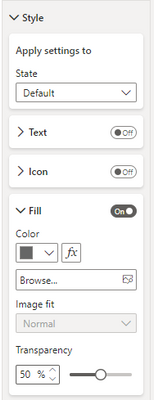
These are the transparency settings for the button:
Shape transparency seems to be unaffected. This is only affecting buttons. If there is a fix or workaround any help would be much appreciated.
Thank you!
Solved! Go to Solution.
Had same problem. Turned out that the theme applied a backgroundcolor to buttons as well.
If you check the Button under the "General" option and then "Effects" -> "Background" it might be turned on there.
Thanks for the reply. I don't think I would have been able to resolve this without the pointer.
You were correct, the theme was the culprit. I'm using the default theme, so, to fix it, I went to "View" > Click the theme dropdown arrow next to the theme icons > Select "Customize current theme." Power BI then prompted me that Microsoft had made updates to the default theme and provided an option to update. I chose the option to update and the button transparency works again.
Thanks again!
Had same problem. Turned out that the theme applied a backgroundcolor to buttons as well.
If you check the Button under the "General" option and then "Effects" -> "Background" it might be turned on there.
Thanks for the reply. I don't think I would have been able to resolve this without the pointer.
You were correct, the theme was the culprit. I'm using the default theme, so, to fix it, I went to "View" > Click the theme dropdown arrow next to the theme icons > Select "Customize current theme." Power BI then prompted me that Microsoft had made updates to the default theme and provided an option to update. I chose the option to update and the button transparency works again.
Thanks again!
Thank you so much. This was driving me nuts.
Don't miss out on Data Days, June 15 through August 7. Learn Fabric, Power BI, SQL, AI and more.
Check out the May 2026 Power BI update to learn about new features.
| User | Count |
|---|---|
| 22 | |
| 21 | |
| 20 | |
| 19 | |
| 13 |
| User | Count |
|---|---|
| 58 | |
| 52 | |
| 37 | |
| 31 | |
| 27 |