Join us at FabCon Atlanta from March 16 - 20, 2026, for the ultimate Fabric, Power BI, AI and SQL community-led event. Save $200 with code FABCOMM.
Register now!The Power BI Data Visualization World Championships is back! Get ahead of the game and start preparing now! Learn more
Hi,
I am trying to build a string every time I make a selectiong from a filter I added from a table I added see the table below
The month the month that is selected in the filter must return the previous month string
e.g If the selected value is May the string must return APRFCST
If the selected value is Jun the string must return MAYFCST
If the selected value is Jul the string must return JULFCST
| Month Num | Month Short |
| Apr | 1 |
| May | 2 |
| Jun | 3 |
| Jul | 4 |
| Aug | 5 |
| Sep | 6 |
| Oct | 4 |
| Nov | 8 |
| Dec | 9 |
Solved! Go to Solution.
Hi @Anonymous,
Create slicer table as:
Slicer =
VALUES('Table'[Month Num])
Create column as:
Column =
CALCULATE(
MAX('Table'[Month Num]),
FILTER(
'Table',
'Table'[Month Short]=EARLIER('Table'[Month Short])-1
)
)
Create measure as:
Measure =
var _month=
CALCULATE(
MAX('Table'[Column]),
FILTER(
'Table',
'Table'[Month Num]=ALLSELECTED(Slicer[Month Num])
)
)
return
CONCATENATE(_month,"FCST")
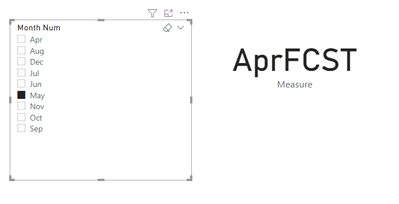
Here is the output:
The demo is attached, please try it.
If you still have some question, please don't hesitate to let me known.
Best Regards,
Link
Is that the answer you're looking for? If this post helps, then please consider Accept it as the solution. Really appreciate!
Hi @Anonymous,
Create slicer table as:
Slicer =
VALUES('Table'[Month Num])
Create column as:
Column =
CALCULATE(
MAX('Table'[Month Num]),
FILTER(
'Table',
'Table'[Month Short]=EARLIER('Table'[Month Short])-1
)
)
Create measure as:
Measure =
var _month=
CALCULATE(
MAX('Table'[Column]),
FILTER(
'Table',
'Table'[Month Num]=ALLSELECTED(Slicer[Month Num])
)
)
return
CONCATENATE(_month,"FCST")
Here is the output:
The demo is attached, please try it.
If you still have some question, please don't hesitate to let me known.
Best Regards,
Link
Is that the answer you're looking for? If this post helps, then please consider Accept it as the solution. Really appreciate!
The below is what I am trying to achieve:
The Power BI Data Visualization World Championships is back! Get ahead of the game and start preparing now!
| User | Count |
|---|---|
| 66 | |
| 45 | |
| 43 | |
| 36 | |
| 23 |
| User | Count |
|---|---|
| 196 | |
| 125 | |
| 105 | |
| 77 | |
| 56 |