Join us at FabCon Atlanta from March 16 - 20, 2026, for the ultimate Fabric, Power BI, AI and SQL community-led event. Save $200 with code FABCOMM.
Register now!The Power BI Data Visualization World Championships is back! It's time to submit your entry. Live now!
Good evening,
Is there a bug in the bookmark feature?
I have set a Bookmark to a page with none of the slicers selected. If I then select both slicers and click on the bookmark, only one of them clears.
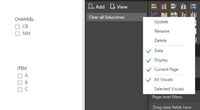
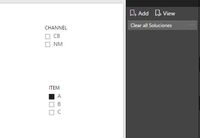
Cerate Bookmark
Selecting both slicers
clicking bookmark
I have then tried changing the bookmark. This time the bookmark is created with both slicers selected. If de-select and then click on the bookmark, both slicers are selected (as they should).
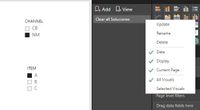
Create Bookmark
Clear slicers
Click on bookmark
So it is inconsistent, right? Can aynone reproduce this?
Thanks.
Proud to be a Super User!
Paul on Linkedin.
Solved! Go to Solution.
@PaulDBrown,
I can't reproduce this issue today. Could you please reboot your machine and re-start Power BI Desktop?
Regards,
Lydia
@PaulDBrown,
What is the version of Power BI Desktop? I make a test using the latest version of Power BI Desktop(2.54.4970.961), when I select values in the two slicers, and click on the bookmark, both selections are not cleared.
Regards,
Lydia
@Anonymous
Lydia,
I’m using the January update. I actually re-downloaded Power Bi desktop yesterday and tried the whole process again, and I get the same behaviour.
scenario 1:
1. Set the bookmark with no slicers selected.
2. Select both slicers.
3. Click bookmark: only one slicer clrears.
scenario 2
1. Set the bookmark with both slicers selected
2. Clear the slicers
3. Click the bookmark: both slicers selected (as is “expected”)
Any ideas?
thanks,
Paul.
Proud to be a Super User!
Paul on Linkedin.
@PaulDBrown,
I can't reproduce this issue today. Could you please reboot your machine and re-start Power BI Desktop?
Regards,
Lydia
@Anonymous
Lydia,
Now that is weird. I just tried the bookmark and it is working today. Baffled as to why this was causing problems last week. Nothing has changed since then!
Thank you for looking into this.
Regards,
Paul.
Proud to be a Super User!
Paul on Linkedin.
I am also having trouble using bookmarks. Previously functionality no longer seems to work.
I use a bookmark to clear filters. To do so, I created a bookmark with all of my slicers/filters cleared. I then created an image that is linked to the the bookmark. When you click on the clear filters image, it should return the report to the state where all filters were cleared.
In the past, this functionality worked like a charm and was super simple to set up. However, I can't seem to get this to work in new reports that I'm creating today. It seems to be random. If I select one filter and then try 'clear filters', it sometimes works. Sometimes not. If two filters are selected, it most often does nothing.
Please note that I have uploaded the latest version of PBI (January). Could it be a bug was interduced with this implementation?
Anyone?
Proud to be a Super User!
Paul on Linkedin.
The Power BI Data Visualization World Championships is back! It's time to submit your entry.
| User | Count |
|---|---|
| 50 | |
| 43 | |
| 36 | |
| 33 | |
| 30 |
| User | Count |
|---|---|
| 138 | |
| 125 | |
| 60 | |
| 59 | |
| 56 |