Join us at FabCon Atlanta from March 16 - 20, 2026, for the ultimate Fabric, Power BI, AI and SQL community-led event. Save $200 with code FABCOMM.
Register now!Get Fabric Certified for FREE during Fabric Data Days. Don't miss your chance! Request now
Hi Everyone,
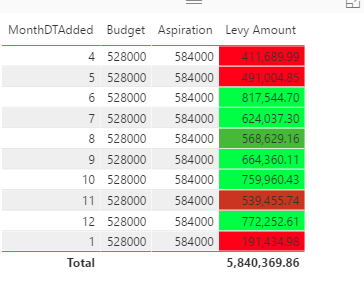
I am trying to create a new column that shows cumulative sum of the levy amount.
Please can someone assist me in doing this.
Solved! Go to Solution.
Try this as a MEASURE
MEASURE =
CALCULATE (
SUM ( TableName[Levy Amount] ),
FILTER (
ALL ( TableName ),
TableName[MonthDTAdded] <= SELECTEDVALUE ( TableName[MonthDTAdded] )
)
)
You may use Quick measure Running total.
the quick measure is not loading any options for me. probably the dataset is too big for it work through it.
I left it overnight but in the morning it still did not give me any options.
is there anyway I can use DAX to fix this issue.
Try this as a MEASURE
MEASURE =
CALCULATE (
SUM ( TableName[Levy Amount] ),
FILTER (
ALL ( TableName ),
TableName[MonthDTAdded] <= SELECTEDVALUE ( TableName[MonthDTAdded] )
)
)
Check out the November 2025 Power BI update to learn about new features.
Advance your Data & AI career with 50 days of live learning, contests, hands-on challenges, study groups & certifications and more!