cancel
Showing results for 
Search instead for 
Did you mean: 

The Power BI Data Visualization World Championships is back! Get ahead of the game and start preparing now! Learn more

Reply
ahsanlhcgov
Helper III
Helper III

Cumulative Sum of a column

Hi Everyone, 


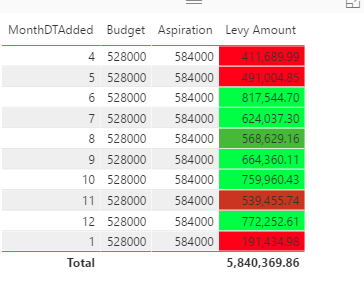
I am trying to create a new column that shows cumulative sum of the levy amount. 


Please can someone assist me in doing this. 


cumulative.png

1 ACCEPTED SOLUTION

@ahsanlhcgov


Try this as a MEASURE


MEASURE =
CALCULATE (
    SUM ( TableName[Levy Amount] ),
    FILTER (
        ALL ( TableName ),
        TableName[MonthDTAdded] <= SELECTEDVALUE ( TableName[MonthDTAdded] )
    )
)

View solution in original post

3 REPLIES 3
v-chuncz-msft
Community Support
Community Support

@ahsanlhcgov,


You may use Quick measure Running total.

Community Support Team _ Sam Zha
If this post helps, then please consider Accept it as the solution to help the other members find it more quickly.

@v-chuncz-msft

the quick measure is not loading any options for me. probably the dataset is too big for it work through it. 


I left it overnight but in the morning it still did not give me any options. 


is there anyway I can use DAX to fix this issue. 

@ahsanlhcgov


Try this as a MEASURE


MEASURE =
CALCULATE (
    SUM ( TableName[Levy Amount] ),
    FILTER (
        ALL ( TableName ),
        TableName[MonthDTAdded] <= SELECTEDVALUE ( TableName[MonthDTAdded] )
    )
)

Helpful resources

Announcements
Power BI DataViz World Championships

Power BI Dataviz World Championships

The Power BI Data Visualization World Championships is back! Get ahead of the game and start preparing now!

November Power BI Update Carousel

Power BI Monthly Update - November 2025

Check out the November 2025 Power BI update to learn about new features.

FabCon Atlanta 2026 carousel

FabCon Atlanta 2026

Join us at FabCon Atlanta, March 16-20, for the ultimate Fabric, Power BI, AI and SQL community-led event. Save $200 with code FABCOMM.