cancel
Showing results for 
Search instead for 
Did you mean: 

We've captured the moments from FabCon & SQLCon that everyone is talking about, and we are bringing them to the community, live and on-demand. Starts on April 14th. Register now

Reply
misul
Helper I
Helper I

Binning data and Distinct Count error

Hello,

I would appreciate any general guidance/info on this topic.


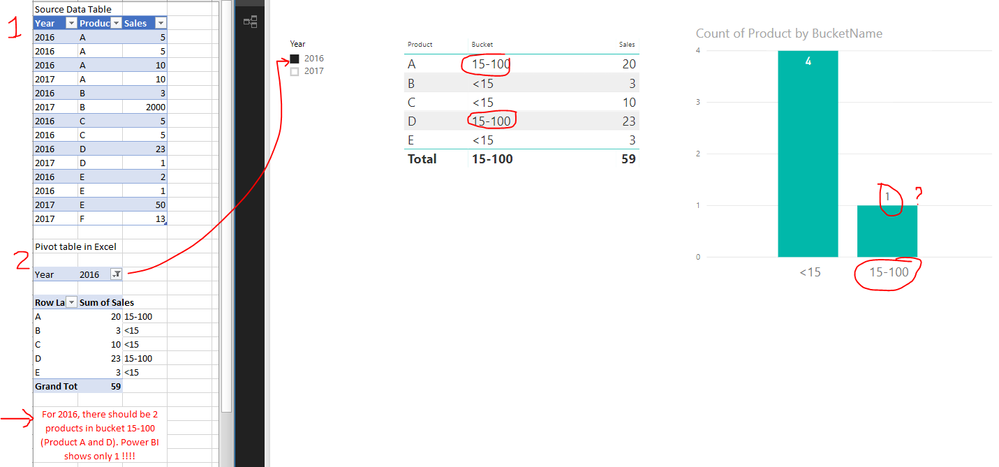
I have a simple sales table and I am trying to group (bin) all products into categories of <15, 15-100 and >100. 


To categorise each product into a bucket, I created a measure.  Bucket = if(sum(Table1[Sales])<15,"<15",if(sum(Table1[Sales])>100,"more than 100","15-100"))


To be able to use this measure on a map, I put it in a calculated column.

BucketName = CALCULATE([Bucket]) 


However, when I filter by year, the bucket (measure) doesn't change as it should. Does anyone know how PowerBI works in this situation?


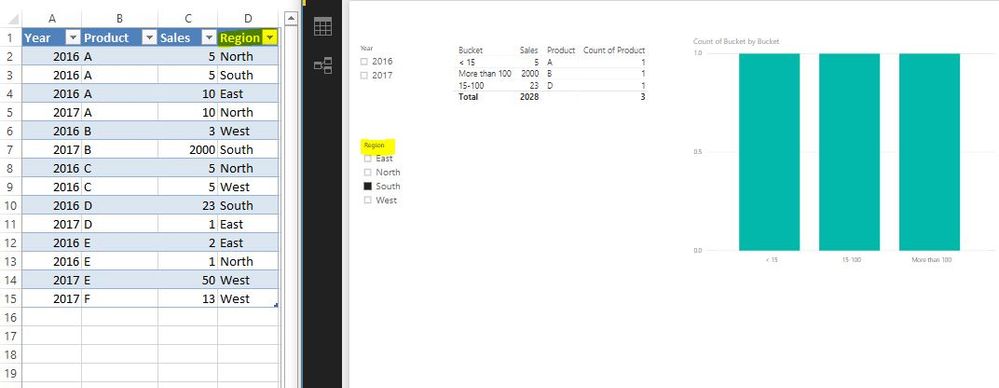
Here is all the data and PowerBI charts:

Capture646.PNG


1 ACCEPTED SOLUTION

4 REPLIES 4
Phil_Seamark
Microsoft Employee
Microsoft Employee

HI @misul


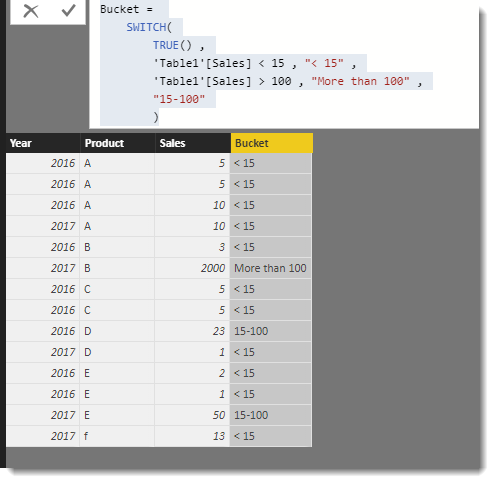
Why not add a calculated column to your table like this


Bucket = 
    SWITCH(
        TRUE() ,
        'Table1'[Sales] < 15 , "< 15" ,
        'Table1'[Sales] > 100 , "More than 100" ,
        "15-100"
        )

image.png


image.png


To learn more about DAX visit : aka.ms/practicalDAX

Proud to be a Datanaut!

hi @Phil_Seamark

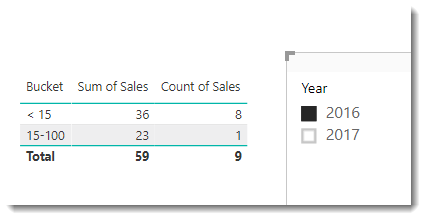
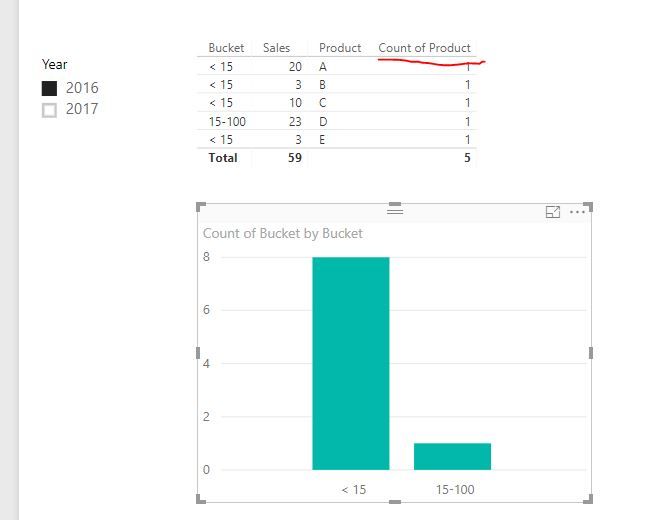
thanks for your comment. However, I am looking for count of Product, not count of Sales. In other words, trying to answer the question "Which are the products that had total sales of <15 in this year?" For 2016, the answer should be 3 products.


I applied your Switch formula ,but it doesn't solve this. 


 Captured.JPG

Some further info: 

The final goal is apply the same buckets on a global as well as regional level. This means, in my understanding, that the bucket applied to each row should be applied  AFTER the filters are year/region are implented.


That's why I tried to use a measure rather than a calculated column. Or perhpas a combination of the two (which I haven't figured out yet).

Capturdde.JPG


For reference : 


This issue was solved in another post. https://community.powerbi.com/t5/Desktop/Dynamic-Segmentation-with-duplicate-rows/m-p/379859


Helpful resources

Announcements
New to Fabric survey Carousel

New to Fabric Survey

If you have recently started exploring Fabric, we'd love to hear how it's going. Your feedback can help with product improvements.

Power BI DataViz World Championships carousel

Power BI DataViz World Championships - June 2026

A new Power BI DataViz World Championship is coming this June! Don't miss out on submitting your entry.

Join our Fabric User Panel

Join our Fabric User Panel

Share feedback directly with Fabric product managers, participate in targeted research studies and influence the Fabric roadmap.

March Power BI Update Carousel

Power BI Community Update - March 2026

Check out the March 2026 Power BI update to learn about new features.