Get certified for free when you join Fabric Data Days 2026 and dive into Fabric, Power BI, SQL, AI, and other essential data skills.
Join nowData Days is here! Join us now for 60+ days of learning, challenges, and connection. Learn more
Before I starte waisting hours on finding the best practise on this topic, I though I might just ask given the question is pretty simple.
Let's say you have a model with the following data:
Customer | Monthlyly fee | Start Date | End Data
A | 100 | 01/06/2019 | 30/11/2019
B | 125 | 01/06/2019 | 31/12/2019
C | 75 | | 01/06/2019 | 31/10/2019
How can I get the monthly total (sum) values in a table to analyze this? Do you generate the monthly values first in PowerQuery of can this be done on the fly using DAX?
Solved! Go to Solution.
Hi @wlknsn ,
In your scenario, I would use the following DAX query to do that:
Result =
CALCULATE (
SUM ( Data[Monthly fee] ),
FILTER (
ALL ( Data ),
Data[Start Date] <= MIN ( 'Date'[Date] )
&& Data[End Date] >= MAX ( 'Date'[Date] )
)
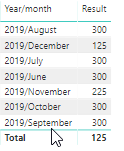
)The result will like below:
Best Regards,
Teige
Hi @wlknsn ,
In your scenario, I would use the following DAX query to do that:
Result =
CALCULATE (
SUM ( Data[Monthly fee] ),
FILTER (
ALL ( Data ),
Data[Start Date] <= MIN ( 'Date'[Date] )
&& Data[End Date] >= MAX ( 'Date'[Date] )
)
)The result will like below:
Best Regards,
Teige
Hi @wlknsn
No need to pre aggregate data if your table is not massive, I would try DAX and if performance is not satisfactory then you can consider aggregating yuor data.
Regards,
Mariusz
If this post helps, then please consider Accept it as the solution to help the other members find it more quickly.
Is there an easy way to do convert that data into monthly records in powerquery?
Don't miss out on Data Days, June 15 through August 7. Learn Fabric, Power BI, SQL, AI and more.
Check out the May 2026 Power BI update to learn about new features.
| User | Count |
|---|---|
| 22 | |
| 21 | |
| 20 | |
| 19 | |
| 13 |
| User | Count |
|---|---|
| 58 | |
| 52 | |
| 37 | |
| 31 | |
| 27 |