cancel
Showing results for 
Search instead for 
Did you mean: 

Join the FabCon + SQLCon recap series. Up next: Power BI, Real-Time Intelligence, IQ and AI, and Data Factory take center stage. All sessions are available on-demand after the live show. Register now

Reply
wlknsn
Helper I
Helper I

Best Practice: Extrapolation/Forecasting

Before I starte waisting hours on finding the best practise on this topic, I though I might just ask given the question is pretty simple.


Let's say you have a model with the following data:

Customer | Monthlyly fee | Start Date | End Data

A | 100 | 01/06/2019 | 30/11/2019

B | 125  | 01/06/2019 | 31/12/2019

C | 75 | | 01/06/2019 | 31/10/2019


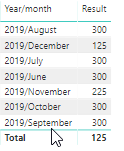
How can I get the monthly total (sum) values in a table to analyze this? Do you generate the monthly values first in PowerQuery of can this be done on the fly using DAX?

1 ACCEPTED SOLUTION
TeigeGao
Solution Sage
Solution Sage

Hi @wlknsn ,

In your scenario, I would use the following DAX query to do that:

Result =
CALCULATE (
    SUM ( Data[Monthly fee] ),
    FILTER (
        ALL ( Data ),
        Data[Start Date] <= MIN ( 'Date'[Date] )
            && Data[End Date] >= MAX ( 'Date'[Date] )
    )
)

The result will like below:

PBIDesktop_W7EgIC6CAf.png

Best Regards,

Teige

View solution in original post

4 REPLIES 4
TeigeGao
Solution Sage
Solution Sage

Hi @wlknsn ,

In your scenario, I would use the following DAX query to do that:

Result =
CALCULATE (
    SUM ( Data[Monthly fee] ),
    FILTER (
        ALL ( Data ),
        Data[Start Date] <= MIN ( 'Date'[Date] )
            && Data[End Date] >= MAX ( 'Date'[Date] )
    )
)

The result will like below:

PBIDesktop_W7EgIC6CAf.png

Best Regards,

Teige

Mariusz
Community Champion
Community Champion

Hi @wlknsn 

No need to pre aggregate data if your table is not massive, I would try DAX and if performance is not satisfactory then you can consider aggregating yuor data.


Regards,
Mariusz

If this post helps, then please consider Accept it as the solution to help the other members find it more quickly. 

Is there an easy way to do convert that data into monthly records in powerquery?

Mariusz
Community Champion
Community Champion

Hi @wlknsn 

You can use "Group By" its fairly simple  

Thanks

Mariusz

Helpful resources

Announcements
April Power BI Update Carousel

Power BI Monthly Update - April 2026

Check out the April 2026 Power BI update to learn about new features.

New to Fabric survey Carousel

New to Fabric Survey

If you have recently started exploring Fabric, we'd love to hear how it's going. Your feedback can help with product improvements.

Power BI DataViz World Championships carousel

Power BI DataViz World Championships - June 2026

A new Power BI DataViz World Championship is coming this June! Don't miss out on submitting your entry.

FabCon and SQLCon Highlights Carousel

FabCon &SQLCon Highlights

Experience the highlights from FabCon & SQLCon, available live and on-demand starting April 14th.