Get certified for free when you join Fabric Data Days 2026 and dive into Fabric, Power BI, SQL, AI, and other essential data skills.
Join nowData Days is here! Join us now for 60+ days of learning, challenges, and connection. Learn more
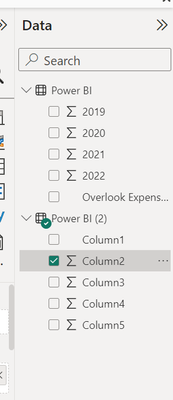
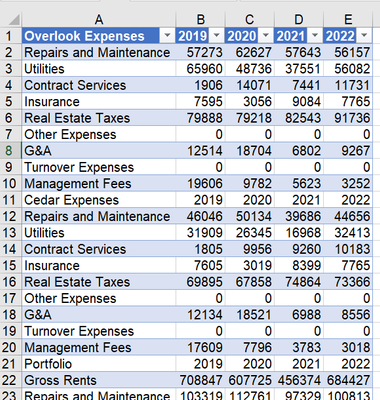
Hello, I'm trying to load an excel file into PowerBI, and when it loads, it does not bring in the left-most column header names. The file is a basic P&L statement for an apartment building. When I import into PowerBI, it gives me only 4 SUM columns to work with and ignores the names of each expense category.
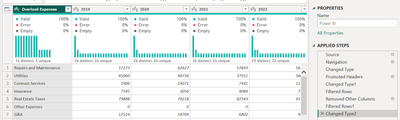
@drogersdk , Open Power Query, and use Fiest Row As Header
Power BI: Power Query Functions one must know
: https://www.youtube.com/watch?v=cN8AO3_vmlY&t=36407s
Power BI - Cheat Sheet: Power Query Functions one must know
https://amitchandak.medium.com/cheat-sheet-power-query-functions-one-must-know-a8531b6e321a
Hello, I've already done that to have the "Expenses" and "2020" "2021" etc as the column headers. I thought if I put my data as it is into Power BI that I could sort and sum by expense category. For example, in excel, I can just create a "total expenses" column all the way to the right. I'd rather do this in Power BI but can't get past this first step. I've watched some Youtube videos on financial statements and they are all very complicated and use coding specific to Power BI. Any suggestions for a more basic tutorial that is finance or P&L specific?
Don't miss out on Data Days, June 15 through August 7. Learn Fabric, Power BI, SQL, AI and more.
Check out the May 2026 Power BI update to learn about new features.
| User | Count |
|---|---|
| 23 | |
| 23 | |
| 21 | |
| 17 | |
| 13 |
| User | Count |
|---|---|
| 58 | |
| 51 | |
| 39 | |
| 29 | |
| 24 |