cancel
Showing results for 
Search instead for 
Did you mean: 

July 7 - July 17 | Round 2 of the Power BI Dataviz World Championships. Don't miss your chance! Learn more

Reply
xPJRx
New Member

Basic But so Frustrating - Help!!!

Hi Everyone, this is doing my head in, and I cannot figure out how to resolve so any guidance would be appreciated.


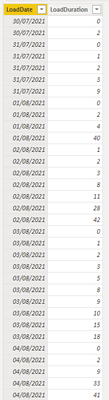
I have a table with 2 columns, Date and Duration as shown below:


xPJRx_0-1638980648271.png

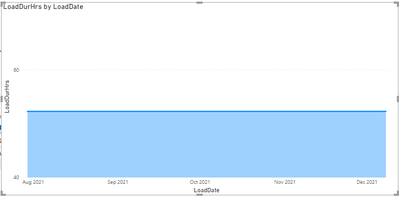
the 'LoadDate' is shown by day, eg 08/12/2021, however, when i drop these values into a graph to plot load duration by day, PowerBi is displaying the dates grouped as month, as shown below:


xPJRx_1-1638980736277.png

There is no date hierachy built into this field, and it is formated as a date field, I have also turned off all the date/time grouping for this workbook in settings, but I still cannot for the life of me change the graph to show by actual day date as shown in the table screenshot.


xPJRx_2-1638980895744.png


 Any ideas?


thanks

Paul


1 ACCEPTED SOLUTION
Thingsclump
Resolver V
Resolver V

Hi @xPJRx 


Try this.

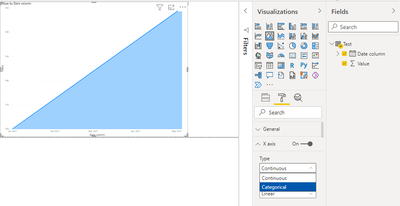
All you have to do is go to Format->X Axis->Type->Categorical.


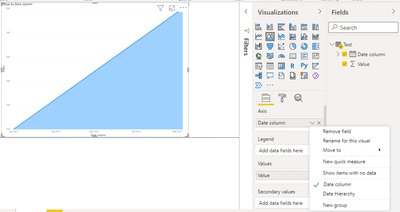
Third image has solution.


Thingsclump_0-1638985549289.png


Thingsclump_2-1638985647320.png

Thingsclump_3-1638985671346.png


Thanks,

Thingsclump team

https://www.thingsclump.com/ 


View solution in original post

3 REPLIES 3
Thingsclump
Resolver V
Resolver V

Hi @xPJRx 


Try this.

All you have to do is go to Format->X Axis->Type->Categorical.


Third image has solution.


Thingsclump_0-1638985549289.png


Thingsclump_2-1638985647320.png

Thingsclump_3-1638985671346.png


Thanks,

Thingsclump team

https://www.thingsclump.com/ 


Knew it would be something so simple.

Thanks for your reply, most appreciated, tested and works just fine 🙂

amitchandak
Super User
Super User

@xPJRx , Make sure you are taking the sum of load duration , not the count


Can you share sample data and sample output in table format? Or a sample pbix after removing sensitive data.

Share with Power BI Enthusiasts: Full Power BI Video (20 Hours) YouTube
Microsoft Fabric Series 60+ Videos YouTube
Microsoft Fabric Hindi End to End YouTube

Helpful resources

Announcements
FabCon and SQLCon Barcelona 2026

FabCon & SQLCon – Barcelona 2026

Join us in Barcelona for FabCon and SQLCon, the Fabric, Power BI, SQL, and AI community event. Save €200 with code FABCMTY200.

60 days of Data Days Carousel

Data Days 2026

Join Fabric Data Days 2026: 60 days of free live/on-demand sessions, challenges, study groups, and certification opportunities.

Power BI DataViz World Championships carousel

Power BI DataViz World Championships - June 2026

A new Power BI DataViz World Championship is coming this June! Don't miss out on submitting your entry.