Get certified for free when you join Fabric Data Days 2026 and dive into Fabric, Power BI, SQL, AI, and other essential data skills.
Join nowTry your skills in the Power BI Dataviz World Championship! Round one ends June 26. Join now
Hi!
I am trying to create a bar chart without some repeated data. Imagine we have a table similar to this:
TABLE1
TEST_ID CATEGORY SUBCATEGORY CHECKED
123 CAT1 SUBCAT1.1 TRUE
123 CAT1 SUBCAT1.2 FALSE
123 CAT1 SUBCAT1.3 TRUE
124 CAT1 SUBCAT1.1 TRUE
124 CAT2 SUBCAT2.1 FALSE
124 CAT2 SUBCAT2.2 TRUE
124 CAT1 SUBCAT1.3 TRUE
125 CAT2 SUBCAT2.1 TRUE
125 CAT3 SUBCAT3.1 TRUE
125 CAT3 SUBCAT3.2 TRUE
125 CAT4 SUBCAT4.1 FALSE
Can I make a bar chart to show how many times have a category been checked, counting just one per test ID and ignoring de subcategories? In the example above, the result should be:
CAT1 ------ 3 (Something under CAT1 has been checked by 3 test IDs)
CAT2 ------ 1
CAT3 ------ 1
CAT4 ------ 0
Thanks in advance!
Regards!
Solved! Go to Solution.
Hi,
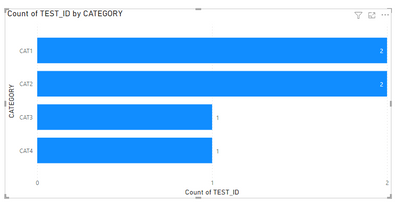
I think the desired output you have shown above is wrong i believe. There are only 2 distinct TESTID's for CAT1 and 2 for CAT2. In that case, it will show bar chart something like below.
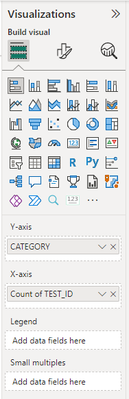
If this is what required, To get only the unique test ids selected for categories. Keep TESTID as below and select distinct count.
Hope this one works.
Hi,
I think the desired output you have shown above is wrong i believe. There are only 2 distinct TESTID's for CAT1 and 2 for CAT2. In that case, it will show bar chart something like below.
If this is what required, To get only the unique test ids selected for categories. Keep TESTID as below and select distinct count.
Hope this one works.
Hi @Rambo92 !
You are absolutely right, the desired output wasn't correct, and your answer is exactly what I needed. Thank you so much!
Don't miss out on Data Days, June 15 through August 7. Learn Fabric, Power BI, SQL, AI and more.
Check out the May 2026 Power BI update to learn about new features.
| User | Count |
|---|---|
| 21 | |
| 21 | |
| 20 | |
| 20 | |
| 12 |
| User | Count |
|---|---|
| 58 | |
| 53 | |
| 39 | |
| 30 | |
| 26 |