cancel
Showing results for 
Search instead for 
Did you mean: 

Did you hear? There's a new SQL AI Developer certification (DP-800). Start preparing now and be one of the first to get certified. Register now

Reply
Fátima
Helper II
Helper II

Bars chart without repeated data

Hi!


I am trying to create a bar chart without some repeated data. Imagine we have a table similar to this:

TABLE1

TEST_ID            CATEGORY          SUBCATEGORY          CHECKED

123                   CAT1                   SUBCAT1.1                 TRUE

123                   CAT1                   SUBCAT1.2                 FALSE

123                   CAT1                   SUBCAT1.3                 TRUE

124                   CAT1                   SUBCAT1.1                 TRUE

124                   CAT2                   SUBCAT2.1                 FALSE

124                   CAT2                   SUBCAT2.2                 TRUE

124                   CAT1                   SUBCAT1.3                 TRUE

125                   CAT2                   SUBCAT2.1                 TRUE

125                   CAT3                   SUBCAT3.1                 TRUE

125                   CAT3                   SUBCAT3.2                 TRUE

125                   CAT4                   SUBCAT4.1                 FALSE


Can I make a bar chart to show how many times have a category been checked, counting just one per test ID and ignoring de subcategories? In the example above, the result should be:

CAT1 ------ 3 (Something under CAT1 has been checked by 3 test IDs)

CAT2 ------ 1

CAT3 ------ 1

CAT4 ------ 0


Thanks in advance!


Regards!

1 ACCEPTED SOLUTION
Rambo92
Helper I
Helper I

Hi,

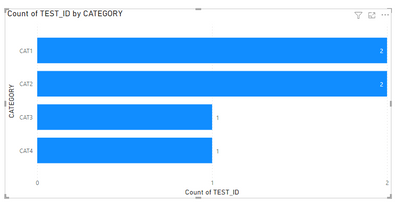
I think the desired output you have shown above is wrong i believe. There are only 2 distinct TESTID's for CAT1 and 2 for CAT2. In that case, it will show bar chart something like below.


Rambo92_0-1674491762005.png

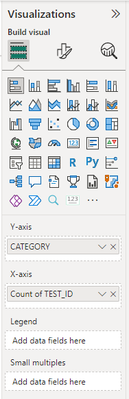
If this is what required, To get only the unique test ids selected for categories.  Keep TESTID as below and select distinct count.

Rambo92_1-1674491940426.png

Hope this one works.

View solution in original post

2 REPLIES 2
Rambo92
Helper I
Helper I

Hi,

I think the desired output you have shown above is wrong i believe. There are only 2 distinct TESTID's for CAT1 and 2 for CAT2. In that case, it will show bar chart something like below.


Rambo92_0-1674491762005.png

If this is what required, To get only the unique test ids selected for categories.  Keep TESTID as below and select distinct count.

Rambo92_1-1674491940426.png

Hope this one works.

Hi @Rambo92 !


You are absolutely right, the desired output wasn't correct, and your answer is exactly what I needed. Thank you so much!

Helpful resources

Announcements
April Power BI Update Carousel

Power BI Monthly Update - April 2026

Check out the April 2026 Power BI update to learn about new features.

Fabric SQL PBI Data Days

Data Days 2026 coming soon!

Sign up to receive a private message when registration opens and key events begin.

New to Fabric survey Carousel

New to Fabric Survey

If you have recently started exploring Fabric, we'd love to hear how it's going. Your feedback can help with product improvements.

Power BI DataViz World Championships carousel

Power BI DataViz World Championships - June 2026

A new Power BI DataViz World Championship is coming this June! Don't miss out on submitting your entry.