Join us at FabCon Atlanta from March 16 - 20, 2026, for the ultimate Fabric, Power BI, AI and SQL community-led event. Save $200 with code FABCOMM.
Register now!Learn from the best! Meet the four finalists headed to the FINALS of the Power BI Dataviz World Championships! Register now
Hi,
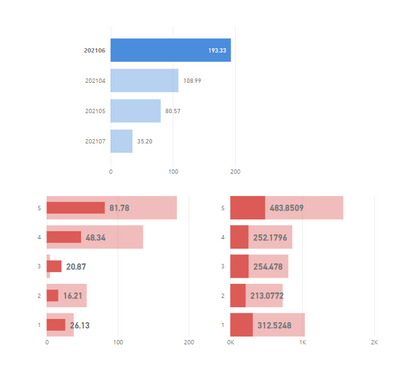
I have 3 bar charts in my dashboard and they are cross filtering each other. However for one of the charts, while filtering, it shows bar inside bar rather that highlighting a part of it. How can I fix this?
In snip below, left right chart is the behavior I dont want and right chart is how I want to see it.
Thanks for your help in advance!
Veena.
Solved! Go to Solution.
Hi,
My data has some negative values which is causing this behavior. @JorgePinho - thanks for your help though!
Regards,
Veena.
Hi,
My data has some negative values which is causing this behavior. @JorgePinho - thanks for your help though!
Regards,
Veena.
Thank you so much for following up! 🙂
Hi,
It's the Stacked Bar chart, same for all 3.
Just simulated a simillar scenario in my Power BI and both charts look the way you want. I have no idea of what might be happening...
Which visual are you using? The standard clustered bar chart?
Share feedback directly with Fabric product managers, participate in targeted research studies and influence the Fabric roadmap.
Check out the February 2026 Power BI update to learn about new features.
| User | Count |
|---|---|
| 61 | |
| 59 | |
| 42 | |
| 18 | |
| 15 |
| User | Count |
|---|---|
| 109 | |
| 100 | |
| 39 | |
| 29 | |
| 29 |