cancel
Showing results for 
Search instead for 
Did you mean: 

Did you hear? There's a new SQL AI Developer certification (DP-800). Start preparing now and be one of the first to get certified. Register now

Reply
Digger
Post Patron
Post Patron

BUG dividing

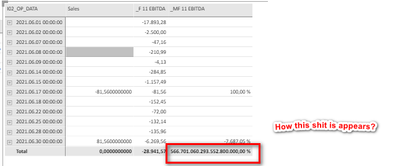
How stupid PBI can produce this result?


Digger_0-1639427339888.png


Sales = SUM(debsum) - SUM(CredSum)

_F 11 EBITDA = m1 + m2 - m3 // does not matter, take for example 1
_MF 11 EBITDA = DIVIDE([_F 11 EBITDA],[Sales])
6 REPLIES 6
bcdobbs
Community Champion
Community Champion

The problem comes from the total of the sales measure.


It's calculating as a tiny value eg 0.00000000000000001 You're then dividing by this and giving the large percentage.


How would you expect the sales measure to agregate at the total level? If it's a straight sum of each day you need to do:

Sales = 
SUMX(
   VALUES ( Date[Date] ),
   SUM(debsum) - SUM(CredSum)
)


Ben Dobbs

LinkedIn | Twitter | Blog

Did I answer your question? Mark my post as a solution! This will help others on the forum!
Appreciate your Kudos!!

@bcdobbs  i also thought like that, but i did a test,
Measure = [Sales] > 0  Result: False

Measure = [Sales] < 0  Result: True

Measure = [Sales] <-0.000000000000001  Result: True

bcdobbs
Community Champion
Community Champion

What value would you expect the total sales to be and how should it be aggregated?


_F 11 EBITDA Is also negative so I think your test further agrees with result you're seeing.


Ben Dobbs

LinkedIn | Twitter | Blog

Did I answer your question? Mark my post as a solution! This will help others on the forum!
Appreciate your Kudos!!

@bcdobbs  it should be empty, so only one working way is Round([Sales],2)

bcdobbs
Community Champion
Community Champion

Ok!


Chsnge the data type of your Sales measure and the underlying columns to currency. I think you're getting issues from floating point arithmetic.


Ben Dobbs

LinkedIn | Twitter | Blog

Did I answer your question? Mark my post as a solution! This will help others on the forum!
Appreciate your Kudos!!
bcdobbs
Community Champion
Community Champion

Sorry slight update to the above now I'm at a computer.

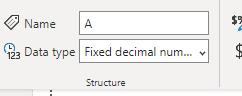
Set the data type for columns and measure to fixed decimal:

Data types in Power BI Desktop - Power BI | Microsoft Docs


bcdobbs_0-1639469920697.png

Rather than decimal number.


Ben Dobbs

LinkedIn | Twitter | Blog

Did I answer your question? Mark my post as a solution! This will help others on the forum!
Appreciate your Kudos!!

Helpful resources

Announcements
April Power BI Update Carousel

Power BI Monthly Update - April 2026

Check out the April 2026 Power BI update to learn about new features.

New to Fabric survey Carousel

New to Fabric Survey

If you have recently started exploring Fabric, we'd love to hear how it's going. Your feedback can help with product improvements.

Power BI DataViz World Championships carousel

Power BI DataViz World Championships - June 2026

A new Power BI DataViz World Championship is coming this June! Don't miss out on submitting your entry.

FabCon and SQLCon Highlights Carousel

FabCon & SQLCon Highlights

Experience the highlights from FabCon & SQLCon, available live and on-demand starting April 14th.