Get Fabric or SQL Certified for Free.
Get certified for free when you join Fabric Data Days 2026 and dive into Fabric, Power BI, SQL, AI, and other essential data skills.
Join now- Power BI forums
- Get Help with Power BI
- Desktop
- Service
- Report Server
- Power Query
- Mobile Apps
- Developer
- DAX Commands and Tips
- Custom Visuals Development Discussion
- Health and Life Sciences
- Power BI Spanish forums
- Translated Spanish Desktop
- Training and Consulting
- Instructor Led Training
- Dashboard in a Day for Women, by Women
- Galleries
- Data Stories Gallery
- Themes Gallery
- Contests Gallery
- QuickViz Gallery
- Quick Measures Gallery
- Visual Calculations Gallery
- Fabric Apps Gallery
- Notebook Gallery
- Translytical Task Flow Gallery
- TMDL Gallery
- R Script Showcase
- Webinars and Video Gallery
- Ideas
- Custom Visuals Ideas (read-only)
- Issues
- Issues
- Events
- Upcoming Events
July 28 - August 9 | Final Round of the Power BI Dataviz World Championships. This is your chance. Learn more
- Power BI forums
- Forums
- Get Help with Power BI
- Desktop
- Create New Table With Condition
- Subscribe to RSS Feed
- Mark Topic as New
- Mark Topic as Read
- Float this Topic for Current User
- Bookmark
- Subscribe
- Printer Friendly Page

- Mark as New
- Bookmark
- Subscribe
- Mute
- Subscribe to RSS Feed
- Permalink
- Report Inappropriate Content
Create New Table With Condition
Hello Power BI heroes,
I have a table which contains a log for cases, every case has a unique ID and belongs to a city. Every case has one more or statuses. I want to create a summarized table which contains the case number and whether it's resolved or not.
The case is considered solved when one of these conditions is met. The conditions are:
Type: X23: statuses: T32 and T09
Type: X10, statuses: T12 and T30
Type: X1, statuses: T42 and T30
Table I have:
| ID | Type | Status |
| 1 | X23 | T32 |
| 1 | X23 | T09 |
| 1 | X32 | T11 |
| 2 | X1 | T12 |
| 2 | X1 | T30 |
| 3 | X23 | T11 |
| 3 | X23 | T30 |
| 3 | X90 | T01 |
| 4 | X53 | T90 |
Since both cases 1 and 2 met the conditions, they are considered solved!! And therefore the desired table I want to have would look like this:
newTable
| ID | Resolved |
| 1 | True |
| 2 | True |
| 3 | False |
| 4 | False |
Any help would be useful! 🙂
Thanks!
Solved! Go to Solution.
- Mark as New
- Bookmark
- Subscribe
- Mute
- Subscribe to RSS Feed
- Permalink
- Report Inappropriate Content
Hi @Anonymous ,
Please have a try.
Manage the two tables relationship.

Create a measure.
Measure 2 = IF(SELECTEDVALUE('ID'[Status]) in VALUES('Table'[Status]),"Ture","False")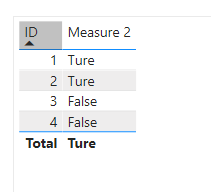
Best Regards
Community Support Team _ Polly
If this post helps, then please consider Accept it as the solution to help the other members find it more quickly.
- Mark as New
- Bookmark
- Subscribe
- Mute
- Subscribe to RSS Feed
- Permalink
- Report Inappropriate Content
Hi @Anonymous ,
Please have a try.
Manage the two tables relationship.
Create a measure.
Measure 2 = IF(SELECTEDVALUE('ID'[Status]) in VALUES('Table'[Status]),"Ture","False")Best Regards
Community Support Team _ Polly
If this post helps, then please consider Accept it as the solution to help the other members find it more quickly.
- Mark as New
- Bookmark
- Subscribe
- Mute
- Subscribe to RSS Feed
- Permalink
- Report Inappropriate Content
Thanks a lot! That works out well.


- Mark as New
- Bookmark
- Subscribe
- Mute
- Subscribe to RSS Feed
- Permalink
- Report Inappropriate Content
Hi,
Why is the resolution status of ID2 TRUE? Please clarify.
Regards,
Ashish Mathur
http://www.ashishmathur.com
https://www.linkedin.com/in/excelenthusiasts/
- Mark as New
- Bookmark
- Subscribe
- Mute
- Subscribe to RSS Feed
- Permalink
- Report Inappropriate Content
Hi Ashish,
Thank you for your response. ID2 is resolved becasue the second entry
| 2 | X1 | T30 |
has met one of the conditions.
Regards, Ziad

- Mark as New
- Bookmark
- Subscribe
- Mute
- Subscribe to RSS Feed
- Permalink
- Report Inappropriate Content
Type: X23: statuses: T32 and T09
When you say "and" do you mean "or" ? Meaning the ID is True when any one condition is true?
First, create a reference table "Valids" that lists the "good" conditions
let
    Source = Table.FromRows(Json.Document(Binary.Decompress(Binary.FromText("i45WijAyVtJRCjE2UorVgfMMLCE8QwMQz9AImWdsAOWBOCZGSByQTCwA", BinaryEncoding.Base64), Compression.Deflate)), let _t = ((type nullable text) meta [Serialized.Text = true]) in type table [Type = _t, Status = _t])
in
    Source
Then apply these transforms:
let
    Source = Table.FromRows(Json.Document(Binary.Decompress(Binary.FromText("i45WMlTSUYowMgaSIcZGSrE6KCIGlggRoCxQxNAQLAJiRxiCBYzQBIwNwALGCFOgepBEkNVYGoBtgqgxAYmYgtUAxWNjAQ==", BinaryEncoding.Base64), Compression.Deflate)), let _t = ((type nullable text) meta [Serialized.Text = true]) in type table [ID = _t, Type = _t, Status = _t]),
    #"Merged Queries" = Table.NestedJoin(Source, {"Type", "Status"}, Valids, {"Type", "Status"}, "Valids", JoinKind.LeftOuter),
    #"Replaced Value" = Table.ReplaceValue(#"Merged Queries",each [Valids],each Table.RowCount([Valids]),Replacer.ReplaceValue,{"Valids"}),
    #"Grouped Rows" = Table.Group(#"Replaced Value", {"ID"}, {{"Resolved", each List.Max([Valids]), type number}})
in
    #"Grouped Rows"
How to use this code: Create a new Blank Query. Click on "Advanced Editor". Replace the code in the window with the code provided here. Click "Done".
- Mark as New
- Bookmark
- Subscribe
- Mute
- Subscribe to RSS Feed
- Permalink
- Report Inappropriate Content
Thank you for your response and help 🙂 I actually meant "or". I will try your solution too. Thanks again.
Helpful resources

Fabric Community Sticker Challenge - Barcelona 2026
If you love stickers, then you will definitely want to check out our community sticker challenge, Barcelona edition!

Power BI Monthly Update - July 2026
Check out the July 2026 Power BI update to learn about new features.

Power BI DataViz World Championships - June 2026
A new Power BI DataViz World Championship is coming this June! Don't miss out on submitting your entry.

| User | Count |
|---|---|
| 30 | |
| 28 | |
| 23 | |
| 21 | |
| 19 |


| User | Count |
|---|---|
| 41 | |
| 32 | |
| 18 | |
| 18 | |
| 15 |


