This time we’re going bigger than ever. Fabric, Power BI, SQL, AI and more. We're covering it all. You won't want to miss it.
Learn moreDid you hear? There's a new SQL AI Developer certification (DP-800). Start preparing now and be one of the first to get certified. Register now
Hello Power BI heroes,
I have a table which contains a log for cases, every case has a unique ID and belongs to a city. Every case has one more or statuses. I want to create a summarized table which contains the case number and whether it's resolved or not.
The case is considered solved when one of these conditions is met. The conditions are:
Type: X23: statuses: T32 and T09
Type: X10, statuses: T12 and T30
Type: X1, statuses: T42 and T30
Table I have:
| ID | Type | Status |
| 1 | X23 | T32 |
| 1 | X23 | T09 |
| 1 | X32 | T11 |
| 2 | X1 | T12 |
| 2 | X1 | T30 |
| 3 | X23 | T11 |
| 3 | X23 | T30 |
| 3 | X90 | T01 |
| 4 | X53 | T90 |
Since both cases 1 and 2 met the conditions, they are considered solved!! And therefore the desired table I want to have would look like this:
newTable
| ID | Resolved |
| 1 | True |
| 2 | True |
| 3 | False |
| 4 | False |
Any help would be useful! 🙂
Thanks!
Solved! Go to Solution.
Hi @Anonymous ,
Please have a try.
Manage the two tables relationship.
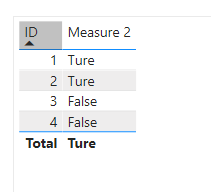
Create a measure.
Measure 2 = IF(SELECTEDVALUE('ID'[Status]) in VALUES('Table'[Status]),"Ture","False")
Best Regards
Community Support Team _ Polly
If this post helps, then please consider Accept it as the solution to help the other members find it more quickly.
Hi @Anonymous ,
Please have a try.
Manage the two tables relationship.
Create a measure.
Measure 2 = IF(SELECTEDVALUE('ID'[Status]) in VALUES('Table'[Status]),"Ture","False")
Best Regards
Community Support Team _ Polly
If this post helps, then please consider Accept it as the solution to help the other members find it more quickly.
Thanks a lot! That works out well.
Hi,
Why is the resolution status of ID2 TRUE? Please clarify.
Hi Ashish,
Thank you for your response. ID2 is resolved becasue the second entry
| 2 | X1 | T30 |
has met one of the conditions.
Regards, Ziad
Type: X23: statuses: T32 and T09
When you say "and" do you mean "or" ? Meaning the ID is True when any one condition is true?
First, create a reference table "Valids" that lists the "good" conditions
let
Source = Table.FromRows(Json.Document(Binary.Decompress(Binary.FromText("i45WijAyVtJRCjE2UorVgfMMLCE8QwMQz9AImWdsAOWBOCZGSByQTCwA", BinaryEncoding.Base64), Compression.Deflate)), let _t = ((type nullable text) meta [Serialized.Text = true]) in type table [Type = _t, Status = _t])
in
Source
Then apply these transforms:
let
Source = Table.FromRows(Json.Document(Binary.Decompress(Binary.FromText("i45WMlTSUYowMgaSIcZGSrE6KCIGlggRoCxQxNAQLAJiRxiCBYzQBIwNwALGCFOgepBEkNVYGoBtgqgxAYmYgtUAxWNjAQ==", BinaryEncoding.Base64), Compression.Deflate)), let _t = ((type nullable text) meta [Serialized.Text = true]) in type table [ID = _t, Type = _t, Status = _t]),
#"Merged Queries" = Table.NestedJoin(Source, {"Type", "Status"}, Valids, {"Type", "Status"}, "Valids", JoinKind.LeftOuter),
#"Replaced Value" = Table.ReplaceValue(#"Merged Queries",each [Valids],each Table.RowCount([Valids]),Replacer.ReplaceValue,{"Valids"}),
#"Grouped Rows" = Table.Group(#"Replaced Value", {"ID"}, {{"Resolved", each List.Max([Valids]), type number}})
in
#"Grouped Rows"
How to use this code: Create a new Blank Query. Click on "Advanced Editor". Replace the code in the window with the code provided here. Click "Done".
Thank you for your response and help 🙂 I actually meant "or". I will try your solution too. Thanks again.
Check out the April 2026 Power BI update to learn about new features.
Sign up to receive a private message when registration opens and key events begin.
If you have recently started exploring Fabric, we'd love to hear how it's going. Your feedback can help with product improvements.
| User | Count |
|---|---|
| 34 | |
| 31 | |
| 30 | |
| 21 | |
| 16 |
| User | Count |
|---|---|
| 63 | |
| 53 | |
| 31 | |
| 23 | |
| 23 |