Get certified for free when you join Fabric Data Days 2026 and dive into Fabric, Power BI, SQL, AI, and other essential data skills.
Join nowJuly 7 - July 17 | Round 2 of the Power BI Dataviz World Championships. Don't miss your chance! Learn more
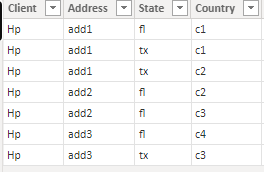
I have a data like below.
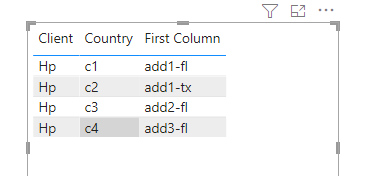
I have to create a report using table visual with avoiding duplicate row(Each state should only have unique address) .
In these i need to avoid
1)Hp add1 tx
2)Hp add2 fl values from the data ....
County value is not considering for duplicate checking.But i will include that column values also in table...For each state wise address should be unique.
Is it possible?
Solved! Go to Solution.
Hi @Anonymous ,
Please try below steps
1. my test table
Table:
2. add a column
Column = [Address]&"-"&[State]
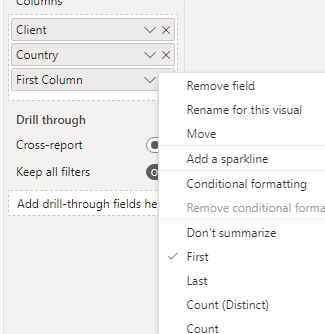
3.add a table visual and for "column" select "first"
Please refer the attached .pbix file.
Best regards,
Community Support Team_ Binbin Yu
If this post helps, then please consider Accept it as the solution to help the other members find it more quickly.
Hi @Anonymous ,
Please try below steps
1. my test table
Table:
2. add a column
Column = [Address]&"-"&[State]
3.add a table visual and for "column" select "first"
Please refer the attached .pbix file.
Best regards,
Community Support Team_ Binbin Yu
If this post helps, then please consider Accept it as the solution to help the other members find it more quickly.
@Anonymous , Power bi by default group the data, if you do not use country or use min/max on the country or create a measure concatenated(table,[Country], " ,") and use that in place of the country. Rest of thing should group by automatically
| User | Count |
|---|---|
| 23 | |
| 22 | |
| 20 | |
| 20 | |
| 12 |
| User | Count |
|---|---|
| 63 | |
| 56 | |
| 47 | |
| 44 | |
| 37 |