This time we’re going bigger than ever. Fabric, Power BI, SQL, AI and more. We're covering it all. You won't want to miss it.
Learn moreLevel up your Power BI skills this month - build one visual each week and tell better stories with data! Get started
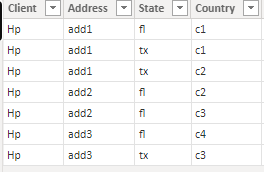
I have a data like below.
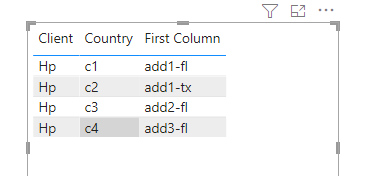
I have to create a report using table visual with avoiding duplicate row(Each state should only have unique address) .
In these i need to avoid
1)Hp add1 tx
2)Hp add2 fl values from the data ....
County value is not considering for duplicate checking.But i will include that column values also in table...For each state wise address should be unique.
Is it possible?
Solved! Go to Solution.
Hi @Anonymous ,
Please try below steps
1. my test table
Table:
2. add a column
Column = [Address]&"-"&[State]
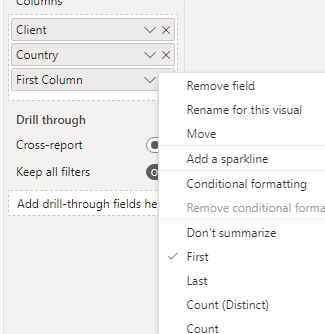
3.add a table visual and for "column" select "first"
Please refer the attached .pbix file.
Best regards,
Community Support Team_ Binbin Yu
If this post helps, then please consider Accept it as the solution to help the other members find it more quickly.
Hi @Anonymous ,
Please try below steps
1. my test table
Table:
2. add a column
Column = [Address]&"-"&[State]
3.add a table visual and for "column" select "first"
Please refer the attached .pbix file.
Best regards,
Community Support Team_ Binbin Yu
If this post helps, then please consider Accept it as the solution to help the other members find it more quickly.
@Anonymous , Power bi by default group the data, if you do not use country or use min/max on the country or create a measure concatenated(table,[Country], " ,") and use that in place of the country. Rest of thing should group by automatically
Sign up to receive a private message when registration opens and key events begin.
If you have recently started exploring Fabric, we'd love to hear how it's going. Your feedback can help with product improvements.
| User | Count |
|---|---|
| 30 | |
| 23 | |
| 23 | |
| 20 | |
| 16 |
| User | Count |
|---|---|
| 64 | |
| 41 | |
| 24 | |
| 22 | |
| 22 |