Share feedback directly with Fabric product managers, participate in targeted research studies and influence the Fabric roadmap.
Sign up nowGet Fabric certified for FREE! Don't miss your chance! Learn more
Hi All,
Is there a DAX formula or a way around to automatically update all the datasets based on the current finanacial year and the previous 2 fy's? so for example when 20/21 comes around, my graphs will automatically update with 18/19, 19/20, 20/21 rather than me having to go in and manually changing the dates in the filter for each graph?
TIA
Solved! Go to Solution.
Hi @UK_User123456 ,
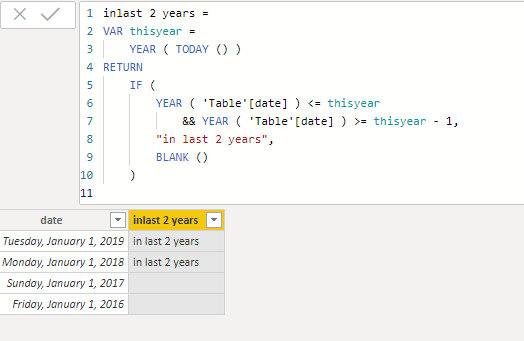
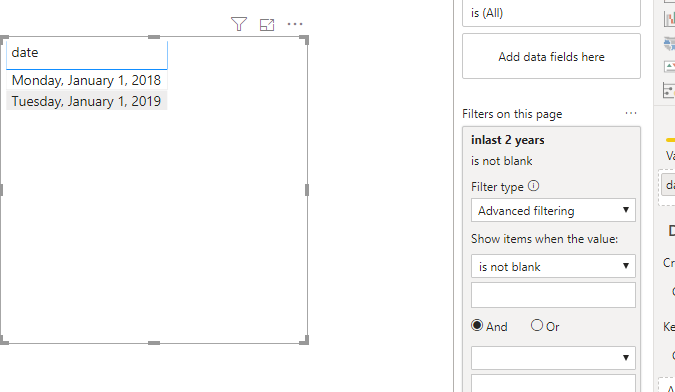
We can create a calculated column and filter by it to work around.
inlast 2 years =
VAR thisyear =
YEAR ( TODAY () )
RETURN
IF (
YEAR ( 'Table'[date] ) <= thisyear
&& YEAR ( 'Table'[date] ) >= thisyear - 1,
"in last 2 years",
BLANK ()
)
Pbix as attached.
Hi,
You may refer to my solution to a similar problem here - Flex a Pivot Table to show data for x months ended a certain user defined month.
Hope this helps.
Hi @UK_User123456 ,
We can create a calculated column and filter by it to work around.
inlast 2 years =
VAR thisyear =
YEAR ( TODAY () )
RETURN
IF (
YEAR ( 'Table'[date] ) <= thisyear
&& YEAR ( 'Table'[date] ) >= thisyear - 1,
"in last 2 years",
BLANK ()
)
Pbix as attached.
Hi @UK_User123456 ,
Does page level filter or report level filer work in your scenario? Please refer to the online document as below.
Share feedback directly with Fabric product managers, participate in targeted research studies and influence the Fabric roadmap.
If you love stickers, then you will definitely want to check out our Community Sticker Challenge!
Check out the January 2026 Power BI update to learn about new features.
| User | Count |
|---|---|
| 63 | |
| 62 | |
| 42 | |
| 20 | |
| 18 |