cancel
Showing results for 
Search instead for 
Did you mean: 

Learn from the best! Meet the four finalists headed to the FINALS of the Power BI Dataviz World Championships! Register now

Reply
chaichatp
Helper III
Helper III

Append Rows using Another columns

I have tried to append rows of  by cloumns, the original data looks like this 


Name Date1  Cost1 Date2 Cost2 
A2013-03-25   1,923,245.06  
B2015-06-04   4,104,660.002017-10-16   392,073.48
C2015-09-10       771,540.002017-08-16   627,925.50
D2013-07-19   1,917,441.272016-10-14   476,390.88
E2015-06-02- 1,261,474.522016-07-28   153,216.00
F2015-07-27                               -  2015-09-29      47,151.00


and I want it to look like this,


Name Date Cost
A25/03/2013   1,923,245.06
B04/06/2015   4,104,660.00
C10/09/2015       771,540.00
D19/07/2013   1,917,441.27
E02/06/2015-1,261,474.52
F27/07/2015                               -  
A  
B16/10/2017   392,073.48
C16/08/2017   627,925.50
D14/10/2016   476,390.88
E28/07/2016   153,216.00
F29/09/2015      47,151.00

Any suggestions, thank you.

1 ACCEPTED SOLUTION
Floriankx
Solution Sage
Solution Sage

This should work:


let
    Source = Excel.CurrentWorkbook(){[Name="Test_Unpivot"]}[Content],
    #"Changed Type" = Table.TransformColumnTypes(Source,{{"Name", type text}, {" Date1 ", type datetime}, {" Cost1 ", type text}, {"Date2", type datetime}, {" Cost2 ", type text}}),
    #"Unpivoted Only Selected Columns" = Table.Unpivot(#"Changed Type", {" Date1 ", " Cost1 ", "Date2", " Cost2 "}, "Attribut", "Value"),
    #"Trimmed Text" = Table.TransformColumns(#"Unpivoted Only Selected Columns",{{"Attribut", Text.Trim, type text}}),
    #"Added Name_temp" = Table.AddColumn(#"Trimmed Text", "Name_temp", each [Name]&Text.End([Attribut],1)),
    #"Replace '1'" = Table.ReplaceValue(#"Added Name_temp","1","",Replacer.ReplaceText,{"Attribut"}),
    #"Replace '2'" = Table.ReplaceValue(#"Replace '1'","2","",Replacer.ReplaceText,{"Attribut"}),
    #"Removed Name" = Table.RemoveColumns(#"Replace '2'",{"Name"}),
    #"Pivoted Column" = Table.Pivot(#"Removed Name", List.Distinct(#"Removed Name"[Attribut]), "Attribut", "Value"),
    #"Add Name" = Table.AddColumn(#"Pivoted Column", "Name", each Text.Start([Name_temp],1)),
    #"Removed Name_temp" = Table.RemoveColumns(#"Add Name",{"Name_temp"}),
    #"Reordered Columns" = Table.ReorderColumns(#"Removed Name_temp",{"Name", "Date", "Cost"}),
    #"Changed Date" = Table.TransformColumnTypes(#"Reordered Columns",{{"Date", type date}})
in
    #"Changed Date"

View solution in original post

4 REPLIES 4
Floriankx
Solution Sage
Solution Sage

This should work:


let
    Source = Excel.CurrentWorkbook(){[Name="Test_Unpivot"]}[Content],
    #"Changed Type" = Table.TransformColumnTypes(Source,{{"Name", type text}, {" Date1 ", type datetime}, {" Cost1 ", type text}, {"Date2", type datetime}, {" Cost2 ", type text}}),
    #"Unpivoted Only Selected Columns" = Table.Unpivot(#"Changed Type", {" Date1 ", " Cost1 ", "Date2", " Cost2 "}, "Attribut", "Value"),
    #"Trimmed Text" = Table.TransformColumns(#"Unpivoted Only Selected Columns",{{"Attribut", Text.Trim, type text}}),
    #"Added Name_temp" = Table.AddColumn(#"Trimmed Text", "Name_temp", each [Name]&Text.End([Attribut],1)),
    #"Replace '1'" = Table.ReplaceValue(#"Added Name_temp","1","",Replacer.ReplaceText,{"Attribut"}),
    #"Replace '2'" = Table.ReplaceValue(#"Replace '1'","2","",Replacer.ReplaceText,{"Attribut"}),
    #"Removed Name" = Table.RemoveColumns(#"Replace '2'",{"Name"}),
    #"Pivoted Column" = Table.Pivot(#"Removed Name", List.Distinct(#"Removed Name"[Attribut]), "Attribut", "Value"),
    #"Add Name" = Table.AddColumn(#"Pivoted Column", "Name", each Text.Start([Name_temp],1)),
    #"Removed Name_temp" = Table.RemoveColumns(#"Add Name",{"Name_temp"}),
    #"Reordered Columns" = Table.ReorderColumns(#"Removed Name_temp",{"Name", "Date", "Cost"}),
    #"Changed Date" = Table.TransformColumnTypes(#"Reordered Columns",{{"Date", type date}})
in
    #"Changed Date"

@chaichatp


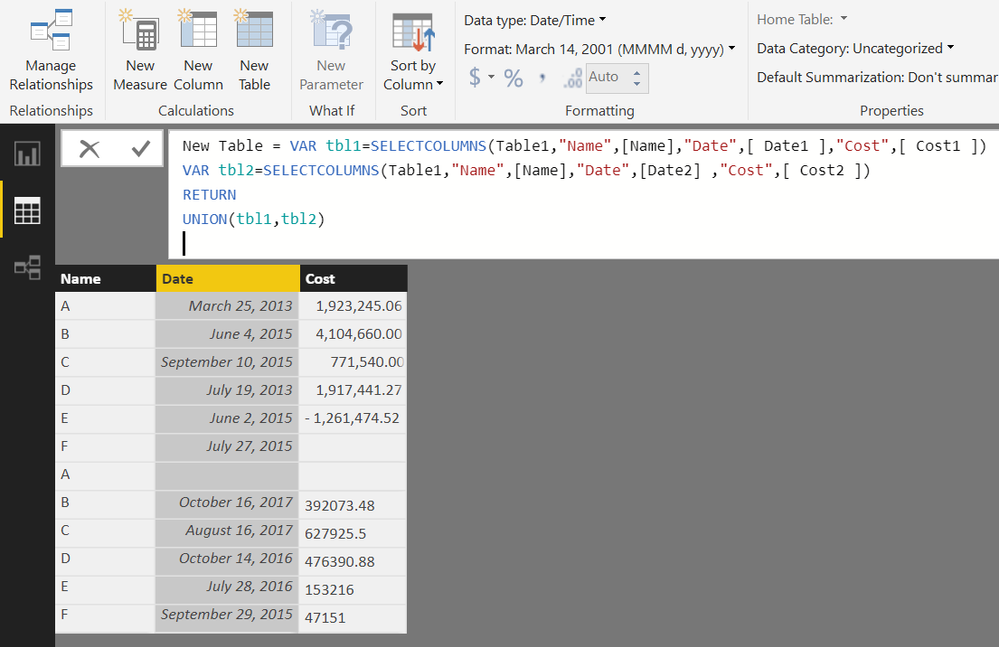
Also, you can create a Calculated Table in DAX to acheive desired output


From the Modelling Tab>>New Table


New Table =
VAR tbl1 =
    SELECTCOLUMNS ( Table1, "Name", [Name], "Date", [ Date1 ], "Cost", [ Cost1 ] )
VAR tbl2 =
    SELECTCOLUMNS ( Table1, "Name", [Name], "Date", [Date2], "Cost", [ Cost2 ] )
RETURN
    UNION ( tbl1, tbl2 )

mmace1
Impactful Individual

Not very fancy - but, what about pulling in your data twice? 


First query - just grab the left most data (remove the columns to the right.)

Second query - just grab the right most data (remove the columns on the left)


Or vise versa. 


Then merge those 2 queries together. 

Helpful resources

Announcements
Join our Fabric User Panel

Join our Fabric User Panel

Share feedback directly with Fabric product managers, participate in targeted research studies and influence the Fabric roadmap.

March Power BI Update Carousel

Power BI Community Update - March 2026

Check out the March 2026 Power BI update to learn about new features.