cancel
Showing results for 
Search instead for 
Did you mean: 

Next up in the FabCon + SQLCon recap series: The roadmap for Microsoft SQL and Maximizing Developer experiences in Fabric. All sessions are available on-demand after the live show. Register now

Reply
sdhn
Responsive Resident
Responsive Resident

Alphabetical Order on Graph

Hi All,


I am using Clustered Column Chart visual.


On my X axis , I want to display data on alpbatical order.


Current we have four groups.  sample data 


A, B , C & D.


each group have 4 number measuremnts.


current sequence  on X axis 

B ---   C  ---  A ---- D -----


I want to display display on X axis as:


A ---  B ---- C --- D


Thanks 


1 ACCEPTED SOLUTION
Anonymous
Not applicable

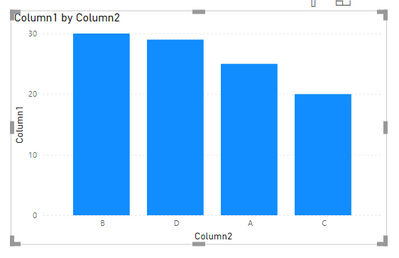
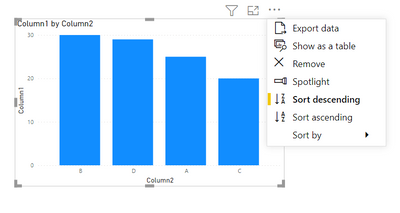
Hi! A simple solution is to go to options within the clustered column chart visual and use the sort descending/ascending option. Click in sort by and choose the column that contains your 4 groups: A, B, C, D. This should fix your problems. If it doesn't work another thing that can work in this and other cases (especially if there are few categories) is to add an ID column numbering from 1 to N number depending on the order you want and following the steps above to order ascending sorting by the column you just created.

Jclozdib98_0-1627485298389.pngJclozdib98_1-1627485324707.pngJclozdib98_2-1627485361076.png

Hope I was able to help!


Best regards, José.


View solution in original post

5 REPLIES 5
Anonymous
Not applicable

Glad to help!

Anonymous
Not applicable

Hi! A simple solution is to go to options within the clustered column chart visual and use the sort descending/ascending option. Click in sort by and choose the column that contains your 4 groups: A, B, C, D. This should fix your problems. If it doesn't work another thing that can work in this and other cases (especially if there are few categories) is to add an ID column numbering from 1 to N number depending on the order you want and following the steps above to order ascending sorting by the column you just created.

Jclozdib98_0-1627485298389.pngJclozdib98_1-1627485324707.pngJclozdib98_2-1627485361076.png

Hope I was able to help!


Best regards, José.


sdhn
Responsive Resident
Responsive Resident

hi Jose,


My actuall data starts as:


Amark

Mvolt

Ten nike

Umbrio


when I sort by ASC


Its dsipalys as

Amark, Umbrio, Ten nike , Mvolt


why ?

Anonymous
Not applicable

When the program has "unsortable" data it follows another scheme. Try the second option, modify your table to include a column where you place numbers 1 through 4 for each group depending on the order you want them to be:


ColumnID

Amark

1
Umbrio4
Ten nike3
Mvolt2


It is important that aside from selecting sort by ASC, you also select which column it is using to make up that ascending order. In this case if you follow my solution you can use sort ascending by ID.

sdhn
Responsive Resident
Responsive Resident

Actually first one also work.  I did not pick right column ealier.   Thank You very much 

Helpful resources

Announcements
New to Fabric survey Carousel

New to Fabric Survey

If you have recently started exploring Fabric, we'd love to hear how it's going. Your feedback can help with product improvements.

Power BI DataViz World Championships carousel

Power BI DataViz World Championships - June 2026

A new Power BI DataViz World Championship is coming this June! Don't miss out on submitting your entry.

Join our Fabric User Panel

Join our Fabric User Panel

Share feedback directly with Fabric product managers, participate in targeted research studies and influence the Fabric roadmap.

March Power BI Update Carousel

Power BI Community Update - March 2026

Check out the March 2026 Power BI update to learn about new features.