Join us at FabCon Atlanta from March 16 - 20, 2026, for the ultimate Fabric, Power BI, AI and SQL community-led event. Save $200 with code FABCOMM.
Register now!The Power BI Data Visualization World Championships is back! Get ahead of the game and start preparing now! Learn more
Hi all,
Using Power BI Desktop July, 2021.
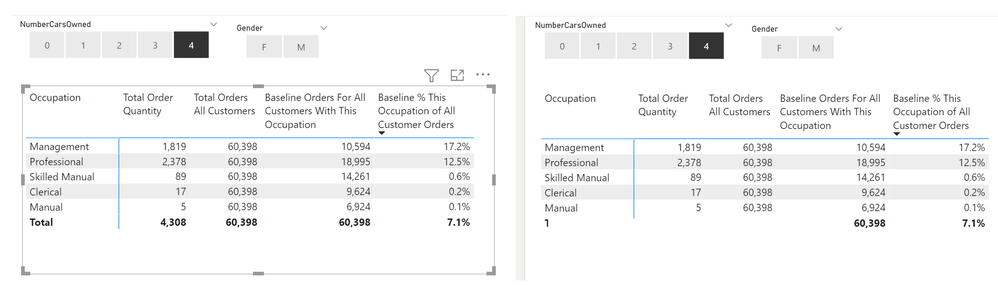
Please see the screen shot where the Matrix is selected and the total row is displaying correctly.
I clicked elsewhere on the canvas and took another screen shot where the total row is not displaying correctly.
Why is that?
Thanks,
-w
Solved! Go to Solution.
@UncleLewis Seems like you have some kind of element covering up part of your matrix visual. Select your matrix. Go to View tab in ribbon and bring the matrix to the front/top. See if that fixes it.
Thanks - that was the issue.
Thanks,
-w
The Power BI Data Visualization World Championships is back! Get ahead of the game and start preparing now!
| User | Count |
|---|---|
| 39 | |
| 35 | |
| 34 | |
| 32 | |
| 27 |
| User | Count |
|---|---|
| 136 | |
| 96 | |
| 77 | |
| 67 | |
| 65 |