Don't miss your chance to take the Fabric Data Engineer (DP-600) exam for FREE! Find out how by attending the DP-600 session on April 23rd (pacific time), live or on-demand.
Learn moreJoin the FabCon + SQLCon recap series. Up next: Power BI, Real-Time Intelligence, IQ and AI, and Data Factory take center stage. All sessions are available on-demand after the live show. Register now
I have a table of Months, Salesperson and Sales.
I want to create a summary table of the median sales total for each month.
I am using the following formula
FilteredValues = Summarize(AllSelected(AllSales), AllSales[Month], "Median Monthly Sales", Median(AllSales[Units]))
But when I filter on a subset of the sales people the table remains static and gives the total for all sales people.
How do I create a summary table that calculates median based on the selections only?
Hey,
as far as I understand your question I would create a measure like so
Median Monthly Sales =
CALCULATE(
Median('AllSales'[Units]),
ALL('AllSales'[Month)
)
Thanks Tom, but that isn't giving me what i need.
If we use the example below
Month SalesPerson Units
Jan ID0001 1000
Jan ID0002 2000
Jan ID0003 3000
Jan ID0004 4000
Jan ID0005 5000
I want to create a summary table that gives a median of 3000 when there is no filter on SalesPerson but gives a Median of 2000 if I am filtering on ID0001, ID0002 & ID0003 only.
Is that possible to do?
Hey,
it's possible 🙂
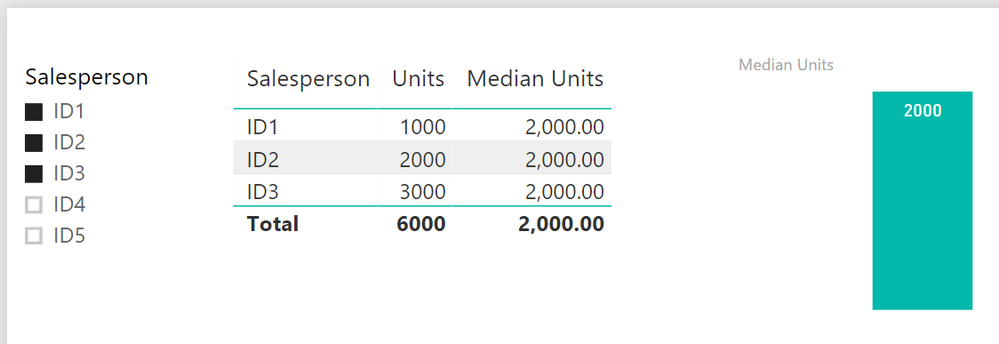
my table is called 'sampleALLSELECTED'
Median Units =
CALCULATE(
MEDIAN('sampleALLSELECTED'[Units]),
ALLSELECTED(sampleALLSELECTED[Salesperson])
) And you will get this
Hope this will help
Hi Tom,
Thanks but that is not quite what I am trying to achieve.
I need a table which has one row per month and gives the mendian for each month based on the selections, so I am trying to do this as a Summarize table. Is there a way to create a summarize table that updates according to selections? Using AllSelected doesn't seem to have any effect.
Hey,
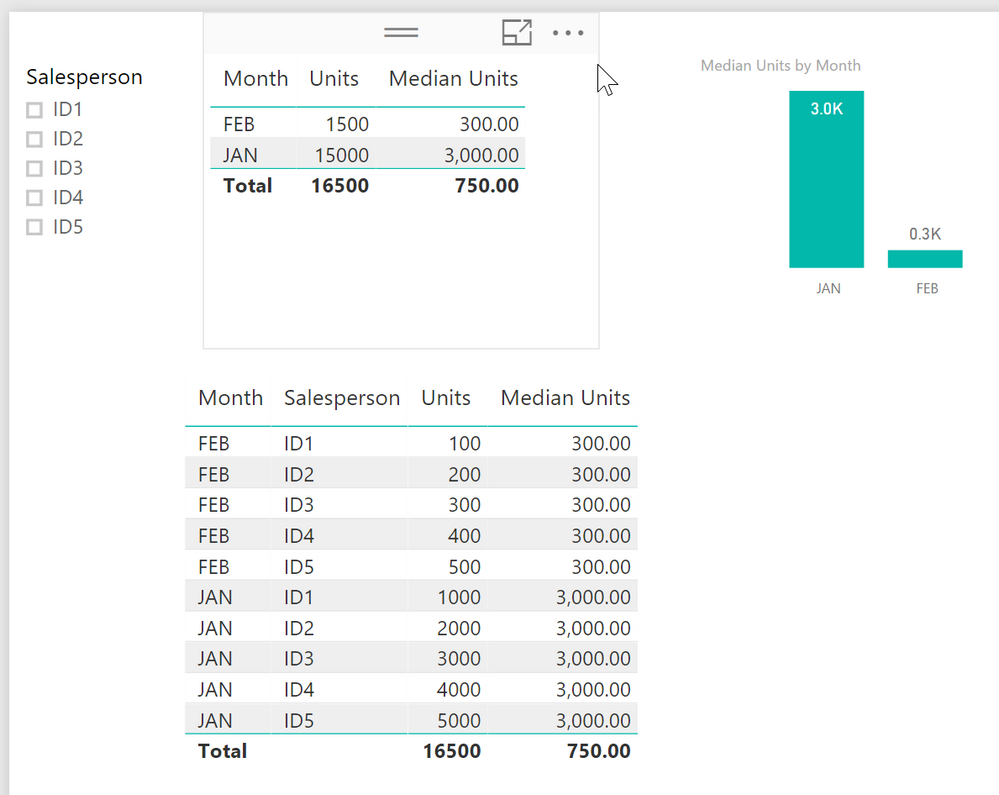
you can achieve what you want by using Month the Measure in a table vis
The second table shows all the data.
You can't use a calculated table / virtual table, as a source for a visual, due to the fact that it is static (reflecting the moment (current selections) when you calculate the table.
For this reason, you have to use a measure, unfortunately, but currently I can't see why a measure is not "good enough"
Check out the April 2026 Power BI update to learn about new features.
If you have recently started exploring Fabric, we'd love to hear how it's going. Your feedback can help with product improvements.
A new Power BI DataViz World Championship is coming this June! Don't miss out on submitting your entry.
| User | Count |
|---|---|
| 48 | |
| 46 | |
| 41 | |
| 20 | |
| 17 |
| User | Count |
|---|---|
| 69 | |
| 67 | |
| 32 | |
| 27 | |
| 26 |