Share feedback directly with Fabric product managers, participate in targeted research studies and influence the Fabric roadmap.
Sign up nowGet Fabric certified for FREE! Don't miss your chance! Learn more
I have a table of Months, Salesperson and Sales.
I want to create a summary table of the median sales total for each month.
I am using the following formula
FilteredValues = Summarize(AllSelected(AllSales), AllSales[Month], "Median Monthly Sales", Median(AllSales[Units]))
But when I filter on a subset of the sales people the table remains static and gives the total for all sales people.
How do I create a summary table that calculates median based on the selections only?
Hey,
as far as I understand your question I would create a measure like so
Median Monthly Sales =
CALCULATE(
Median('AllSales'[Units]),
ALL('AllSales'[Month)
)
Thanks Tom, but that isn't giving me what i need.
If we use the example below
Month SalesPerson Units
Jan ID0001 1000
Jan ID0002 2000
Jan ID0003 3000
Jan ID0004 4000
Jan ID0005 5000
I want to create a summary table that gives a median of 3000 when there is no filter on SalesPerson but gives a Median of 2000 if I am filtering on ID0001, ID0002 & ID0003 only.
Is that possible to do?
Hey,
it's possible 🙂
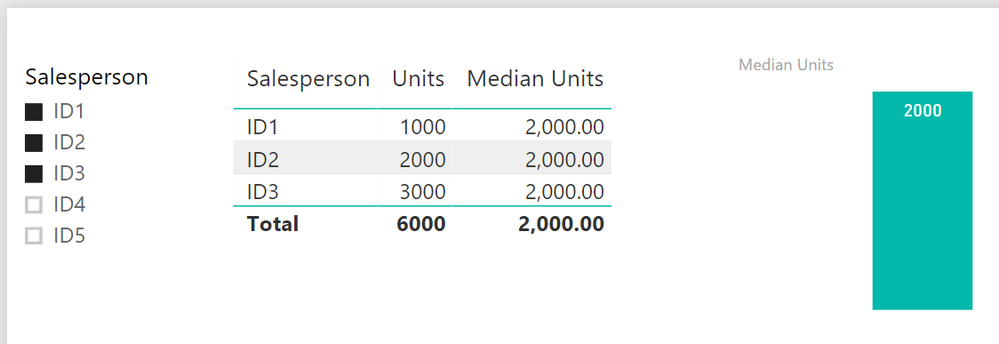
my table is called 'sampleALLSELECTED'
Median Units =
CALCULATE(
MEDIAN('sampleALLSELECTED'[Units]),
ALLSELECTED(sampleALLSELECTED[Salesperson])
) And you will get this
Hope this will help
Hi Tom,
Thanks but that is not quite what I am trying to achieve.
I need a table which has one row per month and gives the mendian for each month based on the selections, so I am trying to do this as a Summarize table. Is there a way to create a summarize table that updates according to selections? Using AllSelected doesn't seem to have any effect.
Hey,
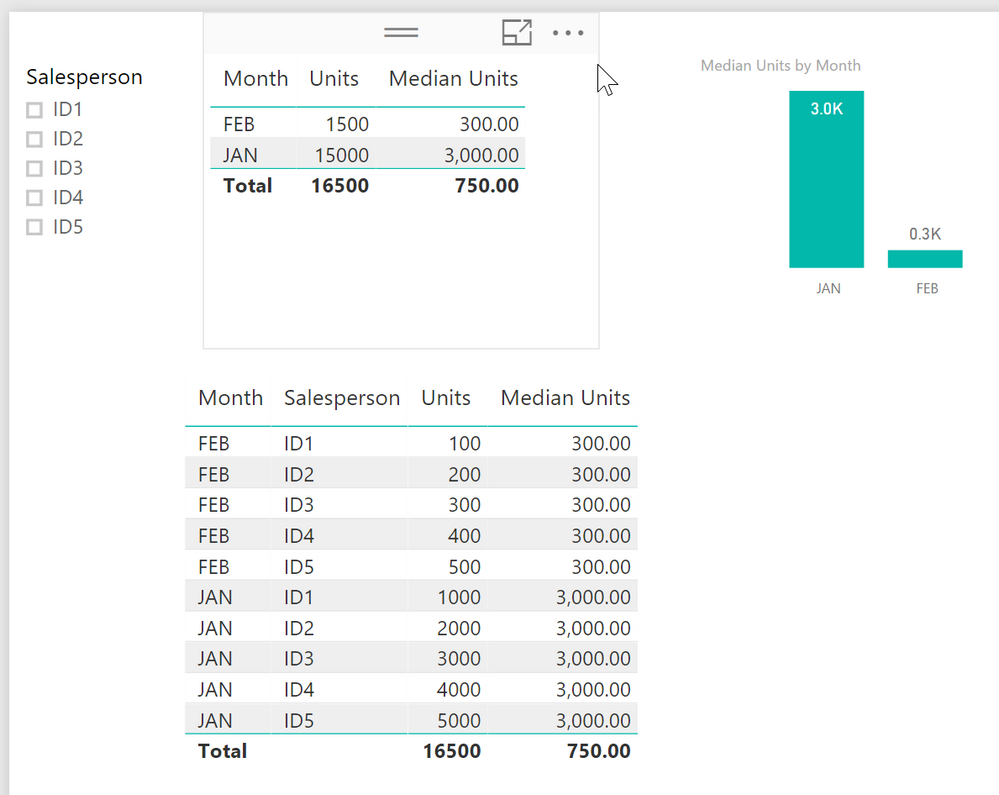
you can achieve what you want by using Month the Measure in a table vis
The second table shows all the data.
You can't use a calculated table / virtual table, as a source for a visual, due to the fact that it is static (reflecting the moment (current selections) when you calculate the table.
For this reason, you have to use a measure, unfortunately, but currently I can't see why a measure is not "good enough"
Share feedback directly with Fabric product managers, participate in targeted research studies and influence the Fabric roadmap.
| User | Count |
|---|---|
| 63 | |
| 62 | |
| 42 | |
| 19 | |
| 16 |
| User | Count |
|---|---|
| 118 | |
| 106 | |
| 38 | |
| 28 | |
| 27 |