
cancel
Showing results for 
Search instead for 
Did you mean: 

We've captured the moments from FabCon & SQLCon that everyone is talking about, and we are bringing them to the community, live and on-demand. Starts on April 14th. Register now

Reply
akariryusei
Regular Visitor

Alert Data

Dear Experts,


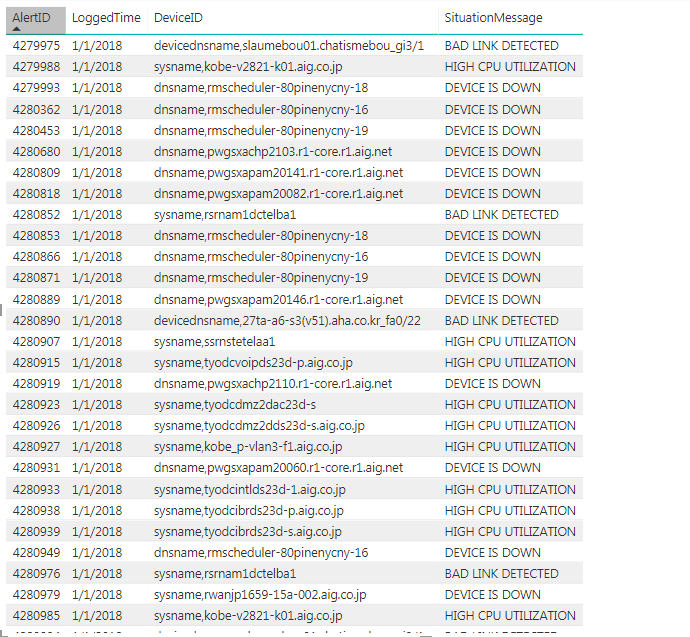
I am still new in power Bi and Dax . I have a question regarding my data. I have alert data set as below. I tried to create summarize column to generate the lists of DeviceID which generated the alerts since Jan 2018 - until Sept 2018 (not necessary everyday) for the same SituationMessage.


Capture.PNG


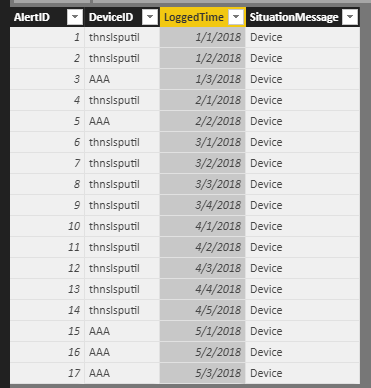
For example, DeviceID thnslsputil were generated alert since February 2018 until September 2018 due to device down.


thnslsputil.PNG

1 ACCEPTED SOLUTION
v-lili6-msft
Community Support
Community Support

HI, @akariryusei

    After my test, you can do these as below:

assume that this is basic data

24.PNG

Step1:

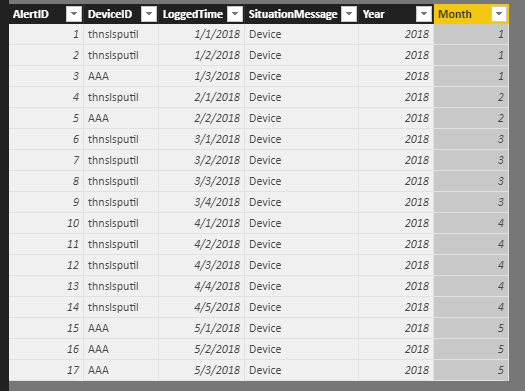
add two column

Year = YEAR(Table1[LoggedTime])

Month = MONTH(Table1[LoggedTime])

25.PNG

Step2:

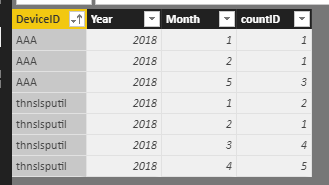
Create a calculate table

alter table = SUMMARIZE(Table1,Table1[DeviceID],Table1[Year],Table1[Month],"countID",CALCULATE(COUNT(Table1[AlertID])))

Result:

26.PNG


here is pbix, please try it.

https://www.dropbox.com/s/nct1bothjtptxv4/Alert%20Data.pbix?dl=0 


Best Regards,

Lin


Community Support Team _ Lin
If this post helps, then please consider Accept it as the solution to help the other members find it more quickly.

View solution in original post

2 REPLIES 2
v-lili6-msft
Community Support
Community Support

HI, @akariryusei

    After my test, you can do these as below:

assume that this is basic data

24.PNG

Step1:

add two column

Year = YEAR(Table1[LoggedTime])

Month = MONTH(Table1[LoggedTime])

25.PNG

Step2:

Create a calculate table

alter table = SUMMARIZE(Table1,Table1[DeviceID],Table1[Year],Table1[Month],"countID",CALCULATE(COUNT(Table1[AlertID])))

Result:

26.PNG


here is pbix, please try it.

https://www.dropbox.com/s/nct1bothjtptxv4/Alert%20Data.pbix?dl=0 


Best Regards,

Lin


Community Support Team _ Lin
If this post helps, then please consider Accept it as the solution to help the other members find it more quickly.

thank you @v-lili6-msft for your help. I am able to generate the result now.

Smiley Very Happy

Helpful resources

Announcements
New to Fabric survey Carousel

New to Fabric Survey

If you have recently started exploring Fabric, we'd love to hear how it's going. Your feedback can help with product improvements.

Power BI DataViz World Championships carousel

Power BI DataViz World Championships - June 2026

A new Power BI DataViz World Championship is coming this June! Don't miss out on submitting your entry.

Join our Fabric User Panel

Join our Fabric User Panel

Share feedback directly with Fabric product managers, participate in targeted research studies and influence the Fabric roadmap.