
Get certified for free when you join Fabric Data Days 2026 and dive into Fabric, Power BI, SQL, AI, and other essential data skills.
Join nowData Days is here! Join us now for 60+ days of learning, challenges, and connection. Learn more
Dear Experts,
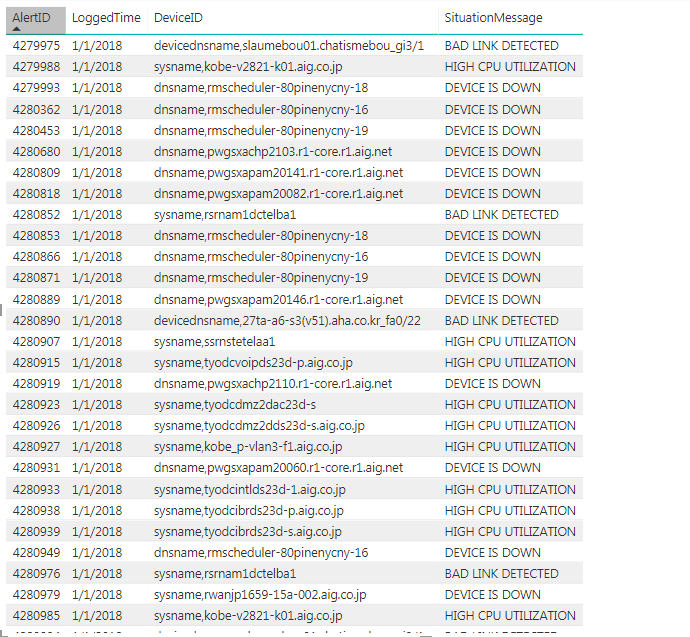
I am still new in power Bi and Dax . I have a question regarding my data. I have alert data set as below. I tried to create summarize column to generate the lists of DeviceID which generated the alerts since Jan 2018 - until Sept 2018 (not necessary everyday) for the same SituationMessage.
For example, DeviceID thnslsputil were generated alert since February 2018 until September 2018 due to device down.
Solved! Go to Solution.
HI, @akariryusei
After my test, you can do these as below:
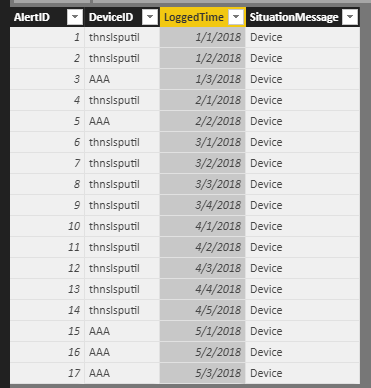
assume that this is basic data
Step1:
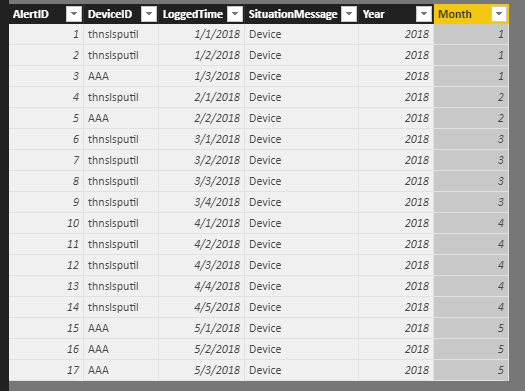
add two column
Year = YEAR(Table1[LoggedTime]) Month = MONTH(Table1[LoggedTime])
Step2:
Create a calculate table
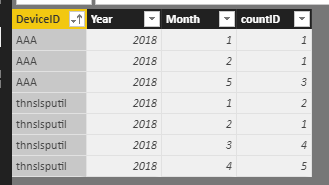
alter table = SUMMARIZE(Table1,Table1[DeviceID],Table1[Year],Table1[Month],"countID",CALCULATE(COUNT(Table1[AlertID])))
Result:
here is pbix, please try it.
https://www.dropbox.com/s/nct1bothjtptxv4/Alert%20Data.pbix?dl=0
Best Regards,
Lin
HI, @akariryusei
After my test, you can do these as below:
assume that this is basic data
Step1:
add two column
Year = YEAR(Table1[LoggedTime]) Month = MONTH(Table1[LoggedTime])
Step2:
Create a calculate table
alter table = SUMMARIZE(Table1,Table1[DeviceID],Table1[Year],Table1[Month],"countID",CALCULATE(COUNT(Table1[AlertID])))
Result:
here is pbix, please try it.
https://www.dropbox.com/s/nct1bothjtptxv4/Alert%20Data.pbix?dl=0
Best Regards,
Lin
Don't miss out on Data Days, June 15 through August 7. Learn Fabric, Power BI, SQL, AI and more.
Check out the May 2026 Power BI update to learn about new features.
| User | Count |
|---|---|
| 23 | |
| 21 | |
| 20 | |
| 19 | |
| 13 |
| User | Count |
|---|---|
| 58 | |
| 52 | |
| 37 | |
| 31 | |
| 27 |