Join us at FabCon Vienna from September 15-18, 2025
The ultimate Fabric, Power BI, SQL, and AI community-led learning event. Save €200 with code FABCOMM.
Get registered- Power BI forums
- Get Help with Power BI
- Desktop
- Service
- Report Server
- Power Query
- Mobile Apps
- Developer
- DAX Commands and Tips
- Custom Visuals Development Discussion
- Health and Life Sciences
- Power BI Spanish forums
- Translated Spanish Desktop
- Training and Consulting
- Instructor Led Training
- Dashboard in a Day for Women, by Women
- Galleries
- Data Stories Gallery
- Themes Gallery
- Contests Gallery
- Quick Measures Gallery
- Notebook Gallery
- Translytical Task Flow Gallery
- TMDL Gallery
- R Script Showcase
- Webinars and Video Gallery
- Ideas
- Custom Visuals Ideas (read-only)
- Issues
- Issues
- Events
- Upcoming Events
Compete to become Power BI Data Viz World Champion! First round ends August 18th. Get started.
- Power BI forums
- Forums
- Get Help with Power BI
- Desktop
- Re: Agroup and concatenate column with a common va...
- Subscribe to RSS Feed
- Mark Topic as New
- Mark Topic as Read
- Float this Topic for Current User
- Bookmark
- Subscribe
- Printer Friendly Page

- Mark as New
- Bookmark
- Subscribe
- Mute
- Subscribe to RSS Feed
- Permalink
- Report Inappropriate Content
Agroup and concatenate column with a common value
Hi!
Sorry, this has probably been asked before but I have not been able to find it.
I have to columns, column 1 have repeated values and column 2 unique values. I would like to agrupate the repated valums from column 1 and concatenate the values in column 2.
I have something like:
| a | perro |
| a | gato |
| a | pájaro |
| b | enero |
| b | febrero |
| c | 1 |
| c | 2 |
| c | 3 |
| c | 4 |
And I would like to get:
| a | perro,gato,pájaro |
| b | enero,febrero |
| c | 1,2,3,4 |
It is possible?
Thank you so much!
Solved! Go to Solution.


- Mark as New
- Bookmark
- Subscribe
- Mute
- Subscribe to RSS Feed
- Permalink
- Report Inappropriate Content
In the Query Editor, you can use the Group By option.
First choose some aggregation for column 2 to create base code, e.g. Sum:

(ignore any errors) and adjust the generated code to:
let
    Source = Excel.CurrentWorkbook(){[Name="Table1"]}[Content],
    #"Changed Type" = Table.TransformColumnTypes(Source,{{"Column1", type text}, {"Column2", type text}}),
    #"Grouped Rows" = Table.Group(#"Changed Type", {"Column1"}, {{"Column2 Values", each Text.Combine([Column2],","), type text}})
in
    #"Grouped Rows"
Notice that Column2 is typed as text.


- Mark as New
- Bookmark
- Subscribe
- Mute
- Subscribe to RSS Feed
- Permalink
- Report Inappropriate Content
I know this is an old thread but it helped me out no end, thanks! For others that stumble across this reply, there is an Idea but with hardly any votes: Microsoft Idea · Incorporate the Concatenate operator to the Group By function (powerbi.com)

- Mark as New
- Bookmark
- Subscribe
- Mute
- Subscribe to RSS Feed
- Permalink
- Report Inappropriate Content
Is there a way to achieve this, not taking blanks into account?

- Mark as New
- Bookmark
- Subscribe
- Mute
- Subscribe to RSS Feed
- Permalink
- Report Inappropriate Content
Hi, seems like this solution doesn't work for DirectQuery mode. Is there a way we can implement this grouping when using DirectQuery mode?
- Mark as New
- Bookmark
- Subscribe
- Mute
- Subscribe to RSS Feed
- Permalink
- Report Inappropriate Content
Never mind, got it!
- Mark as New
- Bookmark
- Subscribe
- Mute
- Subscribe to RSS Feed
- Permalink
- Report Inappropriate Content
In the Query Editor, you can use the Group By option.
First choose some aggregation for column 2 to create base code, e.g. Sum:
(ignore any errors) and adjust the generated code to:
let
    Source = Excel.CurrentWorkbook(){[Name="Table1"]}[Content],
    #"Changed Type" = Table.TransformColumnTypes(Source,{{"Column1", type text}, {"Column2", type text}}),
    #"Grouped Rows" = Table.Group(#"Changed Type", {"Column1"}, {{"Column2 Values", each Text.Combine([Column2],","), type text}})
in
    #"Grouped Rows"
Notice that Column2 is typed as text.


- Mark as New
- Bookmark
- Subscribe
- Mute
- Subscribe to RSS Feed
- Permalink
- Report Inappropriate Content
@MarcelBeug hi Marcel.
If I have this Table
| ID | City | Country |
| 1 | Tokyo | Japan |
| 1 | Kyoto | Japan |
| 2 | New York | USA |
| 3 | Beijing | China |
| 3 | Jakarta | Indonesia |
| 4 | Kuala Lumpur | Malaysia |
can I summarise to this
| ID | City | Country |
| 1 | Tokyo, Kyoto | Japan |
| 2 | New York | USA |
| 3 | Beijing, Jakarta | China, Indonesia |
| 4 | Kuala Lumpur | Malaysia |
The idea is to remove repetition, instead of Japan, Japan. It will become Japan.
- Mark as New
- Bookmark
- Subscribe
- Mute
- Subscribe to RSS Feed
- Permalink
- Report Inappropriate Content
Hi @ngadiez
This woerked for me, the clave was List.Distict:
Table.Group(#"Columnas quitadas", {"City"}, {{"Country", each Text.Combine(List.Distinct([Country), ","), type text}})

- Mark as New
- Bookmark
- Subscribe
- Mute
- Subscribe to RSS Feed
- Permalink
- Report Inappropriate Content
Is there a way to accomplish this in DAX? trying to do this, but in DAX because its from a calculated table.
Thanks!

- Mark as New
- Bookmark
- Subscribe
- Mute
- Subscribe to RSS Feed
- Permalink
- Report Inappropriate Content
This is not possible in DAX, as far as I've tried. Neither SUMMARIZE or GROUP_BY or SUMMARIZECOLUMNS makes this available. You can count the rows, count the unique values, even, but you cannot extract the text from the columns and treat them like rows.

- Mark as New
- Bookmark
- Subscribe
- Mute
- Subscribe to RSS Feed
- Permalink
- Report Inappropriate Content
Hi @Cramos
this is not correct. I have the following table:
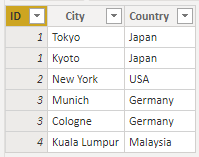
With DAX I can create a calculated table like this:

In a matrix visual I can use the following measure:

With kind regards from the town where the legend of the 'Pied Piper of Hamelin' is at home
FrankAT (Proud to be a Datanaut)
- Mark as New
- Bookmark
- Subscribe
- Mute
- Subscribe to RSS Feed
- Permalink
- Report Inappropriate Content
It works perfectly! Thank you so much!
Helpful resources

Power BI Monthly Update - July 2025
Check out the July 2025 Power BI update to learn about new features.

Fabric Community Update - August 2025
Find out what's new and trending in the Fabric community.


| User | Count |
|---|---|
| 92 | |
| 70 | |
| 69 | |
| 58 | |
| 50 |


