Don't miss your chance to take the Fabric Data Engineer (DP-600) exam for FREE! Find out how by attending the DP-600 session on April 23rd (pacific time), live or on-demand.
Learn moreNext up in the FabCon + SQLCon recap series: The roadmap for Microsoft SQL and Maximizing Developer experiences in Fabric. All sessions are available on-demand after the live show. Register now
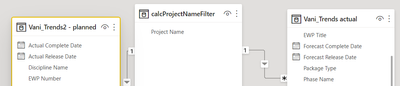
I have created a dim table filter which is modelled from 2 tables
My query for this is -
calcProjectNameFilter = DISTINCT(
UNION(
VALUES('Vani_Trends actual'[Project Name]),
VALUES('Vani_Trends2 - planned'[Project Name])
)
)
I now want to create a second filter - phase name that lets me filter the graphs. However, when I do the same process as above, it shows me all the phases but I want to show just the ones in a particular project.
How can I create a filter modelled from two tables AND dependent on the selected project name?
Solved! Go to Solution.
Hi @anansrivastava ,
Why you don't combine the phase name column and project column in a filter table?
Filter = DISTINCT(
UNION(
SELECTCOLUMNS('Vani_Trends actual',"Project Name",'Vani_Trends actual'[Project Name],"Phase Name",'Vani_Trends actual'[Phase Name]),
SELECTCOLUMNS('Vani_Trends2 - planned',"Project Name",'Vani_Trends2 - planned'[Project Name],"Phase Name",'Vani_Trends2 - planned'[Phase Name])
))
If this post helps, then please consider Accept it as the solution to help the other members find it more quickly.
Best Regards,
Dedmon Dai
Hey @anansrivastava ,
you have to filter then the values that you are using. So try the following for your table:
FILTER(VALUES('Vani_Trends actual'[Project Name]), 'Vani_Trends actual'[Project Name]='myFavouriteProject')
Dear Selimovd,
Thank you for your reply.
However, I need to use data modelling as my slicer has 2 filter 2 tables. So something like -
calcProjectNameFilter = CALCULATETABLE( DISTINCT(
UNION(
VALUES('Vani_Trends actual'[Project Name]),
VALUES('Vani_Trends2 - planned'[Project Name])
),
ALLSELECTED(calcProjectNameFilter)
))
This didn't work. How can I integrate your solution with mine?
Hi @anansrivastava ,
Why you don't combine the phase name column and project column in a filter table?
Filter = DISTINCT(
UNION(
SELECTCOLUMNS('Vani_Trends actual',"Project Name",'Vani_Trends actual'[Project Name],"Phase Name",'Vani_Trends actual'[Phase Name]),
SELECTCOLUMNS('Vani_Trends2 - planned',"Project Name",'Vani_Trends2 - planned'[Project Name],"Phase Name",'Vani_Trends2 - planned'[Phase Name])
))
If this post helps, then please consider Accept it as the solution to help the other members find it more quickly.
Best Regards,
Dedmon Dai
If you have recently started exploring Fabric, we'd love to hear how it's going. Your feedback can help with product improvements.
A new Power BI DataViz World Championship is coming this June! Don't miss out on submitting your entry.
Experience the highlights from FabCon & SQLCon, available live and on-demand starting April 14th.
| User | Count |
|---|---|
| 47 | |
| 44 | |
| 40 | |
| 20 | |
| 15 |
| User | Count |
|---|---|
| 70 | |
| 68 | |
| 32 | |
| 27 | |
| 25 |