cancel
Showing results for 
Search instead for 
Did you mean: 

Learn from the best! Meet the four finalists headed to the FINALS of the Power BI Dataviz World Championships! Register now

Reply
anansrivastava
Frequent Visitor

Advanced filtering. Dependent dropdown using modelling

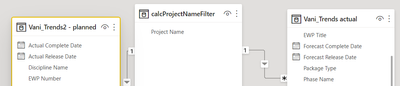
I have created a dim table filter which is modelled from 2 tables

anansrivastava_0-1621873109303.png


My query for this is - 


calcProjectNameFilter = DISTINCT(
UNION(
VALUES('Vani_Trends actual'[Project Name]),
VALUES('Vani_Trends2 - planned'[Project Name])
)
)


I now want to create a second filter - phase name that lets me filter the graphs. However, when I do the same process as above, it shows me all the phases but I want to show just the ones in a particular project. 


How can I create a filter modelled from two tables AND dependent on the selected project name?

1 ACCEPTED SOLUTION

Hi @anansrivastava ,


Why you don't combine the phase name column and project column in a filter table?


Filter = DISTINCT(
UNION(
SELECTCOLUMNS('Vani_Trends actual',"Project Name",'Vani_Trends actual'[Project Name],"Phase Name",'Vani_Trends actual'[Phase Name]),
SELECTCOLUMNS('Vani_Trends2 - planned',"Project Name",'Vani_Trends2 - planned'[Project Name],"Phase Name",'Vani_Trends2 - planned'[Phase Name])
))


If this post helps, then please consider Accept it as the solution to help the other members find it more quickly.


Best Regards,

Dedmon Dai

View solution in original post

3 REPLIES 3
selimovd
Super User
Super User

Hey @anansrivastava ,


you have to filter then the values that you are using. So try the following for your table:

FILTER(VALUES('Vani_Trends actual'[Project Name]), 'Vani_Trends actual'[Project Name]='myFavouriteProject')


If you need any help please let me know.
If I answered your question I would be happy if you could mark my post as a solution ✔️ and give it a thumbs up 👍
 
Best regards
Denis
 

Dear Selimovd,


Thank you for your reply.

However, I need to use data modelling as my slicer has 2 filter 2 tables. So something like - 

calcProjectNameFilter = CALCULATETABLE( DISTINCT(
UNION(
VALUES('Vani_Trends actual'[Project Name]),
VALUES('Vani_Trends2 - planned'[Project Name])
),
ALLSELECTED(calcProjectNameFilter)
))


This didn't work. How can I integrate your solution with mine? 

Hi @anansrivastava ,


Why you don't combine the phase name column and project column in a filter table?


Filter = DISTINCT(
UNION(
SELECTCOLUMNS('Vani_Trends actual',"Project Name",'Vani_Trends actual'[Project Name],"Phase Name",'Vani_Trends actual'[Phase Name]),
SELECTCOLUMNS('Vani_Trends2 - planned',"Project Name",'Vani_Trends2 - planned'[Project Name],"Phase Name",'Vani_Trends2 - planned'[Phase Name])
))


If this post helps, then please consider Accept it as the solution to help the other members find it more quickly.


Best Regards,

Dedmon Dai

Helpful resources

Announcements
Power BI DataViz World Championships carousel

Power BI DataViz World Championships - June 2026

A new Power BI DataViz World Championship is coming this June! Don't miss out on submitting your entry.

Join our Fabric User Panel

Join our Fabric User Panel

Share feedback directly with Fabric product managers, participate in targeted research studies and influence the Fabric roadmap.

March Power BI Update Carousel

Power BI Community Update - March 2026

Check out the March 2026 Power BI update to learn about new features.