Join us in Barcelona for FabCon and SQLCon, September 28 - October 1, 2026.
This is best Fabric, Power BI, SQL and AI community event. How do we know? The last event sold out! Save €200 with code FABCMTY200.
Register now- Power BI forums
- Get Help with Power BI
- Desktop
- Service
- Report Server
- Power Query
- Mobile Apps
- Developer
- DAX Commands and Tips
- Custom Visuals Development Discussion
- Health and Life Sciences
- Power BI Spanish forums
- Translated Spanish Desktop
- Training and Consulting
- Instructor Led Training
- Dashboard in a Day for Women, by Women
- Galleries
- Data Stories Gallery
- Themes Gallery
- Contests Gallery
- QuickViz Gallery
- Quick Measures Gallery
- Visual Calculations Gallery
- Fabric Apps Gallery
- Notebook Gallery
- Translytical Task Flow Gallery
- TMDL Gallery
- R Script Showcase
- Webinars and Video Gallery
- Ideas
- Custom Visuals Ideas (read-only)
- Issues
- Issues
- Events
- Upcoming Events
The Fabric community is now in read-only for platform upgrade. Learn more
- Power BI forums
- Forums
- Get Help with Power BI
- Desktop
- Re: Adding rows dynamically to a table
- Subscribe to RSS Feed
- Mark Topic as New
- Mark Topic as Read
- Float this Topic for Current User
- Bookmark
- Subscribe
- Printer Friendly Page

- Mark as New
- Bookmark
- Subscribe
- Mute
- Subscribe to RSS Feed
- Permalink
Adding rows dynamically to a table
Hi All, I have two tables:
1. Dynamic summarized table
2. I am trying to create table 2 - a new table with the same data as Table 1 but with extra rows.
Table 1: dynamic summarized table
| Name | Category |
| A | A |
| B | B |
| C | C |
| D | D |
| E | E |
Table 2:
Trying to achieve the following expected result. Adding rows to a new table with the same information as summarized Table 1
| Name | Category |
| A | A |
| A | All |
| B | B |
| B | All |
| C | C |
| C | All |
| D | D |
| D | All |
| E | E |
| E | All |
Is it possible to create table 2 with Dax? I have not found a way to do it easily. Please note I am not keen on doing this manually as Table 1 changes often which is why it is a dynamic table, summarized from the main fact table.
Thanks so much in advance
Solved! Go to Solution.
- Mark as New
- Bookmark
- Subscribe
- Mute
- Subscribe to RSS Feed
- Permalink
Hi @Anonymous ,
According to my understand, you want to dynamically add rows based on the original table, right?
I did it in two ways. And here is my pbix file.
1.Use DAX
UnionedTable =
VAR _allNames =
    ALLSELECTED ( Table1[Name] )
VAR _newTable =
    ADDCOLUMNS ( _allNames, "New", "All" )
RETURN
UNION ( Table1, _newTable )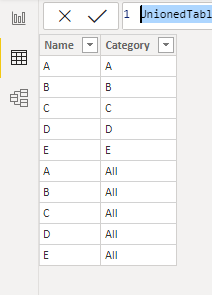
2.Follow these steps in Query Editor:
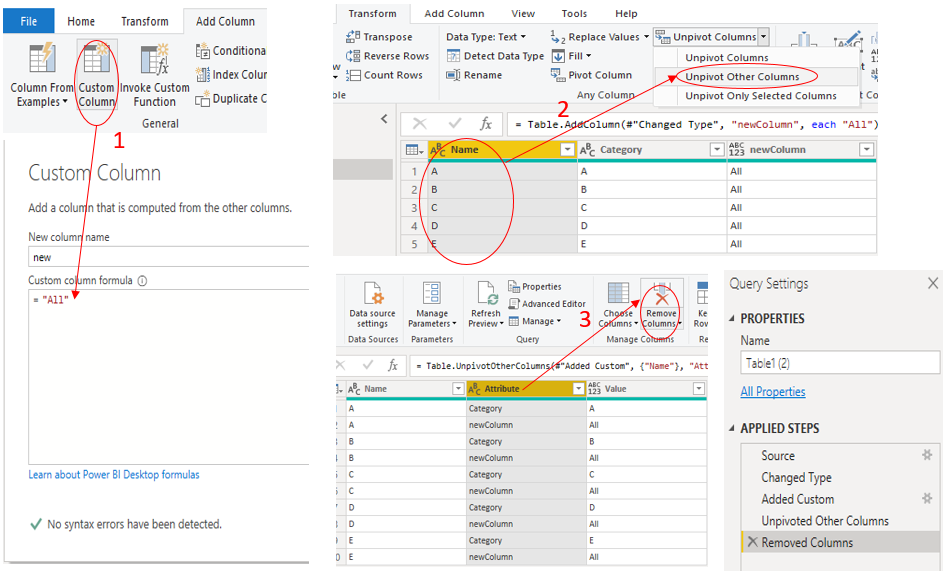
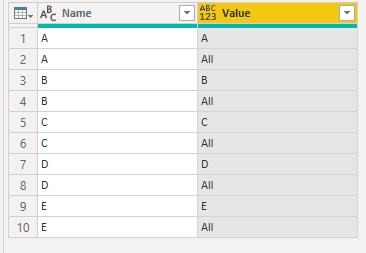
Add a custom column(set value as “All”) -->Select the Name column ,use “unpivot other Columns”-->Delete the "Attribute" column ,then the table will be transformed as what you want :
let
    Source = Table.FromRows(Json.Document(Binary.Decompress(Binary.FromText("i45WclTSAeJYnWglJyDLCcxyBrKcwSwXIMsFzHIFslyVYmMB", BinaryEncoding.Base64), Compression.Deflate)), let _t = ((type nullable text) meta [Serialized.Text = true]) in type table [Name = _t, Category = _t]),
    #"Changed Type" = Table.TransformColumnTypes(Source,{{"Name", type text}, {"Category", type text}}),
    #"Added Custom" = Table.AddColumn(#"Changed Type", "newColumn", each "All"),
    #"Unpivoted Other Columns" = Table.UnpivotOtherColumns(#"Added Custom", {"Name"}, "Attribute", "Value"),
    #"Removed Columns" = Table.RemoveColumns(#"Unpivoted Other Columns",{"Attribute"})
in
    #"Removed Columns"
Did I answer your question ? Please mark my reply as solution. Thank you very much.
If not, please upload some insensitive data samples and expected output.
Best Regards,
Eyelyn Qin
- Mark as New
- Bookmark
- Subscribe
- Mute
- Subscribe to RSS Feed
- Permalink
Hi @Anonymous ,
According to my understand, you want to dynamically add rows based on the original table, right?
I did it in two ways. And here is my pbix file.
1.Use DAX
UnionedTable =
VAR _allNames =
    ALLSELECTED ( Table1[Name] )
VAR _newTable =
    ADDCOLUMNS ( _allNames, "New", "All" )
RETURN
UNION ( Table1, _newTable )
2.Follow these steps in Query Editor:
Add a custom column(set value as “All”) -->Select the Name column ,use “unpivot other Columns”-->Delete the "Attribute" column ,then the table will be transformed as what you want :
let
    Source = Table.FromRows(Json.Document(Binary.Decompress(Binary.FromText("i45WclTSAeJYnWglJyDLCcxyBrKcwSwXIMsFzHIFslyVYmMB", BinaryEncoding.Base64), Compression.Deflate)), let _t = ((type nullable text) meta [Serialized.Text = true]) in type table [Name = _t, Category = _t]),
    #"Changed Type" = Table.TransformColumnTypes(Source,{{"Name", type text}, {"Category", type text}}),
    #"Added Custom" = Table.AddColumn(#"Changed Type", "newColumn", each "All"),
    #"Unpivoted Other Columns" = Table.UnpivotOtherColumns(#"Added Custom", {"Name"}, "Attribute", "Value"),
    #"Removed Columns" = Table.RemoveColumns(#"Unpivoted Other Columns",{"Attribute"})
in
    #"Removed Columns"
Did I answer your question ? Please mark my reply as solution. Thank you very much.
If not, please upload some insensitive data samples and expected output.
Best Regards,
Eyelyn Qin


- Mark as New
- Bookmark
- Subscribe
- Mute
- Subscribe to RSS Feed
- Permalink
Thanks @lbendlin I guessed as much, my M skills don't extend to this! Any ideas on where I should start.
- Mark as New
- Bookmark
- Subscribe
- Mute
- Subscribe to RSS Feed
- Permalink
Here's a crude example
let
    Source = Table.FromRows(Json.Document(Binary.Decompress(Binary.FromText("i45WclTSAeJYnWglJyDLCcxyBrKcwSwXIMsFzHIFslyVYmMB", BinaryEncoding.Base64), Compression.Deflate)), let _t = ((type nullable text) meta [Serialized.Text = true]) in type table [Name = _t, Category = _t]),
    #"Added Custom" = Table.AddColumn(Source, "Custom", each "All"),
    #"Unpivoted Columns" = Table.UnpivotOtherColumns(#"Added Custom", {"Name"}, "Attribute", "Value"),
    #"Removed Other Columns" = Table.SelectColumns(#"Unpivoted Columns",{"Name", "Value"}),
    #"Renamed Columns" = Table.RenameColumns(#"Removed Other Columns",{{"Value", "Category"}})
in
    #"Renamed Columns"
I am sure there are more elegant ways.
- Mark as New
- Bookmark
- Subscribe
- Mute
- Subscribe to RSS Feed
- Permalink
@lbendlin Adding a column and unpivoting - that's a great idea. I haven't got it working yet but schooling up.
Thanks.
- Mark as New
- Bookmark
- Subscribe
- Mute
- Subscribe to RSS Feed
- Permalink
@lbendlin hoping this will be quick,
I seem to be having issues with the following rows:
#"Added Custom" = Table.AddColumn(Source, "Custom", each "All"),
#"Unpivoted Columns" = Table.UnpivotOtherColumns(#"Added Custom", {"Name"}, "Attribute", "Value"),
#"Removed Other Columns" = Table.SelectColumns(#"Unpivoted Columns",{"Name", "Value"})
"I named the custom column "Custom", but what is the "Name' column for? This is throwing an error and if I change it to "Custom" it still throws an error.
- Mark as New
- Bookmark
- Subscribe
- Mute
- Subscribe to RSS Feed
- Permalink
Create a blank query, open it in Advanced editor, and replace the entire code with what I posted.
Helpful resources

FabCon & SQLCon – Barcelona 2026
Join us in Barcelona for FabCon and SQLCon, the Fabric, Power BI, SQL, and AI community event. Save €200 with code FABCMTY200.

Power BI DataViz World Championships - June 2026
A new Power BI DataViz World Championship is coming this June! Don't miss out on submitting your entry.

| User | Count |
|---|---|
| 21 | |
| 21 | |
| 14 | |
| 14 | |
| 13 |


| User | Count |
|---|---|
| 47 | |
| 35 | |
| 24 | |
| 20 | |
| 19 |


