Get certified for free when you join Fabric Data Days 2026 and dive into Fabric, Power BI, SQL, AI, and other essential data skills.
Join nowTry your skills in the Power BI Dataviz World Championship! Round one ends June 26. Join now
Hi,
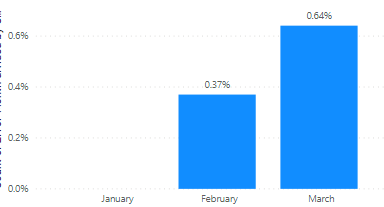
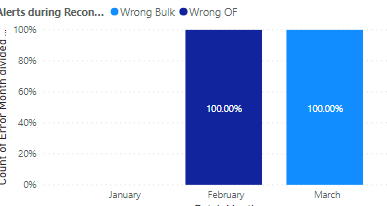
I have built a graph that is summarizing error data per month. I want to add a legend to show breakdown by type of error, but when I add this to the legend it changes my values.
Here is my graph before adding a legend
Here is my graph after: It changes the values to be 100%
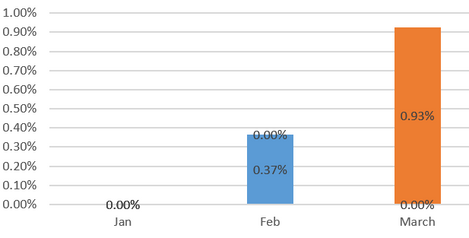
I had a previous graph in excel that looked like this, which is what I'm trying to replicate (data isn't updated which is why the numbers differ)
Any help would be appreciated!
Solved! Go to Solution.
In my ex[perience this happens when you either have the data type wrong or you haven't set up a relationship correctly (if you're drawing data from more than one table). I'd check you've got your data types correct first.
Check your relation of legend with fact.
In my ex[perience this happens when you either have the data type wrong or you haven't set up a relationship correctly (if you're drawing data from more than one table). I'd check you've got your data types correct first.
Don't miss out on Data Days, June 15 through August 7. Learn Fabric, Power BI, SQL, AI and more.
Check out the May 2026 Power BI update to learn about new features.
| User | Count |
|---|---|
| 25 | |
| 22 | |
| 21 | |
| 19 | |
| 13 |
| User | Count |
|---|---|
| 68 | |
| 55 | |
| 43 | |
| 42 | |
| 30 |