
cancel
Showing results for 
Search instead for 
Did you mean: 

July 28 - August 9 | Final Round of the Power BI Dataviz World Championships. This is your chance. Learn more

Reply
Anonymous
Not applicable

Adding column with a fixed value

Hi,


I have 2 tables:


US table:

ProductRevenue
11000
22000
31000


Canada Table:


ProductRevenueCountry
11000Canada
22000Canada
31000Canada


I have to merge these 2 tables and I want to add Country column in US table. I tried using add column, but couldn't work. How can I add another column and its values in the US table?


Expected outcome:


ProductRevenueCountry
11000Canada
22000Canada
31000Canada
11000USA
22000USA
31000USA


Thanks for the help!

1 ACCEPTED SOLUTION
Pascal_KTeam
Resolver I
Resolver I

Hi

You can do this in Power Query Editor. 

Add custom column with formula ="USA"

View solution in original post

6 REPLIES 6
PaulDBrown
Community Champion
Community Champion

@Anonymous 


Just to illustrate how to do this in Power Query:

1) go to Power Query ("Transform Data" in the ribbon

2) select your US Table and choose "Add Custom" from the Add column in the ribbon:

Custom Column.jpg


3) Name the new Column "Country" and add the code as shown:

Add US.JPG


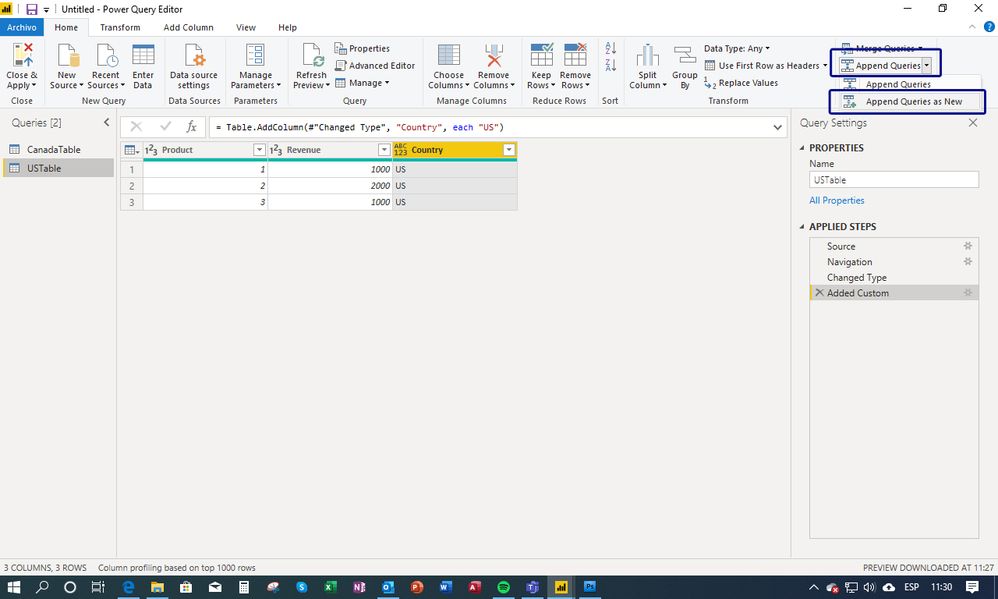
4) Select "Append Queries" from the ribon and choose "Append as new":

select append.jpg

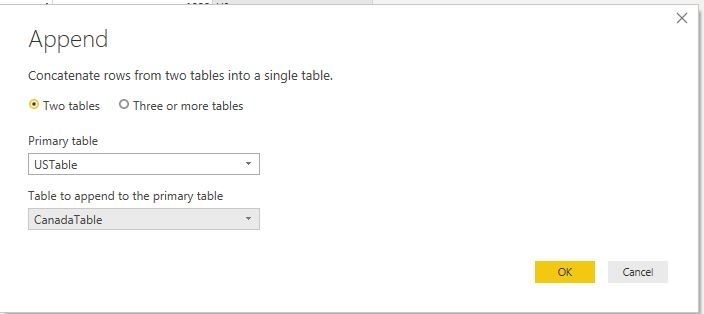
 5) in the dialogue, select the "Canada" table to append to the US table:

Append.JPG


6) and your done - "Close and apply":

Full.JPG


Did I answer your question? Mark my post as a solution!
In doing so, you are also helping me. Thank you!

Proud to be a Super User!
Paul on Linkedin.


Anonymous
Not applicable

Thanks, everyone for your input. I tried adding a custom column but I was just using single quotes, I should have used double-quotes. 

Anonymous
Not applicable

You should be able to add a custom column in the Query Editor with the code:


= "USA"
amitchandak
Super User
Super User

Go to Data View. Add new column

Country = "USA"


In Canada

Country = "Canada"

Share with Power BI Enthusiasts: Full Power BI Video (20 Hours) YouTube
Microsoft Fabric Series 60+ Videos YouTube
Microsoft Fabric Hindi End to End YouTube
Anonymous
Not applicable


Add a calculated column to US Table.


Country = "US"
Pascal_KTeam
Resolver I
Resolver I

Hi

You can do this in Power Query Editor. 

Add custom column with formula ="USA"

Helpful resources

Announcements
FabCon and SQLCon Barcelona 2026

FabCon & SQLCon – Barcelona 2026

Join us in Barcelona for FabCon and SQLCon, the Fabric, Power BI, SQL, and AI community event. Save €200 with code FABCMTY200.

Fabric Community Sticker Design Challenge Barcelona Carousel

Fabric Community Sticker Challenge - Barcelona 2026

If you love stickers, then you will definitely want to check out our community sticker challenge, Barcelona edition!

July Power BI Update Carousel

Power BI Monthly Update - July 2026

Check out the July 2026 Power BI update to learn about new features.

Power BI DataViz World Championships carousel

Power BI DataViz World Championships - June 2026

A new Power BI DataViz World Championship is coming this June! Don't miss out on submitting your entry.

Top Solution Authors