Join us at FabCon Atlanta from March 16 - 20, 2026, for the ultimate Fabric, Power BI, AI and SQL community-led event. Save $200 with code FABCOMM.
Register now!Get Fabric Certified for FREE during Fabric Data Days. Don't miss your chance! Request now
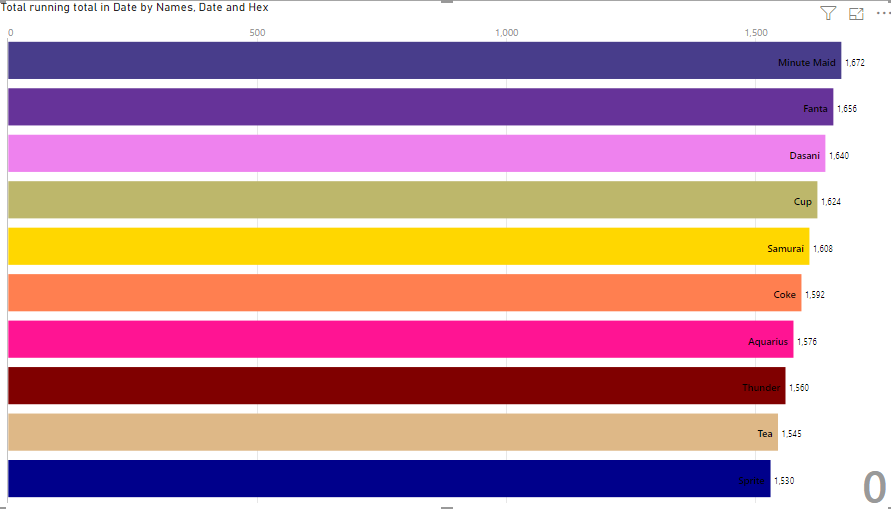
hi , i have used animation bar chat , i still don't get the Color Field in format of this Animation Bar Chart , may i know how to set the color ?
Solved! Go to Solution.
Select your codes from this site this might help https://htmlcolorcodes.com/color-names/
Also, i tested the codes myself, first i created a table of distinct names and specified each a unique hex color code and set the relationship between the main table and the unique names table and then put the hex code column on the colour.
https://drive.google.com/drive/folders/16z-F9svZ3pt_m02PDTqaqH3bPlmejK5v?usp=sharing
Try downloading a sample
Create a new column with hex codes inside your data or create a new table containing the distinct Names each having a color hex code.
To see the changes just switch to a different page and go back to where the bar chart is.
Yeah that works even if without the # sign.
Make sure each unique Name has its own hex code and if you leave it blank or you did not include the code it will show black.
hi @ggzmorsh ,
i have put the this column in the color Field , it doesn't work , the color still appear as its default.
Select your codes from this site this might help https://htmlcolorcodes.com/color-names/
Also, i tested the codes myself, first i created a table of distinct names and specified each a unique hex color code and set the relationship between the main table and the unique names table and then put the hex code column on the colour.
https://drive.google.com/drive/folders/16z-F9svZ3pt_m02PDTqaqH3bPlmejK5v?usp=sharing
Try downloading a sample
Check out the November 2025 Power BI update to learn about new features.
Advance your Data & AI career with 50 days of live learning, contests, hands-on challenges, study groups & certifications and more!