
Join us at FabCon Atlanta from March 16 - 20, 2026, for the ultimate Fabric, Power BI, AI and SQL community-led event. Save $200 with code FABCOMM.
Register now!Vote for your favorite vizzies from the Power BI Dataviz World Championship submissions. Vote now!
Hi,
I have 2 tables:
US table:
| Product | Revenue |
| 1 | 1000 |
| 2 | 2000 |
| 3 | 1000 |
Canada Table:
| Product | Revenue | Country |
| 1 | 1000 | Canada |
| 2 | 2000 | Canada |
| 3 | 1000 | Canada |
I have to merge these 2 tables and I want to add Country column in US table. I tried using add column, but couldn't work. How can I add another column and its values in the US table?
Expected outcome:
| Product | Revenue | Country |
| 1 | 1000 | Canada |
| 2 | 2000 | Canada |
| 3 | 1000 | Canada |
| 1 | 1000 | USA |
| 2 | 2000 | USA |
| 3 | 1000 | USA |
Thanks for the help!
Solved! Go to Solution.
Hi
You can do this in Power Query Editor.
Add custom column with formula ="USA"
@Anonymous
Just to illustrate how to do this in Power Query:
1) go to Power Query ("Transform Data" in the ribbon
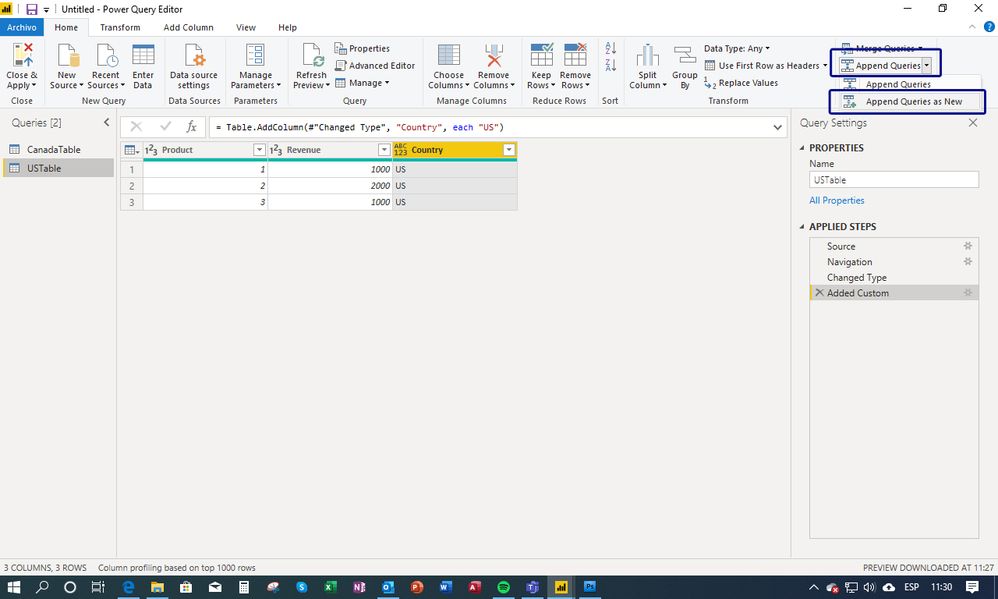
2) select your US Table and choose "Add Custom" from the Add column in the ribbon:
3) Name the new Column "Country" and add the code as shown:
4) Select "Append Queries" from the ribon and choose "Append as new":
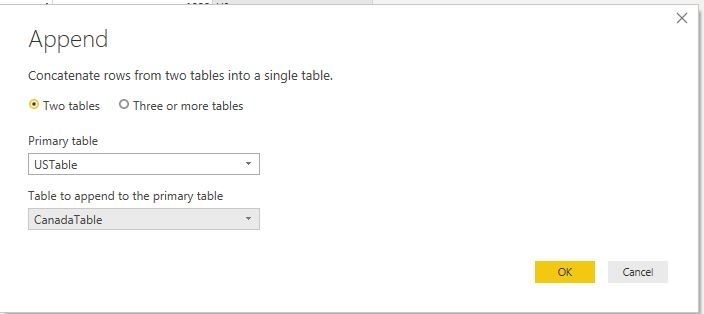
5) in the dialogue, select the "Canada" table to append to the US table:
6) and your done - "Close and apply":
Proud to be a Super User!
Paul on Linkedin.
Thanks, everyone for your input. I tried adding a custom column but I was just using single quotes, I should have used double-quotes.
You should be able to add a custom column in the Query Editor with the code:
= "USA"
Add a calculated column to US Table.
Country = "US"
Hi
You can do this in Power Query Editor.
Add custom column with formula ="USA"
Vote for your favorite vizzies from the Power BI World Championship submissions!
If you love stickers, then you will definitely want to check out our Community Sticker Challenge!
Check out the January 2026 Power BI update to learn about new features.
| User | Count |
|---|---|
| 65 | |
| 51 | |
| 42 | |
| 23 | |
| 21 |
| User | Count |
|---|---|
| 137 | |
| 113 | |
| 52 | |
| 37 | |
| 31 |