This time we’re going bigger than ever. Fabric, Power BI, SQL, AI and more. We're covering it all. You won't want to miss it.
Learn moreLevel up your Power BI skills this month - build one visual each week and tell better stories with data! Get started
Hi all,
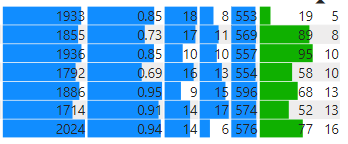
I have a matrix with several columns of data, that will have data bars on them. Is there a way to have a target line on this at a certain value, and to then have the conditional formatting of the data bar to say if < target, red, else blue? My table looks like the below.
For an example, for the first column, say the target was 2000, I would like all the top data bars to be red, except the bottom that would be blue as its over the target amount?
Many thanks,
Mike
Hi @MikeLanglois,
Current data bar conditional formatting seems does not support advanced configuration based on the dynamic target.
Perhaps you can submit an idea for these requirements or try to use script based on visuals(R, Python) to manually plot these graphs.
Regards,
Xiaoxin Sheng
@MikeLanglois Not aware of a way to do that. You can only have different colors for positive and negative data bars.
Check out the April 2026 Power BI update to learn about new features.
Sign up to receive a private message when registration opens and key events begin.
If you have recently started exploring Fabric, we'd love to hear how it's going. Your feedback can help with product improvements.
| User | Count |
|---|---|
| 36 | |
| 33 | |
| 31 | |
| 24 | |
| 18 |
| User | Count |
|---|---|
| 68 | |
| 50 | |
| 33 | |
| 24 | |
| 24 |