Join us at FabCon Atlanta from March 16 - 20, 2026, for the ultimate Fabric, Power BI, AI and SQL community-led event. Save $200 with code FABCOMM.
Register now!Vote for your favorite vizzies from the Power BI Dataviz World Championship submissions. Vote now!
Hi all,
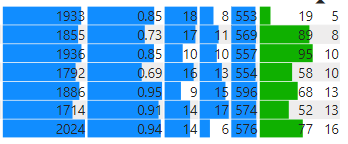
I have a matrix with several columns of data, that will have data bars on them. Is there a way to have a target line on this at a certain value, and to then have the conditional formatting of the data bar to say if < target, red, else blue? My table looks like the below.
For an example, for the first column, say the target was 2000, I would like all the top data bars to be red, except the bottom that would be blue as its over the target amount?
Many thanks,
Mike
Hi @MikeLanglois,
Current data bar conditional formatting seems does not support advanced configuration based on the dynamic target.
Perhaps you can submit an idea for these requirements or try to use script based on visuals(R, Python) to manually plot these graphs.
Regards,
Xiaoxin Sheng
@MikeLanglois Not aware of a way to do that. You can only have different colors for positive and negative data bars.
Vote for your favorite vizzies from the Power BI World Championship submissions!
If you love stickers, then you will definitely want to check out our Community Sticker Challenge!
Check out the January 2026 Power BI update to learn about new features.
| User | Count |
|---|---|
| 64 | |
| 51 | |
| 46 | |
| 23 | |
| 19 |
| User | Count |
|---|---|
| 136 | |
| 110 | |
| 50 | |
| 32 | |
| 29 |