Join us at FabCon Atlanta from March 16 - 20, 2026, for the ultimate Fabric, Power BI, AI and SQL community-led event. Save $200 with code FABCOMM.
Register now!Get Fabric Certified for FREE during Fabric Data Days. Don't miss your chance! Request now
Hi all,
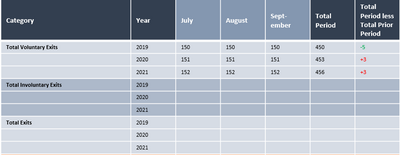
I am trying to add measures to the Rows section of a matrix and this isn't working. Here is the view I'm trying to get to:
The three values for 'Category' are already created as measures. I have Year/Month on a date table, and I'd like to show the measures and Year on Rows, with the months shown on the columns. Is this possible?
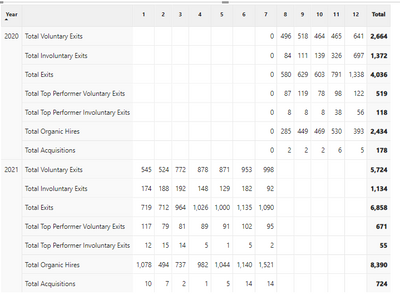
And yes, I've already tried Show on Rows and it does not fit this requirement:
Thanks!
Solved! Go to Solution.
@garynorcrossmmc , Measure before dimension is only possible when you convert measure to rows too.
Means unpivot the data
column header grouping
https://www.daxpatterns.com/dynamic-segmentation/
https://community.powerbi.com/t5/Desktop/Matrix-Display-Values-above-Columns/td-p/256905
As far as I know, the built-in method is only "Show on Rows ". I'm afraid there are no other methods to meet your needs.
@garynorcrossmmc , Measure before dimension is only possible when you convert measure to rows too.
Means unpivot the data
column header grouping
https://www.daxpatterns.com/dynamic-segmentation/
https://community.powerbi.com/t5/Desktop/Matrix-Display-Values-above-Columns/td-p/256905
Check out the November 2025 Power BI update to learn about new features.
Advance your Data & AI career with 50 days of live learning, contests, hands-on challenges, study groups & certifications and more!