Join us in Barcelona for FabCon and SQLCon, September 28 - October 1, 2026.
This is best Fabric, Power BI, SQL and AI community event. How do we know? The last event sold out! Save €200 with code FABCMTY200.
Register now- Power BI forums
- Get Help with Power BI
- Desktop
- Service
- Report Server
- Power Query
- Mobile Apps
- Developer
- DAX Commands and Tips
- Custom Visuals Development Discussion
- Health and Life Sciences
- Power BI Spanish forums
- Translated Spanish Desktop
- Training and Consulting
- Instructor Led Training
- Dashboard in a Day for Women, by Women
- Galleries
- Data Stories Gallery
- Themes Gallery
- Contests Gallery
- QuickViz Gallery
- Quick Measures Gallery
- Visual Calculations Gallery
- Fabric Apps Gallery
- Notebook Gallery
- Translytical Task Flow Gallery
- TMDL Gallery
- R Script Showcase
- Webinars and Video Gallery
- Ideas
- Custom Visuals Ideas (read-only)
- Issues
- Issues
- Events
- Upcoming Events
The Fabric community is now in read-only for platform upgrade. Learn more
- Power BI forums
- Forums
- Get Help with Power BI
- Desktop
- Re: Add filter value into the report header
- Subscribe to RSS Feed
- Mark Topic as New
- Mark Topic as Read
- Float this Topic for Current User
- Bookmark
- Subscribe
- Printer Friendly Page


- Mark as New
- Bookmark
- Subscribe
- Mute
- Subscribe to RSS Feed
- Permalink
Add filter value into the report header
Hi,
I'm trying to use the date filter in to report the report header, for example I have created a report on the fiscal year 2013-2014 but once I change the fiscal year to 2-14-2015 it should refresh the report header instead of me or the user changing the report header or create a new report.
Thanks,
Roomi
Solved! Go to Solution.


- Mark as New
- Bookmark
- Subscribe
- Mute
- Subscribe to RSS Feed
- Permalink


- Mark as New
- Bookmark
- Subscribe
- Mute
- Subscribe to RSS Feed
- Permalink
@mroomi, Example below
Measure Defined a below:
Filtered Year = IF ( ISFILTERED(vw_Name[PSPStatus]), CONCATENATE("Document Count for the Fiscal Year ", (IF(HASONEVALUE(vw_Name[PSPStatus]), FIRSTNONBLANK(vw_Name[PSPStatus],"") ,""))), "Report Page is not Filtered by FY")
Table Data:


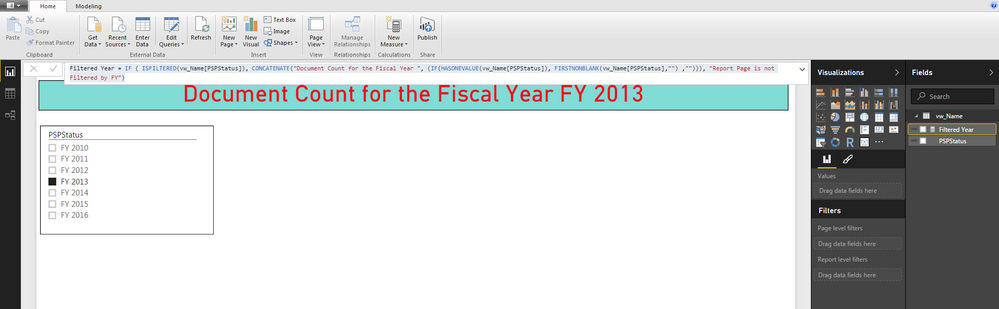
Noticed that Long Text Visual is unable to take Measure as an input ...
Hope this helps!
- Mark as New
- Bookmark
- Subscribe
- Mute
- Subscribe to RSS Feed
- Permalink
@mroomi Create a DAX text measure using HASONEVALUE & FIRSTNONBLANK & optionally [ISFILTERED or HASONEFILTER] and use this.
For example, please see Will Thompson's Create Impactful Reports With Power BI Desktop MSDataSummit Video around 28:30 minute mark..
- Mark as New
- Bookmark
- Subscribe
- Mute
- Subscribe to RSS Feed
- Permalink
Thanks,
I tried to create a simple one but I get the following error
Title = if (HASONEVALUE(vw_Name[PSPStatus]),vw_Name[PSPStatus])
Error = "A single value for column 'PSPStatus' in table 'vw_Name' cannot be determined. This can happen when a measure formula refers to a column that contains many values without specifying an aggregation such as min, max, count, or sum to get a single result."
Actually what I'm trying to do is to when ever the user changes the value of the filter it reflects in the report headrer.
- Mark as New
- Bookmark
- Subscribe
- Mute
- Subscribe to RSS Feed
- Permalink
Hi ankitpatira,
Is there a way to use the long text visual with the teaxt header? Currently the long text visual is reading value from atextual field in database.
I'm trying to display the following text
"Document Count for the '2014-2015'" where 201-2015 value will be changed according to the filter.
- Mark as New
- Bookmark
- Subscribe
- Mute
- Subscribe to RSS Feed
- Permalink
@mroomi, Example below
Measure Defined a below:
Filtered Year = IF ( ISFILTERED(vw_Name[PSPStatus]), CONCATENATE("Document Count for the Fiscal Year ", (IF(HASONEVALUE(vw_Name[PSPStatus]), FIRSTNONBLANK(vw_Name[PSPStatus],"") ,""))), "Report Page is not Filtered by FY")
Table Data:
Noticed that Long Text Visual is unable to take Measure as an input ...
Hope this helps!
- Mark as New
- Bookmark
- Subscribe
- Mute
- Subscribe to RSS Feed
- Permalink
It, worked perfectly, really appreciate all of you guys help.
- Mark as New
- Bookmark
- Subscribe
- Mute
- Subscribe to RSS Feed
- Permalink
Looks like you table vw_Name has multiple values for PSPStatus.
I am assuming that you have this a column as a single select filter.
You will have to consider situations for
Whether it is filtered or not ..using ISFILTERED
If is not filtered, then you will have to handle the case by having an appropriate text - can be blank too .
If it is indeed filtered, then you check for HASONEVALUE(vw_Name[PSPStatus])
The True part is easy just display the first value.
For the False part you may need to have some logic to eithe take min or max or first etc...
Some thing like below and used the "Filtered Year" measure in a card visual and size it as needed
Filtered Year = IF ( ISFILTERED(vw_Name[PSPStatus]), CONCATENATE("Report Page is Filtered for FY for ", (IF(HASONEVALUE(vw_Name[PSPStatus]), FIRSTNONBLANK(vw_Name[PSPStatus],"") ,""))), "Report Page is not Filtered by FY")

Helpful resources

FabCon & SQLCon – Barcelona 2026
Join us in Barcelona for FabCon and SQLCon, the Fabric, Power BI, SQL, and AI community event. Save €200 with code FABCMTY200.

Power BI DataViz World Championships - June 2026
A new Power BI DataViz World Championship is coming this June! Don't miss out on submitting your entry.

| User | Count |
|---|---|
| 23 | |
| 22 | |
| 14 | |
| 14 | |
| 13 |


| User | Count |
|---|---|
| 47 | |
| 36 | |
| 24 | |
| 20 | |
| 20 |


