cancel
Showing results for 
Search instead for 
Did you mean: 

Try your skills in the Power BI Dataviz World Championship! Round one ends June 26. Join now

Reply
Anonymous
Not applicable

ALL function strage behaviour

Hi All,

I am facing strange behaviour of ALL function

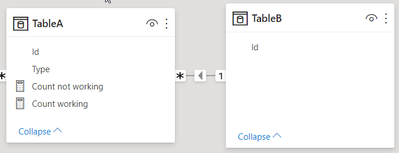
Let me explain, model is simple in this case and i am having fact table (tableA) and dimension table (TableB). You can also download PBIX here it is probably easier to understand it 
 

morz3d_1-1623705968632.png


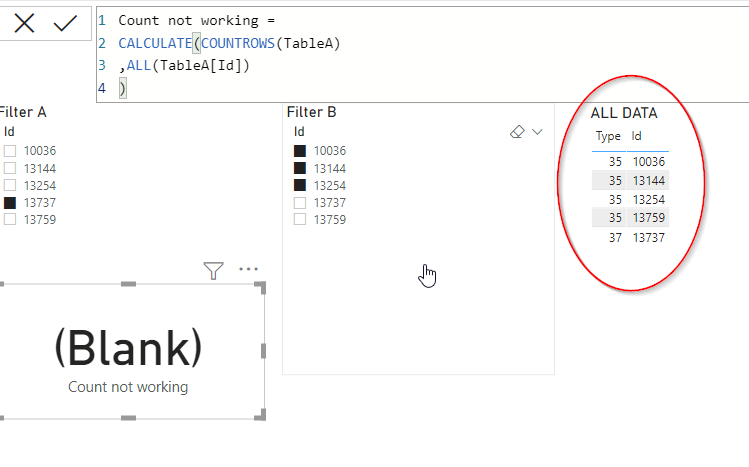
There are only few records in TableA and the logic is following: i would like to get rowcount of tableA but only considering filter from tableB, this is the reason why ALL(tableA[ID]) is used to clear any filter ID column of Table A. FIlterB is constant like shown in the picture

Problem is following, this logic is working for FilterA Id = 13759 but it is not working for 13737 (one shown on the picture), i am not quite sure why is this happening, only difference is type of those two IDs, but i dont see how that could influence this result.

IT could be solved by adding anohter tableC and using it as a slicer, I already checked this solution on the second tab, but for this approach i would need to change my reports heavily so i would prefer if i get it working with measure fix.


morz3d_2-1623706160198.png


1 ACCEPTED SOLUTION
selimovd
Most Valuable Professional

Hey @Anonymous ,


the reason is that you are using a slicer for the same table as you do a COUNTROWS.

In that case the Auto-Exist feature kicks in, what is a technique to optimize unnecessary calculations in DAX. You can easily solve that by using a star schema, filtering only on dimensional tables and using the IDs from the fact table only to create the relationships.


There is also an article about the details of Auto-Exist:

Understanding DAX Auto-Exist - SQLBI


If you need any help please let me know.
If I answered your question I would be happy if you could mark my post as a solution ✔️ and give it a thumbs up 👍
 
Best regards
Denis
 

View solution in original post

3 REPLIES 3
Syndicate_Admin
Administrator
Administrator

Thanks @selimovd this explains it exactly.

I'll switch to start the schema

Anonymous
Not applicable

Thanks @selimovd this exactly explains it.

I will switch to start schema

selimovd
Most Valuable Professional

Hey @Anonymous ,


the reason is that you are using a slicer for the same table as you do a COUNTROWS.

In that case the Auto-Exist feature kicks in, what is a technique to optimize unnecessary calculations in DAX. You can easily solve that by using a star schema, filtering only on dimensional tables and using the IDs from the fact table only to create the relationships.


There is also an article about the details of Auto-Exist:

Understanding DAX Auto-Exist - SQLBI


If you need any help please let me know.
If I answered your question I would be happy if you could mark my post as a solution ✔️ and give it a thumbs up 👍
 
Best regards
Denis
 

Helpful resources

Announcements
Fabric Data Days is here Carousel

Fabric Data Days 2026

Don't miss out on Data Days, June 15 through August 7. Learn Fabric, Power BI, SQL, AI and more.

Power BI DataViz World Championships carousel

Power BI DataViz World Championships - June 2026

A new Power BI DataViz World Championship is coming this June! Don't miss out on submitting your entry.